# First Acrylic Diamond Drag Bit Engraver - Millennium Falcon
**URL:** https://forum.sienci.com/t/first-acrylic-diamond-drag-bit-engraver-millennium-falcon/3861
**Category:** 🪑 Projects
**Created:** [October 10, 2021, 12:32am UTC](https://forum.sienci.com/t/first-acrylic-diamond-drag-bit-engraver-millennium-falcon/3861 "2021-10-10T00:32:01Z")
**Posts on this page:** 14
**Page:** 1
### Author:  [@webbit\_NJ](https://forum.sienci.com/u/webbit_NJ)
#### Post date: [October 10, 2021, 12:32am UTC](https://forum.sienci.com/t/first-acrylic-diamond-drag-bit-engraver-millennium-falcon/3861/1 "2021-10-10T00:32:01Z")
Hello!
Here is my first experiment with a Carbide3d MCEtcher Spring Diamond Drag Bit Engraver.
I don’t remember if i used the 90deg or the 120deg bit.
It ended up better than i thought, so i decided to cut the outline later. (Single Flute 1/8 Upcut)
The Source is a detailed outline of the Millennium Falcon (found on Google Image) and i did an Image Trace.
What i Learned:
- With that much detail, on a small acrylic piece (6"x4"), it took quite a while…
- Since it was a test, i had choosen the Zero arbitrarily when Engraving. When i later decided to do the Outline cut, i had to Zero on the image detail for the outline cut.
It is not perfect, but it’s close.
- Since it was a test, i did not Flip the Image, so the Engraving is on the Front Side, this is usually done on the Back side of the Acrylic.
- I did not leave enough “Blank” at the bottom (When inserted in the Base), but since it was a learning experience, i am happy.
- Next time, i will not do “Since is it a test…” 🙂
I then purchased a cheap Led Base from Amazon to test it the Edge lit.
The photos are not that great, but you get the idea..
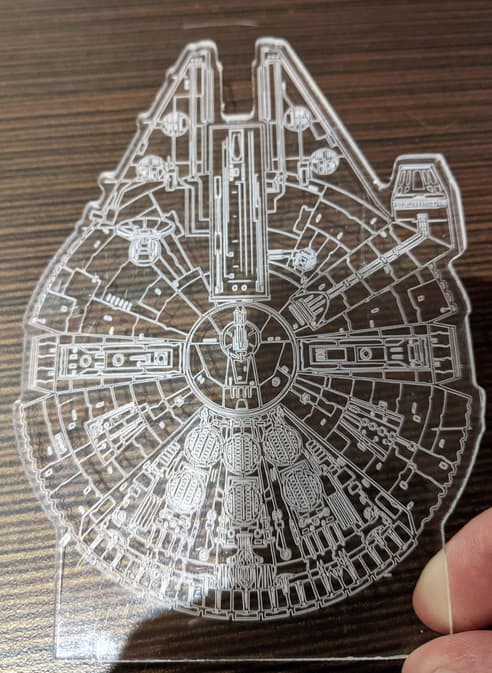
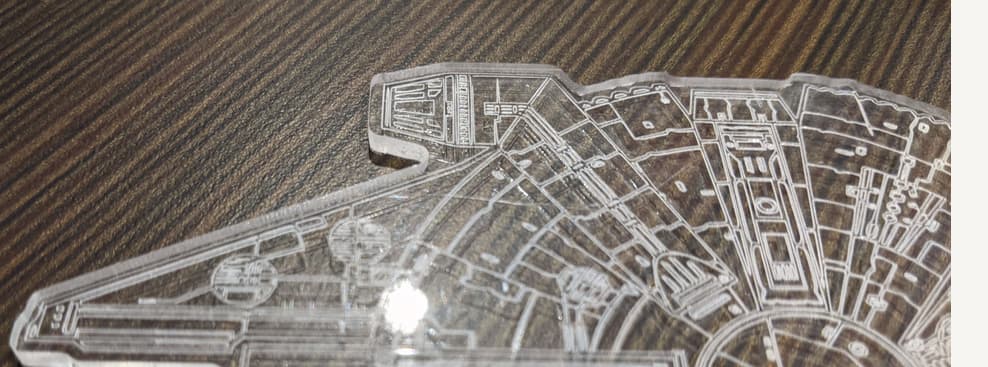
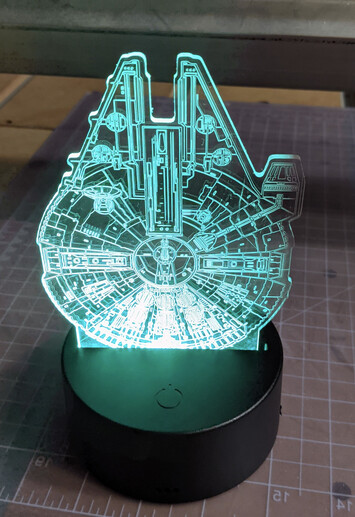
---
### Author:  [@solitice](https://forum.sienci.com/u/solitice)
#### Post date: [October 10, 2021, 8:48pm UTC](https://forum.sienci.com/t/first-acrylic-diamond-drag-bit-engraver-millennium-falcon/3861/2 "2021-10-10T20:48:15Z")
I’m interested in etching acrylic as well, the results you have look great. What plunge and feed rate settings did you use?
---
### Author:  [@webbit\_NJ](https://forum.sienci.com/u/webbit_NJ)
#### Post date: [October 10, 2021, 9:24pm UTC](https://forum.sienci.com/t/first-acrylic-diamond-drag-bit-engraver-millennium-falcon/3861/3 "2021-10-10T21:24:44Z")
Hello!
Here is what i used. It worked, but don’t know if it is optimal.
Plunge Rage=15.0
Feed Rate=45.0
Stepover=0.008
Full Depth=0.05
Depth par pass=0.025 (Second pass made it pop!)
RPM was ZERO = ROUTER OFF
Note that some Bits allow for Power Engraving, not the ones i used.
When i Zeroed, i made sure the Spring was engaged, and that the Retract Height was high enough to clear and that the Spring was released.
---
### Author:  [@MikeH](https://forum.sienci.com/u/MikeH)
#### Post date: [May 18, 2022, 4:46pm UTC](https://forum.sienci.com/t/first-acrylic-diamond-drag-bit-engraver-millennium-falcon/3861/4 "2022-05-18T16:46:35Z")
webbit\_NJ it looks great, what type of acrylic did you use and where did you get it.
---
### Author:  [@webbit\_NJ](https://forum.sienci.com/u/webbit_NJ)
#### Post date: [May 19, 2022, 4:46pm UTC](https://forum.sienci.com/t/first-acrylic-diamond-drag-bit-engraver-millennium-falcon/3861/5 "2022-05-19T16:46:24Z")
This was Overstock from an old project.
I think it was either 1/8 or 3/16 plexi
Bought either at Rona or Home Depot.
Sorry, the purchase was so long ago…
---
### Author:  [@Retiredgoat](https://forum.sienci.com/u/Retiredgoat)
#### Post date: [January 8, 2024, 12:25pm UTC](https://forum.sienci.com/t/first-acrylic-diamond-drag-bit-engraver-millennium-falcon/3861/6 "2024-01-08T12:25:10Z")
Webbit\_NJ,
I know this is an old post but was hoping your checking your posts. I’m new to CNC and trying to engrave some acrylic and so far not too successful. In addition to these settings, what bit did you select in Carveco when using the spring drag bit? Thanks!
---
### Author:  [@webbit\_NJ](https://forum.sienci.com/u/webbit_NJ)
#### Post date: [January 9, 2024, 3:04am UTC](https://forum.sienci.com/t/first-acrylic-diamond-drag-bit-engraver-millennium-falcon/3861/7 "2024-01-09T03:04:42Z")
Hello!
I do not use Carveco.
I used Carbide Create V6 for this project.
Here are the Parameters I added to the Tool Library:
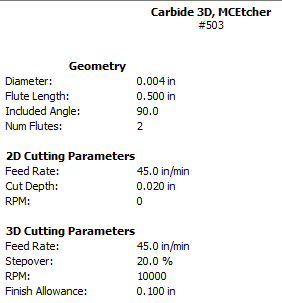
…and the parameters for the Job:
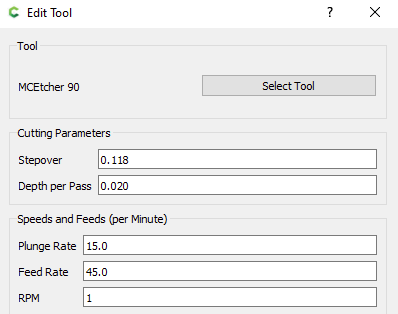
Remember that the bit i used is static (not spinning)
But the ZERO RPM was not allowed, so i put 1 (don’t remember, but i read that somewhere)
Anyway, the Router in not controlled (and was turned off)
Great quiet project…
Hope you are able to use these parameters in Carveco.
This was a nice project
NJ
---
### Author:  [@Retiredgoat](https://forum.sienci.com/u/Retiredgoat)
#### Post date: [January 10, 2024, 12:41pm UTC](https://forum.sienci.com/t/first-acrylic-diamond-drag-bit-engraver-millennium-falcon/3861/8 "2024-01-10T12:41:55Z")
Thanks so much for the quick response, this help a lot!
---
### Author:  [@MikeH](https://forum.sienci.com/u/MikeH)
#### Post date: [January 10, 2024, 5:15pm UTC](https://forum.sienci.com/t/first-acrylic-diamond-drag-bit-engraver-millennium-falcon/3861/9 "2024-01-10T17:15:24Z")
Cool project. Where did you get the graphics from?
---
### Author:  [@webbit\_NJ](https://forum.sienci.com/u/webbit_NJ)
#### Post date: [January 13, 2024, 12:46pm UTC](https://forum.sienci.com/t/first-acrylic-diamond-drag-bit-engraver-millennium-falcon/3861/10 "2024-01-13T12:46:19Z")
Hello…
Assuming you don’t work for Disney 🙂
I simply searched on GooGle image for something like:
Millenium Falcon Clipart
or
Millenium Falcon PNG
or
Millenium Falcon SVG
and found similar images, like this one: (Not sure it was the one)
[https://seeklogo.com/free-vector-logos/star-wars-millennium-falcon](https://seeklogo.com/free-vector-logos/star-wars-millennium-falcon)
then converted to whatever format to SVG
checked for conversion quality and details
Then imported to Carbide Create.
Hope this helps…
Or copyright strike… 🙂
---
### Author:  [@Retiredgoat](https://forum.sienci.com/u/Retiredgoat)
#### Post date: [January 13, 2024, 10:05pm UTC](https://forum.sienci.com/t/first-acrylic-diamond-drag-bit-engraver-millennium-falcon/3861/11 "2024-01-13T22:05:17Z")
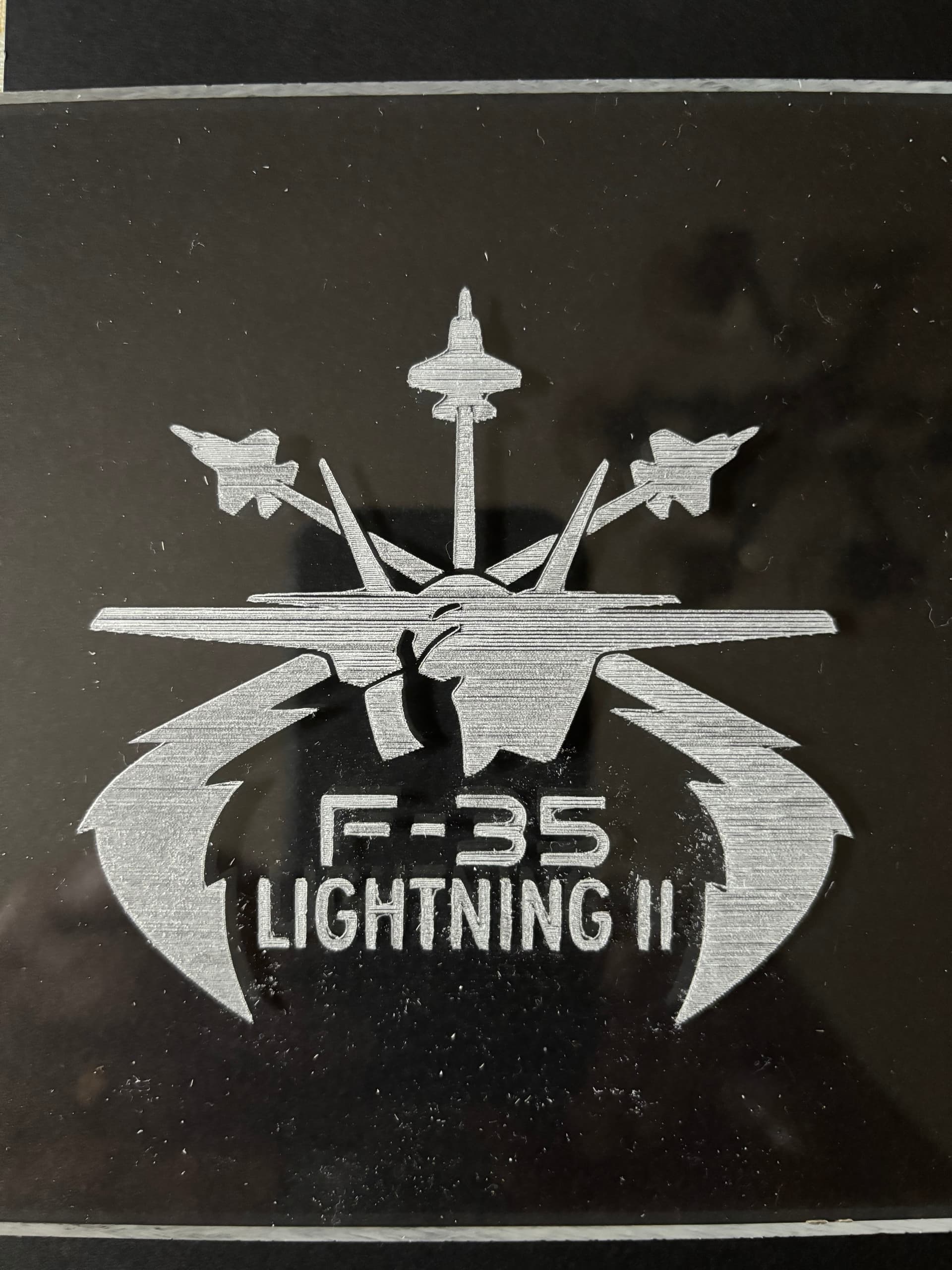
I decided to give Carbide Create a try and glad I did. First sample came out pretty good, just need to tweak it a little more. I do have a follow on question, my Z axis is coming up pretty high when moving to next drag, which setting controls that. It’s adding a lot of time to the job. Again, thanks for the help!
---
### Author:  [@Retiredgoat](https://forum.sienci.com/u/Retiredgoat)
#### Post date: [January 13, 2024, 10:20pm UTC](https://forum.sienci.com/t/first-acrylic-diamond-drag-bit-engraver-millennium-falcon/3861/12 "2024-01-13T22:20:51Z")
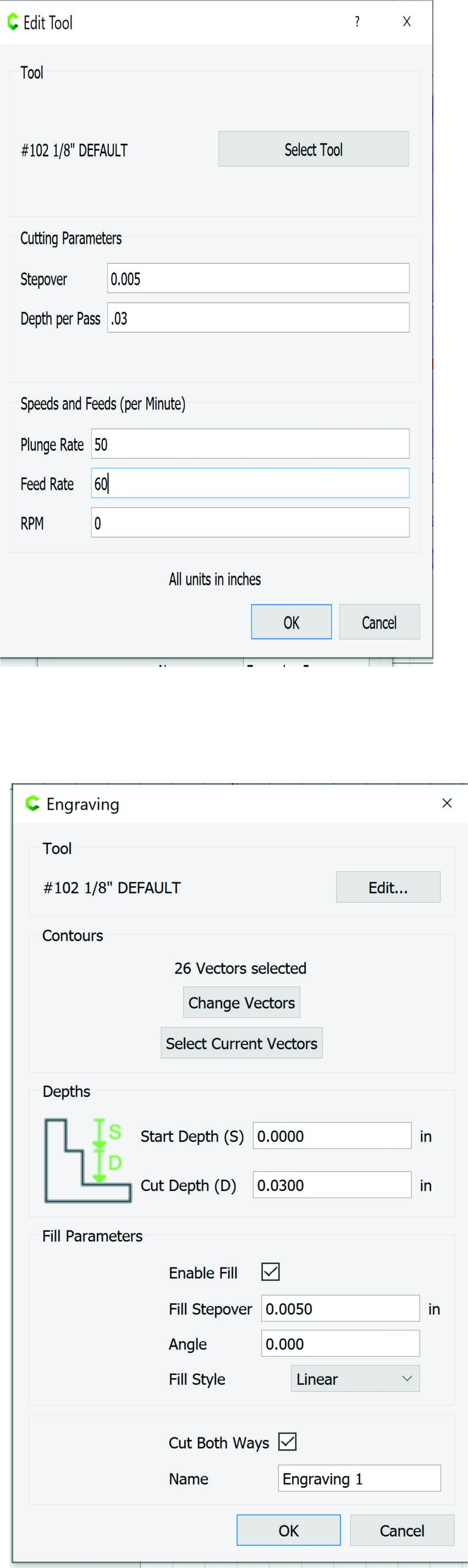
Also, these are the settings I used.
---
### Author:  [@webbit\_NJ](https://forum.sienci.com/u/webbit_NJ)
#### Post date: [January 14, 2024, 10:55pm UTC](https://forum.sienci.com/t/first-acrylic-diamond-drag-bit-engraver-millennium-falcon/3861/13 "2024-01-14T22:55:59Z")
Great Job!
To remove/reduce these Z movements between engraves:
If you are using Carbide Create, in the Design Window “Job Setup” (where you set the Size of the Stock and Zero position), there is the Retract height value you can set depending on your Spoilboard/Material/Clamps/etc
Random Example:

---
### Author:  [@Retiredgoat](https://forum.sienci.com/u/Retiredgoat)
#### Post date: [January 15, 2024, 11:59am UTC](https://forum.sienci.com/t/first-acrylic-diamond-drag-bit-engraver-millennium-falcon/3861/14 "2024-01-15T11:59:47Z")
Neil,
Thanks for that info! Last question if I could, in hat same area it has me select a machine and I don’t have any of those machines, at least not yet. I have a simple 3018 pro, and advice which of them I should select. BTW, that setting for retract is at .5000 currently, however it seems to be retracting much more than that, at least an inch each time it retracts. Again, thanks for the help.