I am new to CNC router work. I am using V-Carve for my first project I made a simple bowl. I am using a SainSmart 4040 Pro as my router. I placed the wood on the table, centered the router on the wood project, zeroed everything, and hit go. The router has no error codes, but only moves maybe a MM back and forth.
@Medicjack Welcome to the group. I’ve moved your post to a more appropriate category. I would bet that @Chucky_ott is correct, but let us know how you make out.
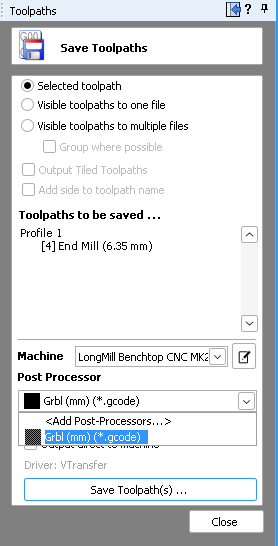
When I made the bowl in V-Carve, it was made in inches. I have Gsender in inches as well. As far as a post-processor, I did not use any, help suggest one please.
@Medicjack VCarve cannot create the gcode that gSender uses without you selecting a post processor. As @Chucky_ott says, change whatever you selected to the grbl mm post processor and use that to create the gcode file(s). Run those in gSender.
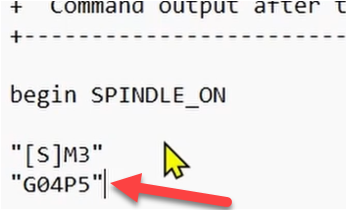
Medicjack, while you are checking your post-processer make sure you have a dwell (G04) command. For unknown reasons, my initial setup did not have this command and I broke a bit. With this command, the router/spindle will come up to full speed before it starts to cut. IDC has a great video on the subject; see https://www.youtube.com/watch?v=wiqwXgP-zaE
When viewing your post-processer, scroll down until you see begin SPINDLE_ON
The dwell command is the G04P5 (in quotes) command. This informs the CNC to pause moving the spindle for 5 seconds. This ensures your spindle is up to speed before starting the cut.
Hi everyone, first, thank you for all the help. When I was looking at the post-processor, I noted that there was a way to download the information from the router. When I set it up, I just typed it in. Once it was downloaded, I tried to run it again, and it ran without any issues. So again, THANK YOU.