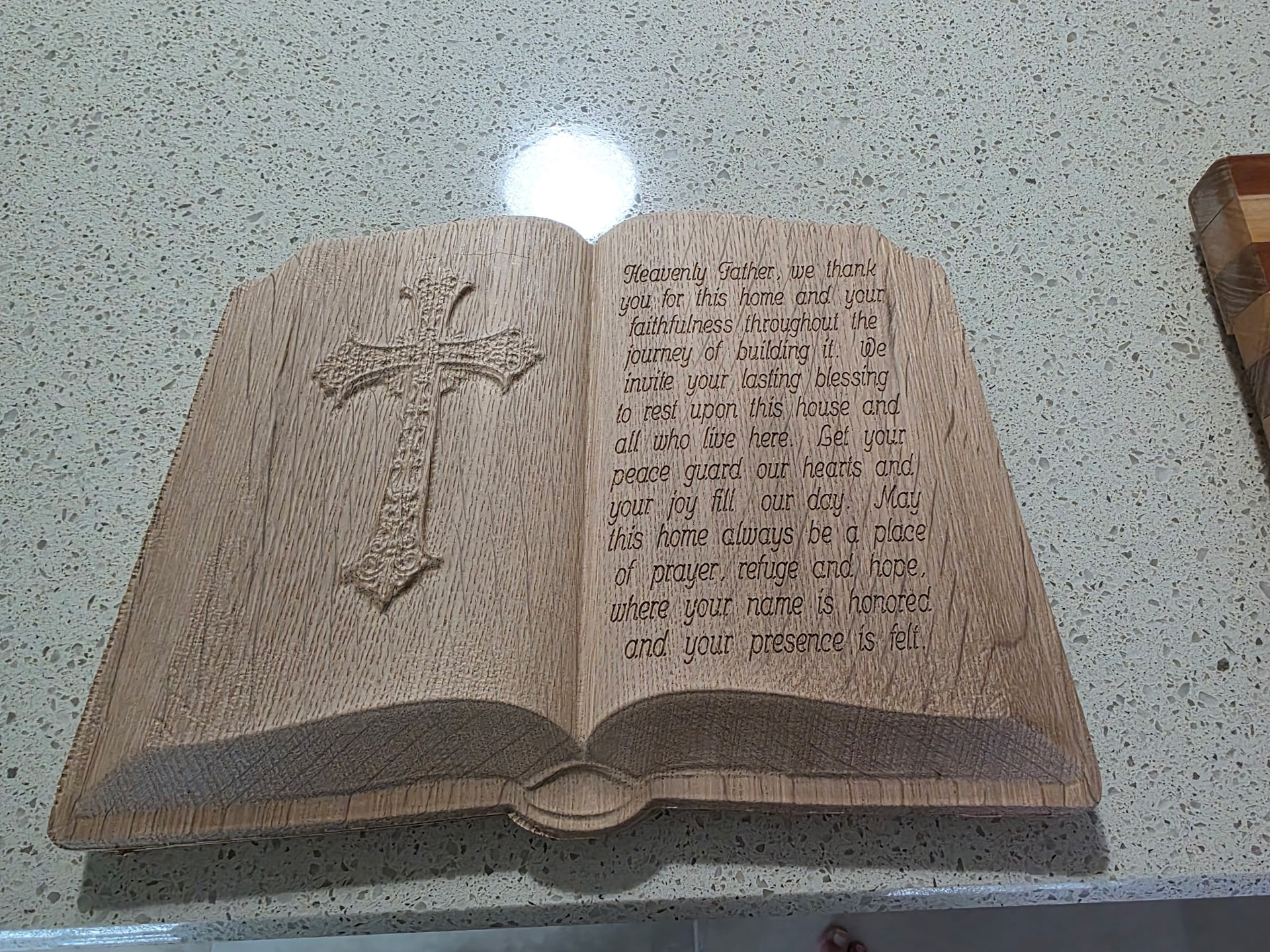
Latest project on the Altmill, made with qtr sawn white oak. Took 6 hours for the carve, not totally finished yet want to put some clear finish on it. Text was done with a 20 degree v bit. It was tricky to get the spacing correct, but I think it came out ok.
11 Likes
Love it! Doing carves in oak is always a challenge. It tends to dull the bits quite quickly. Would you be so kind to share your roughing bit size and feed and speed? Did you have any burning? Great job on a super great theme!
1 Like
I didn’t get any burning used brand new bits though (last thing I wanted was to get 3/4 done and something blow apart). Oak is tricky with the font esp. with that font size, if by chance you get a font line boxing around a grain line I have had it blow out (albeit a small blow out)
I am generally conservative with my feeds and speeds so take that for what its worth. The machine could definitely handle more, my anxiety not so much 
Roughing pass=1/4 inch end mill 16k rpm 40 IPM
Finish pass=1/8 ball nose 16k rpm 50 IPM
Text Pass=20 deg Vbit 10k rpm 65 IPM
2 Likes
It looks really good. How thick is that piece?
Nice work!
Is the piece curved or flat where the text is? The one thing that I think could make it look even more realistic would be if the text followed the curve of the page. That might be hard to do though. Of the programs I’ve used I think Fusion 360 is the only one that might be able to pull it off.
Does the model have perspective built in? It looks like it might be wider at the bottom but it’s hard to tell if it’s in the model or just the camera angle.
I still think it’s great and my suggestion could make it harder to read.
2 Likes
@_Michael I was asking myself the same thing. The top of the book does look curved but the text appears flat. Maybe just an illusion.
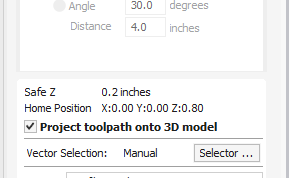
FWIW, vCarve can do a v-carve that follows the surface of a model. There’s a check box to have the toolpath “project on the surface of the model” or something like that.
@rq6162 nice work.
1 Like
I’m not sure if that would be enough. The text vectors might need a curved baseline but it’s hard to tell without being able to hold it. And if there is perspective in the model the text would need to change size for each line. Not easy things to get right IMHO.
Where the font is its curved. Not a bunch but a curve. I did use the project on to toolpath checkbox. I do wonder if it was a major curve if that would be enough.
@_Michael Agreed. It would look ok on a light curve but too much and the letters will be distorted. I guess it’s a problem you have to live with when the end mill stays vertical.
1.3 inches thick at max depth
1 Like
I think vectric has a follow curve opption for teks and if I’m not mistaken an option to have the letters bend and warp with the curve too. The curve vector can be simply trace out of the model.
A bit of work, but to me it would totally be worth it, if not a biiiig plus to go the length and have the text curve the page and project back at the model.
1 Like
I’m in the process of upgrading my PC so I can’t fire up Vectric to check but I probably just couldn’t figure out how to do it with Vectric. I did a project where I put text on a torus but it was 6-7 years ago and I was brand new to CNC. Most likely I got the text baseline to curve but was missing the ‘project onto model’ setting to get the uniform depth.
Yeah the setting is shown below in vcarve.
One note is if memory serves me it does not show up in the vcarve toolpath, I had to use a profile toolpath and use the vbit with the profile toolpath. Lol I know i know sometimes I say wth and do things that might not be traditional.
1 Like
@rq6162 Projecting the toolpath on the 3D model is available for the v-carve toolpath in v12.5.
Beautiful and great job!