Possibly because it is not an update to gSender but an ‘Edge’ version.
@Jens @Ninefingers 1.5.6 is the current release for the production version. It’s 1.6 that is the new Edge. Mind you, gSender doesn’t show the updates for me either. It also doesn’t reconnect to my SLB even though I have it set to reconnect. Too lazy to contact Sienci about it.
Is this over USB or Ethernet? If Ethernet, that is fixed in the next release 
And yes, as mentioned Edge is pre-release software and does not show up on the updater.
1 Like
@KGN In 1.4.12, there is a slider labelled rotary/4th axis. With the SLB, this is to be set to 4th axis.
In 1.5.6, that slider is no longer labelled that way. Now it is only labelled rotary. Should this slider be in the off position to indicate that the user wants to choose 4th axis? Meaning, that is now the default condition and the slider is only turn to the on position if the user wants to select rotary??
Thanks.
The behaviour depends on the firmware you’re connected with:
SLB/grblHAL:
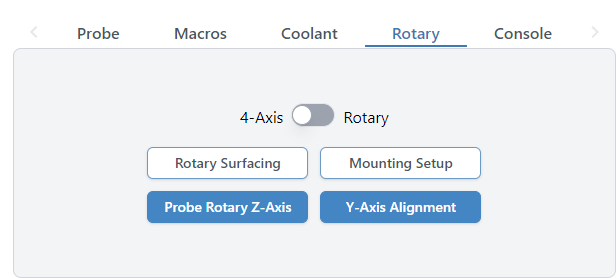
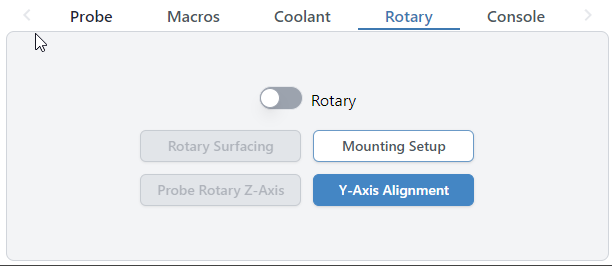
Switch options are 4-axis (default) and Rotary.
If off (4-axis, the default) nothing is changed, A is still A and Y is still Y.
If on (Rotary) A is replaced with Y, similar to the vanilla grbl experience, because the assumption is that you are hijacking Y again.
Grbl
For vanilla grbl, 4 axis is not a thing so you can just choose to replace A with Y for the axis hijacking by enabling.
@KGN Tks much, Kevin. That explains why I don’t see the 4th axis option on my test Uno. It is connecting via grbl.
Hey folks, 1.5.7 is now available with the following updates:
- Fixed issue with start job shortcut not firing in some situations.
- Park shortcut now persists between sessions.
- Unlock button now has same logic as large Alarm unlock button for Alarm 10 and 17 where it will reset and unlock for you.
- Corner selection hidden for Z-only probe type.
- Squaring tool calculations for custom distances are now correct.
- Added support for Teensy boards in recognized devices.
- Error line reporting mismatch fixed.
- Stopping on start event codes should now correctly clear the planner and reset the board.
- Added cut depth validation to Surfacing tool.
- Auto-reconnect should work for Ethernet again.
- Added import/export functionality for gamepad profiles.
- Homing location now shows correctly on stats page.
- Fixed issue with terminal history order.
- Added new config option to run check on a file when it’s loaded in.
- Fixed issue with rapid position shortcuts not memoizing positions.
- GRBL spindle max/min again correctly updates the eeprom on change.
- Config search behaviour updates to be more consistent with modified flag enabled.
- Probe shortcut no longer causes an error 2 due to stale distance modal.
- Rapid position shortcut no longer has a stale homing location value.
As always, gSender can be downloaded via Github at:
4 Likes
any updates to the tool change system?
i’ve been doing some cuts that had some tool changes, and after i probe the changed tool i just close the prompt instead of clicking continue, since that does almost nothing, just move the machine to next “go” position instead of actually starting the next code spindle on and so on.
edit: from my understanding clicking on “continue” it should close the prompt and start the new section
or am i using it wrong