We looked at it from your original report of them not persisting and someone said they fixed it - it’s back in Jira and is being looked at again. Fingers crossed should be 1.6.1 as well.
@KGN @martindg I can confirm that, in 1.6.0, any shortcut linked to a macro is deleted when exiting from gSender.
Also, none of my shortcuts linked to macros were brought into 1.6.0 from 1.4.12. So, I have lost all of them.
Thankfully, I found this out on my test machine, not the one connected to my LongMill.
1 Like
i am here to report and give feedback, when using the tool change function with M6 in my Gcode, Gsender doesn’t send my maschine to the toolsetter location, intead it drops Z down to the toolsetter height but doesn’t move X and Y, it does not matter where the X and Y are in terms of cordinates, can be Home position , work zero, random location and so on. i downgraded to 1.5.7 and it automaticaly goes to tool setter position as soon as the M6 is read from the file
please fix
also, really nice touch on the “unprobed” upcoming tools 
i couldn’t find any other issues or features not working since my file starts with a tool change after probing XYZ
I opened the keyboard shortcut menu to confirm that 1.6.0 deleted all my macro shortcuts on exit. When I clicked on the carve button to go back, gSender was frozen. As I reported, this happened in the 1.5.x series, but seemed to have been fixed in the latest Edge version. It appears that fix was not included in the latest gSender.
Edit. After 35 seconds of waiting, gSender returned to the carve screen.
Sadly, it appears that the problem with gSender going to LaLa land whenever it feels like it has not been fixed in 1.6.0. I was really hoping that the major re-write of gSender would get rid of that issue 
1 Like
So this is a behaviour change related to the new option to have a custom tool change location. It moves to probe X/Y on probe hit, not initially as it did before.
You can see this in the initial probe code, where it moves to G53 X[global.toolchange.PROBE_POS_X] Y[global.toolchange.PROBE_POS_Y]
And in the secondary probe, where again it moves G53 X[global.toolchange.PROBE_POS_X] Y[global.toolchange.PROBE_POS_Y]
Again, this is related to the new custom tool change location, since it doesn’t make sense to initially go to the TLS location then immediately to the tool change location.
From testing, it seems to be moving to the correct location on probe hit as expected. Can you confirm if this is just a behaviour thing you’re seeing or if it’s not moving to the configured location after you press probe/probe initial?
well, i am here now, and i do have to confirm it is working as you described it. for me it is a bit weird, and i was panicking since i didn’t noticed the change. or could be that i didn’t really understood, yes i read he release notes, sometimes 2 or 3 times, but still.
anyways, it works, not as before but if it does the job done, sure i’ll take it.
also i noticed the new tool change location, that is actually a really nice touch  , i dont’t have to worry about the endmill falling on the tool setter anymore
1 Like

1.6.0 was really well received (thanks for all the feedback), but a few issues and edge cases popped up across different setups that we wanted to address quickly. 1.6.1 is focused on tightening things up, improving consistency, and smoothing out some rough edges.
- Added option to skip the first tool change when using fixed strategy, with a prompt to confirm
- Added application scaling support for larger monitors and devices (Config → Accessibility)
- Rapid Position and Park buttons now enable correctly after homing on grbl controllers
- Spindle Delay config now properly reads
$392on older firmware versions - Go To flyout can now move in machine coordinates (MCS) when homing is enabled
- Go To flyout now uses the same safe height logic as other Go To actions
- Machine defaults selector will now prompt to apply changes where needed
- Gamepad Park shortcut now works as expected
- Gamepad Fixed Rapid Position shortcut using stale position data
- Macro keybindings should persist again
- Continued improvements to rotary time estimation
- Fixed issue where tool table was assumed as compiled in from
PRB:output (not always present on some grblHAL setups) - Laser test now calculates max values using
$30(grbl) or$730(grblHAL) instead of local state - Added iOS application icon support for better branding on handheld shortcuts
- Added option to toggle probe type directly in the Probe drawer for quicker swapping of probe block types
- Improvements to Automations editor (variables dropdown + general UX tweaks)
- Added option to disable Electron power saving (allows screen blanking)
- Lite mode toggle is now more obvious when enabled/disabled
- Macros now show again in Remote Mode
- Updated 3D Probe instructions to better match the selected probe type
Download
All versions of gSender can be downloaded on Github:
3 Likes
OK, so tried 1.6.1. My two issues I was having with 1.6.0 (shortcut bindings to macros and laser test mode function) are working great for me. However, I tried to run a basic laser etch file I’ve run hundreds of time. Hitting ‘Run’ and the laser moves to the start position and stops without firing. After a few seconds the laser head will move and complete a quick fire (pulse) and then repeat this process. Looking at the console (photo) it appears that every line (or maybe every other line?) in the gcode file is being wrapped with:
M4S0 G4 P6
S500
(gCode line from file)
M5
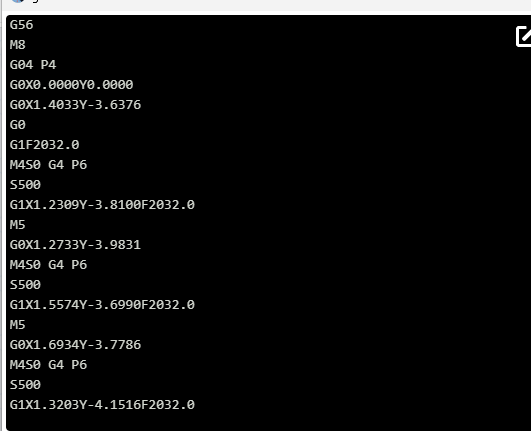
I went ahead and reinstalled 1.6.0 and using the same gCode file and without changing any settings the file ran flawlessly as it has for the previous hundred+ times I’ve run it
What is your spindle delay configured to? $392 on grblHAL, or default gSender setting for grbl. If it’s set to 0, it shouldn’t be inserting anything. If it’s set to 6, dwells are inserted.
Well, that setting is 0. But I’m pretty sure this is not a settings issue. Running the exact same gcode file without changing any firmware settings the file runs just great in version 1.6.0. Here is a snippet from the console and it is clear that there are no ‘G4 P6’ lines inserted into the running file.
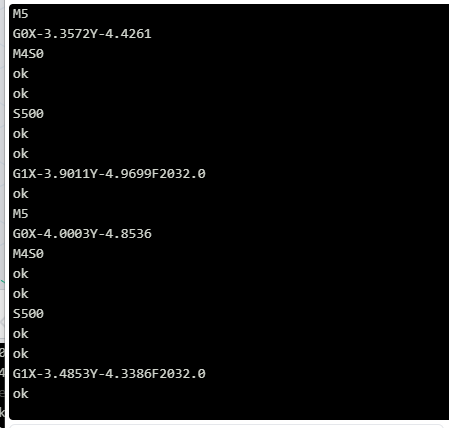
When run under 1.6.1, the console shows many, many ‘G4 P6’ lines inserted after seemingly every M4S0 command
These two console outputs were run one after the other with the same gCode file and no settings changes. The only difference is the first is version 1.6.0 and the second is version 1.6.1. Unless I’m totally whacked out and doing something crazy, there is a change in behavior from 1.6.0 to 1.6.1 that is affecting the run of this file. This almost looks like troubleshooting code that didn’t get stripped before release. I’m sure that’s not what it is but something is different.
Is there a planned grblHAL release for the LongMill SLB? I see focus on the SLB-EXT and AltMill but so far no mention for the LongMill SLB
Yup, we plan on releasing it “officially”, it was just delayed to give support some ease with 4x8, ATC, and new EXT firmware all releasing at the same time.
Last I heard the plan was to make it available within resources but continue shipping the SLB with sienciHAL for the remaining stock and let the customer choose whether to update or not.
In the meantime, it’s been publicly available as part of our automated builds (although not linked in resources yet) - the first option is the SLB equivalent. This is the same version released and shipping for EXT.
I’ll double check during the engineering meeting tomorrow to see if we can get it posted online on the official resources now that the product rush is hopefully subsiding
Thank you for the response. Will there be a listing of the compiled options? I have the 5.05b-as firmware so I need to make sure the auto-square is enabled. I’m also looking for SD card support as right now, when I attempt to use an SD card, the SLB disconnects (I’m using Ethernet). Before troubleshooting the SD card issue, I wanted to make sure it was enabled in firmware as I believed it was not enabled in the beginning of the SLB rollout
I am continually amazed at the detailed level of discussion. I personally do not want to know about gcode commands, firmware, etc.. I just want to successfully and reliably carve wood for my projects. FYI, I used to do assembler (and other compilers) programming many decades ago, so not a complete luddite, but, is it expected that an average CNC user should know about gcode commands? Really? My recent experience:
- was on 1.5.7, and when prompted, tried to update to 1.6.0. Unsuccessful.
- prompted for 1.6.1, and successfully loaded and installed. Ran my next 3D project.
- forget any level of confidence in estimated time for cuts. Vectric and gsender estimates nowhere close. When I changed cut speed, I expected a change in time? NOT!
- AutoZeroTouchplate for Z used to result in Z at 15mm. Now 8mm. Do not mind, but???
- visualiser always showed Yellow for past cuts. I am not interested in “seeing” cuts made 20 minutes ago. No value.
- visualiser showed 850K lines of code (LOC). Progress (my eyeball) not reflective of actual, but… Final result was a complete cut at 750L LOC. Some cuts way off on LOC, some cuts pretty close.
Seems to me that full and proper testing has not been done. The inconsistency and lack of information bothers me a lot. What is my confidence level on the next project? Try it and see is not a recipe for success.
I’m not sue what you’re expecting. You say you have no interest in learning what gcode or firmware is and how it all works but in reality, you should want to know these things to better understand how it works. I’m not saying you need to have the ability to write entire projects by hand in gcode but to at least understand the fundamentals would be ideal.
You describe a number of more cosmetic things that have “no value” to you but you list out things such as time estimation which I would argue have “no value” to me. Developers can only do so much but when people aren’t willing to learn how to troubleshoot and test the software, then things eventually get past testing.
Post your issues in the github repo so developers can look at the issues. Timing a cut is a huge part, understanding the speed, lines to cut in relation to the total number of lines minus the lines that have been cut. Adjusting if someone changes the speeds on the fly and then recalculating and displaying the results is complicated but the issues can only be fixed if you put forth some effort to understand how the machine runs and are willing to provide feedback, The software is free in terms of monetary value but as part of the community, you need to take some responsibility and do your part in reporting what is happening that you don’t expect.
If you want the Z to go higher after probing, what value is set in gSender? (final Z retract) Did you attempt to investigate a setting that has been implemented? What were the release notes between 1.5.x and 1.6.x?
Lines of code (LOC) A “line” could be seen as more than one “line” based on the gcode (learning gcode would help you understand what a line of code is)
2 Likes
@Retiree There are other free senders that you can try. ioSender and ncSender come to mind. There are others.
Let me repeat: “I want to successfully and reliably cut wood for my projects”. I have LM 2.5, CLSM and SLB-XT. Part of the system is the S/W, ie., gSender. I have deliberately gone with vanilla Sienci all the way to ensure the best support possible when I have had issues. In line with the topic, I posted my experiences with 1.6.1. The actual carving worked as it should, but the items indicated are changes from 1.5.7 and most are not new. Yes, I read the release notes and there was no mention of the items I indicated. I have posted most of these on previous threads over past couple of years, so have provided feedback and agree it is important to do so.
I disagree with hamanjan re having to know how gcode and firmware work. Let me use a car analogy: one expects reliable service, accurate instrumentation, etc., and knowing about OBD codes, how the S/W compensates for anti-skid control, etc., is of interest to some, but is not required to drive the car well and safely. One does not need to know Windows code or crv code to use Windows or VCarve. Yes, gSender is free - Sienci marketing decision. I would consider paying for this S/W, if it is reliable, accurate, etc..
Revisiting my laser issue. Version 1.6.1 is inserting a dwell (G4 P?) after each M4 command in laser gcode. Here is a short snippet of code of a file run in 1.6.0 and 1.6.1.
1.6.0 -
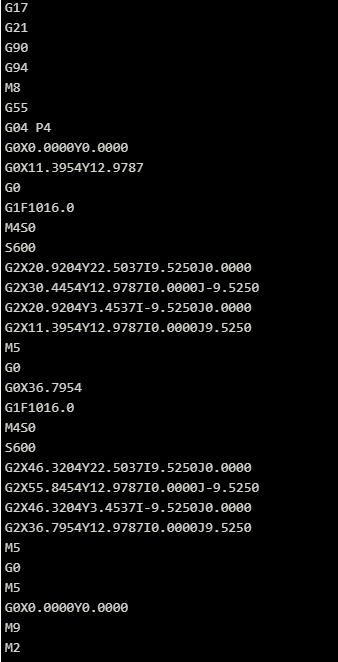
1.6.1 -
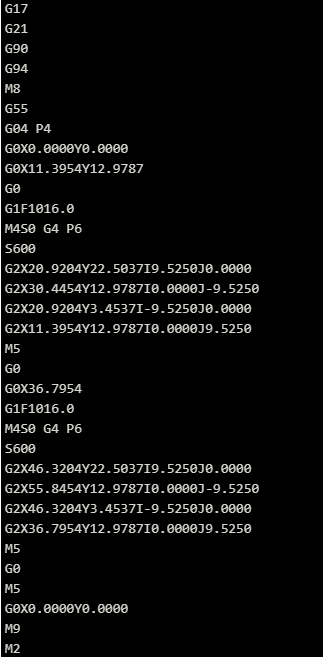
Kevin, you asked what my $392 was set to and I said I had set it to 0. Well, I thought I had set it to 0. Setting this to 0 generates a “Value out of Range” error. So, I went ahead and set it to 1 and rerunning the file generated the following in the console.
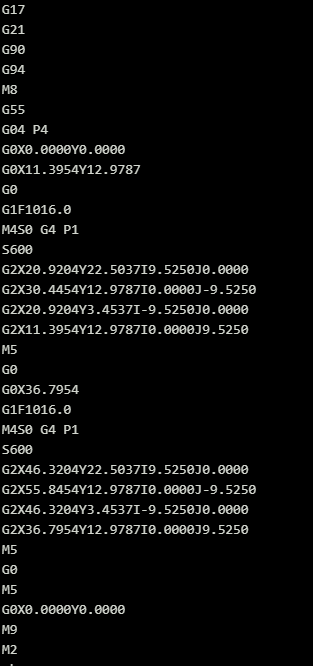
So in version 1.6.1 it appears that a dwell is being inserted into every M4 command using the $392 value. This is clearly not acceptable in a laser cut file and is particularly an issue when $392 cannot be set to 0.
Using your car analogy would be best served by using AI to drive the car. You need to know what commands are being sent.
If you’re driving, you are sending the commands to turn left/right stop/go which is not at all like using a CNC. Your analogy of YOU driving the car would be YOU moving the router manually as a trim router or maybe a router table/sled.
I read the same release notes, and I knew there were changes to probing which is how I knew where to look for the setting. All it takes is a bit of common sense, basic computer troubleshooting skills and take some initiative. If you want to be completely spoon fed, then you may want to spend another $50,000 for a hands off push button system with onsite support. My CNC cuts exactly what I tell it to every time so in fact, it does “successfully and reliably cut wood for my projects” What you’re talking about is mostly cosmetic and I get that some people can’t handle change. You are more than free to use older versions that look and act like you personally feel comfortable.
1 Like