hamanjam. We obviously see things differently. Accurate instrumentation , eg., speedometer, odometer, etc., is important to me to drive a car safely. Similarly, accurate CNC instrumentation is important to me to achieve my carving objectives. If this is not important to Sienci and other gSender users, so be it. I have provided my input as a Sienci customer and a participant in this forum.
chucky_ott’s response with practical suggestions is appreciated - your comments on what, in your opinion, I “should” be doing/thinking, are not appreciated.
This interaction has nothing to do with the topic of the thread. I will now focus my time on learning more about VCarve…
Yeah, it turns out the documentation wasn’t relevant to sienciHAL in that it reported a minimum of 0 (which is correct on newer versions of grblHAL for $392/$394 which is incidentally what was tested against) but sienciHAL has a minimum of 1 (which doesn’t make sense but besides the point).
So we’ll probably have to not use $392 and revert the behaviour to a custom gSender setting for next version. Thanks for confirming my questions!
Thanks Kevin. I guess my next question would be what timeline do you anticipate for this fix?.
Speaking strictly for my situation, the injection of the dwell after the M4 command make version 1.6.1 unusable for any kind of laser work. As much of my work involves laser etching over 3D carves I need pretty precise calibration of X0Y0 between my spindle and my laser. I use a number of macros in my workflow to accomplish this and implementing these macros really needs to be done via keyboard shortcuts. Unfortunately the keyboard bindings to macros does not work correctly in 1.6.0 (or actually 1.5.7 for that matter). This puts me in a bit of a bind.
My current solution is to use 1.6.0 (or 1.5.7) and redefine all of the keyboard shortcut bindings to my macros each time I restart gSender. Not a great workflow. I guess I could go back to 1.5.6 (or whatever version in which the macro bindings worked) but this obviously looses some of the features/fixes rolled out in the later versions.
As an aside (and just out of curiosity) what is setting $392 actually supposed to code for such that injecting the “G4 P($392 value)” command after every M4 command makes sense.
Has anyone been able to access & use the Tool Table on a Longmill MK2 w/ SLB and gSender 1.6.1?
I understood that you can use this functionality when doing manual tool changes (with no ATC) but I cannot seem to get the ‘Tools’ button to appear in the ATC tab so that I can enter my tools’ descriptions.
I have flashed the SLB’s firmware to to 5.0.5b as per the instructions and completed that without error. Querying the Console with $i confirms that the board is at SuperLongBoard_B5.0.5b now. What is odd though is checking gSender’s Machine Information (button at top of screen to the right of the connection icon) says Firmware version: 20230917.
I do have the ‘Enable ATC Controls’ option turned on in the Config tab and can see the ATC tab on the Carve screen but all that tab says is ‘ATC Unavailable No ATC Flag’.
1.6.1 on the mac is terribly laggy - z moves are driving the endmill into the table and every operation has a 10-15 second lag between operations like choosing the settings button
You cannot, the ATC drawer and tool table are both tied to a firmware feature that is not present in SLB 5.0.5b. There is a reason it is guarded behind a version and ATC flag check.
I’ve gone into a bit more detail here about that + possible solutions we’ll look at:
I just powered up my AltMill with SLB-EXT for first time today connected to a Mac and thought something was wrong how unbelievably laggy it was. Everything you clicked on from Unlocking the machine to connecting to the machine would take 10-15 seconds. I even opened activity monitor to see and nothing was sucking up the CPU.
I just found out that the default download is for the intel processor, which will run on our M series processors but it will force rosetta to run - download the x64 mac dmg - with that it loads up in about 3-5 seconds and is running much better.
Oh wow thanks for that heads up! . yeah, just checked mine and it is also Intel. Looks like their build script is wrong. The download link says it is “gSender-1.6.1-Mac-Universal.dmg” but the app in that dmg is just the Intel one! On the releases page Releases · Sienci-Labs/gsender · GitHub it shows there is a Mac silicon and a Universal but the Universal is just the intel one.
I submitted support tick to make sure it gets fixed. I also updated macOS to latest since I wanted to see what happens now that Apple warns you when you run an Intel only application. The next major macOS release will be the last one that supports running Intel apps on apple silicon Macs.
This is the message you get on macOS 26.5 when running the default download for gSender:
gSender 1.6.2 is a smaller follow-up release focused on polishing up some edge-case issues that cropped up after 1.6.0, along with a number of workflow and usability improvements across the application. A lot of this work targets firmware compatibility, ATC/tool change flows, and smoothing out a few rough edges reported by the community over the last little while.
Data collection and analytics
You may also notice that gSender prompts you again about analytics/data collection preferences after updating. If this feels familiar, you may have already responded to this prompt quite a while ago and simply forgotten about it. We’ve recently changed analytics providers, so we wanted to give everyone another opportunity to review and update their preferences.
The data collected is primarily general usage metrics, operating system information, and tool usage data that helps us understand what parts of the application are being used most often and where issues may be occurring.
As always, analytics participation is completely optional and can be enabled or disabled at any time in the Config section of the application.
General Fixes and updates
Updated firmware defaults to better account for TLS/probe misconfiguration scenarios
Various firmware default updates and compatibility improvements for newer firmware versions
Uploading to SD cards over ethernet is working correctly again
Laser power slider now behaves as expected on newer firmware
Spindle selector now works correctly on newer firmware
Laser offsets now map correctly to the updated Config key structure
Flash utility will now automatically select grblHAL firmware when SLB_DFU is detected
Exiting rotary mode will once again properly restore previous machine values
Non-enabled spindles will no longer appear in the spindle dropdown list
Spindle dropdown will now attempt to refresh itself automatically if empty in the Spindle/Laser drawer
UX and Visual
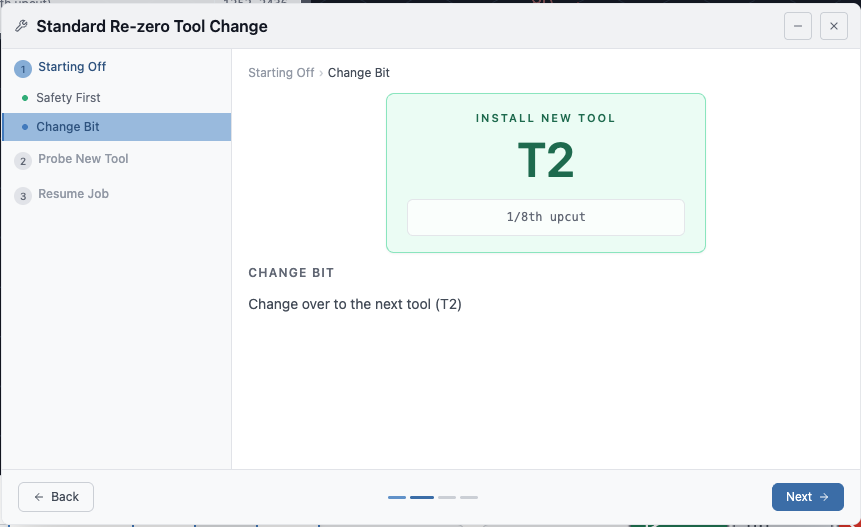
Numerous visual and workflow improvements to the tool change wizard
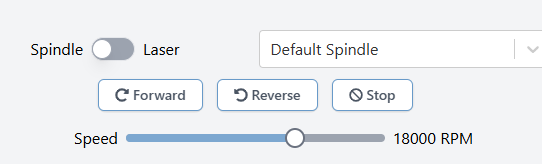
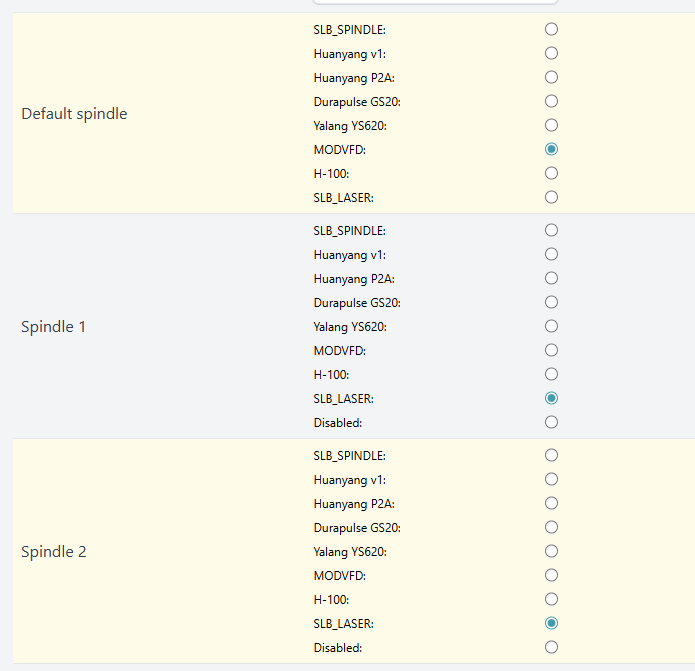
Well, wanting to take advantage of the fixes in 1.6.1 and 1.6.2 I updated to 1.6.2. So my bad I guess,…When I first start up gSender the Spindle/Laser menu shows “Default Spindle”. If I don’t change this I can run my Spindle just fine.
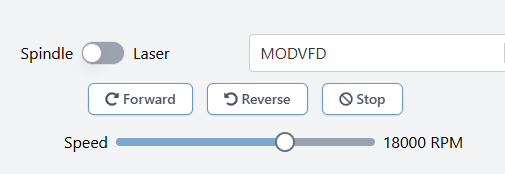
If I select the SLB_Laser option and toggle the slide switch to 'Laser" the Laser works just fine. If I select the ‘MODVFD’ option (as I have always done in previous versions) the spindle no longer will run. To make matters worse once I select the MODVFD menu option the 'Default Spindle" menu option goes away so the only way to get the spindle to run is to restart gSender and running my spindle job without touching the ‘Spindle/Laser’ menu.
I went in to look at the Spindle/Laser Config screen and tried to reset the settings to the defaults. I have the Default Spindle ($395) set to MODVFD whcih is what I have had it set to in previous versions and it worked fine. The manual says that the default for Spindle 1 ($511) is SLB_LASER and the default for Spindle 2 ($512) is MODVFD. However, clicking on the default reset for $512 does not reset $512 to MODVFD. The setting $512 seems to just continuously resets to SLB_LASER. Trying to change it manually to MODVFD doesn’t change the setting; it agains just seems to reset to SLB_LASER.
My Spindle and Laser controls all worked fine in versions through 1.6.1, It is getting very frustrating to get specific items fixed in new updates but then have other things that were working (e.g., keyboard shortcuts for Macros, laser power output setting, errant spindle delays being injected into the code) all of the sudden breaking.
I hope that support for Intel Macs continues with gSender for a good while, as I rotate older Macs to less processor critical tasks (such as running my CNC) and the shiny new iron to CAD and Software etc. I can expect my current Intel MacBook Pro to keep going and have enough power to run gSender for a good while yet…
We don’t plan on stopping support for Intel Mac builds unless we come across circumstances like Electron dropping support in a future version. Both Intel and Silicon versions are available and will remain available for the foreseeable future.