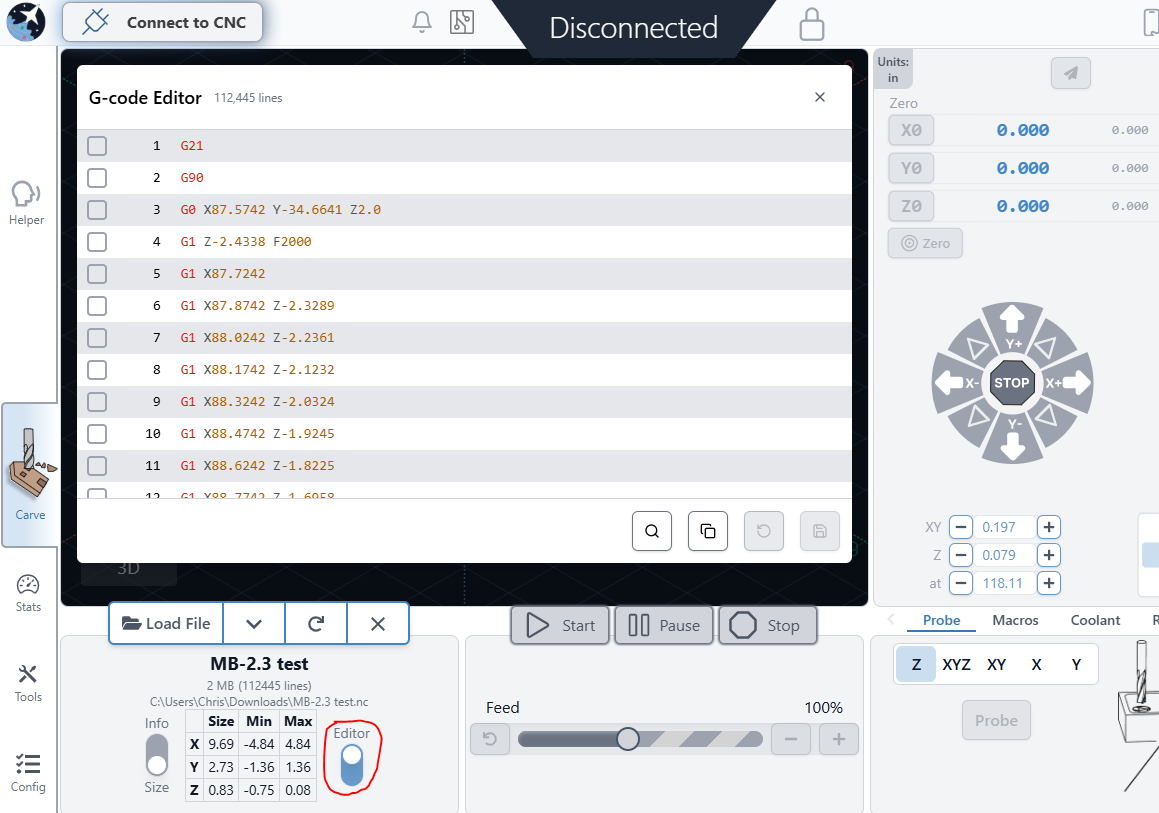
this would be a great addition.
Agreed, I thought this was a good idea 18 months ago
Do you mean to edit the gcode after its loaded into gSender or to edit the gcode file and then reload the file after editing?
Simple feature to edit loaded gcode file before running it. I previously used BCNC and it had this feature. You could deselect entire section’s and lines, delete and edit. It would prompt you to save on file close. It came in really handy when a certain operation needed to be repeated for one reason or another or a tool was already loaded that would be requested on startup. Just uncheck a couple lines or a section and run it rather than going back to the other PC and posting another file or firing up a text editor.
1 Like
Sorry if i stepped on your toes I didn’t see another request for this feature.
It’s something we have in the backlog as a potential feature we’d like to add down the line. It won’t be in for 1.2.0 though, but will probably be on the docket for the next major release after that.
2 Likes
Hi, I’m really new to gsender so far I do like it.
Here are a couple of thoughts, can we get a gcode editor. Even if it’s just a shortcut to note pad with a pop up that asks if you want to save the file if yes maybe have gsender reload the file??
On another note :
Tool change… It gives you 3 steps to go though for the change .
Instructions don’t advance, as you do the task you have to use the scroll bar to get to the next step. Otherwise not visible .At least that’s happening on my system
Thanks you
I dont know, must have gone totaly stupid here but,
WHERE??? is the G Code viewer? There should be a code viewer where you can see for example if you need to start on a specific line you should be able to check the G Code and what line to start of from. I have NO WHERE where I can see the actual code???
Here’s a link to the one I use to review GCode.
Thx but what Im looking for is if there is an INTERNAL g code viewer in G Sender so you can see what line it’s on etc. Not external, any text viewer can view the g code.
1 Like
Click the console tab in g-sender after you load a file, is that what you are looking for?
It would be really useful to be able to see the actual gcode currently being executed including any comments encountered on the console tab. The comments are actually more important to me than the gcode. Let me explain why:
My Fusion360 tool library has descriptions for each tool which automatically get posted as comments in the gcode file. Being able to look up and see them at each tool change it super handy. Coming from an industrial environment, I have always used this technique (with other CAM software as well and many many other CNCs). Even when you have a physical printed setup sheet in your hand that calls out each tool used by a job, the comment in the actual program confirms it thus further minimizing the chance of a wrong tool being loaded.
BTW nice job on the latest gSender guys. I upgraded from 1.4.12 to 1.5.2 and I am super impressed.
Everywhere I look , I see improvements!
And this is coming from a software engineer of over 30 years…
2 Likes
I just purchased an SLB and I am trying to reacclimate with Gsender, I sold my long mill 3 years ago to upgrade before the AltMill was a thing. The past few years I’ve been using OpenBuilds Control, one of the great features is you are able to access and edit the code directly from Control’s interface. Sometimes I may want to add a G4 for a pause to let the spindle ramp, a M6 or make some other quick adjustments. It would be nice to beable to view and edit your Gcode inside the tool and save the step of opening in a text tool
1 Like
It would be nice to see this,
1 Like
It’s definitely on the list as something we’d like to add (at least a viewer), but no timeline.
3 Likes
couldn’t agree more. I have worked with all sorts of industrial CNCs and I have never ever seen one where you cannot see the code that is being executed…including comments.
1 Like
Great news, thank you for the response!