I know that this is a SCIENCI forum, but I want to use gSender with a Sainsmart 3018 Prover and a WIFI link instead of a physical USB cable. I am have some trouble, and am wondering if anyone else has tried this.
I want to get rid of the USB cable from my PC to my Sainsmart 3018 Prover. I know that they sell a unit, the GGW-USB, that will do this, but it only works with the Genmitsu app, and I want to be able to use it with gSender.
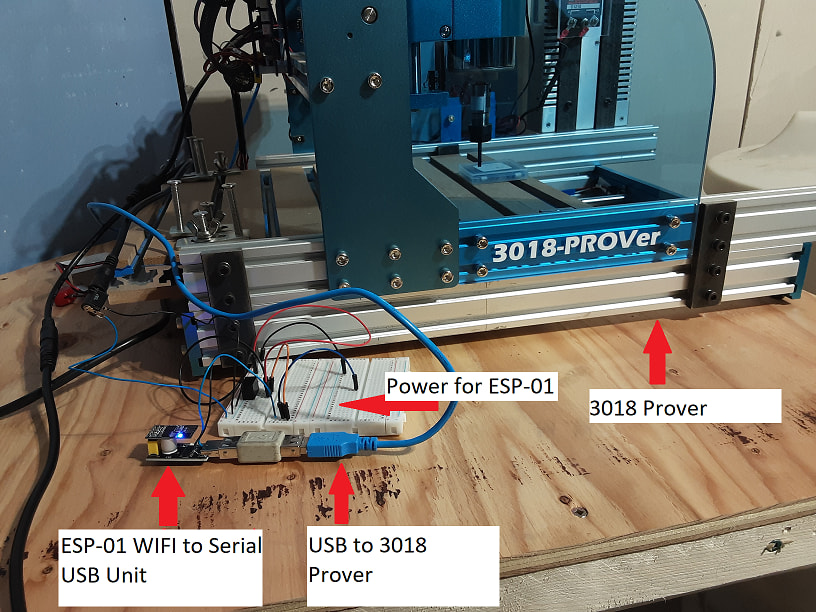
I built and programmed an ESP-01 WIFI to Serial USB device. I set my router to fix the address of the ESP-01 to 192.168.1.103:23. I tested it extensively with YAT (Yet Another Terminal). I could open a terminal on 192.168.1.103 port 23, and when I plugged it into a USB port, it recognized and I could open the COM port on my PC in another terminal using YAT.
At this point, I could send text messages back and forth from one terminal to the other, transparently. It worked perfectly.
When I connected my 3018 to my PC with a physical USB cable, it worked perfectly with gSender. When I connected the 3018 to my WIFI to Serial USB device, it did not work. I found this online:
“Connects but status says Disconnected
If your machine connects on a COM port successfully but the machine status says “Disconnected” then this is not an issue with gSender. A ‘Disconnected’ status means that gSender isn’t able to recognize your CNC even though it can see it.”
This would indicate that the problem is in my CNC controller. I cannot understand why a physical USB cable works fine, but the WIFI to Serial USB unit does not. Of course, the first thing is to suspect the WIFI unit, but I have been doing electronics for a long time and I am reasonably sure that I got it right. I will keep testing, but I have run out of ideas and am looking for help.
Has anyone else tried this and made it work? What problems did you have along the way?
Just a guess but I’m assuming the IP is assigned to the ESP-01 and not the Sainsmart controller?
If you disconnect the USB cable from the ESP-01, can you still open a terminal to 192.168.1.103 ? If yes, I would assume a USB communication problem between the ESP-01 and the Sainsmart.
Yes, the IP address is assigned to the ESP-01. I used HW VSP3 to create a vitual serial port, COM20, and linked it to 192.168.1.103:23. gSender sees the virtual serial port, and shows “Connected” in the upper left, but “Disconnected” at the center tab.
When a USB device is connected to a PC, there is some handshaking that goes back and forth. I don’t know much about USB, usually just letting the CH340 chip handle the details. I am wondering if something got lost, even though the serial link seems to be sending everything.
very discouraging. I thought that I was being so clever. Back to the books!
I am using port 23, which is the telnet port. It can be used for unencrypted, text-based, remote terminal connections, which is what I thought was required.
I will look into connecting via telnet. I did try connecting to 192.168.1.103:23 using YAT, and sending G28, which is the Home command. There was no response from the CNC. Is that what you mean by connecting with telnet?
I will reconsider my home-rolled program, and try ESP-link, which is a well documented wifi to serial bridge. If that fails, I will try ESP Now for the link.
Since the 3018 Prover can be connected via a USB cable, I thought that using a device with a USB output would be a no brainer. So here I am. Still some stuff to try. If I get it, I will let you all know.
But as an aside, you can assign any number you want, as long as the the client and server are using the same port number. I’d be surprised if your device was configured to use anything other than 23 for Telnet.
I use PuTTY myself but any telnet client should work.
The Telnet client displays “GRBLHAL 1.1f” as soon as the connection is established.
I looked into telnet, activating the service for Windows, opening a cmd window, and entering “telnet 192.168.1.103:23” and got a “Could not open connection to the host…”
I tried opening a session with PuTTy, no connection.
So, telnet does not seem to be working. My “hand-rolled” telnet client server came from the internet. Honestly, I do not understand all the ins and outs of it. I will fall back on ESP-Link and see how that goes.
@RonC Make sure you close gSender when trying telnet/PuTTy. Your controller likely won’t accept a second connection. I posted about this in another post earlier this afternoon.
And your syntax for telnet is incorrect. instead of the colon, just use a space (or don’t specify the port since 23 is the default.
I did get telnet going. I can send serial data from IP address to COM Port flawlessly. The problem lies in the UART to USB Adapter.
I think, now, that my problem is not a matter of having a transparent serial to usb device.
I think that the problem is that the CNC machine is built as a USB Device, and my PC is a USB Host. When plugged into a Host, the Device handshakes a bunch of data with the Host. The Host decides what talking gets done after this.
The problem is that the ESP-01 UART to USB adapter is a Device, not a Host! So, when I plug my cleverly programmed Device into the CNC machine, which is another Device, there is no Host in the system! You cannot plug a Device into a Device and expect it to work.
So, there it is. Dead in the water. I have either to figure out how to turn the ESP-01 UART to USB adapter into a Host, or to rethink the entire project. I guess that my problem is that USB is so darned easy to USE that I gave no thought as to what was actually going on.
Back to the drawing board! Thanks to all for taking an interest in my problem. If I figure it out, I will get back you you with the solution.
@RonC I wonder if a wireless printer adapter (if there is such a device) or wireless print server would work. That essentially converts a USB device to a wireless device. Not sure if they’ll transmit every protocol (e.g. telnet) though.
I just googled the GGW-USB that you referred to in your original post. $35 CAD here on Amazon.ca. Probably won’t be able to buy anything cheaper. (never mind, you say that it only works with their app.)
At this point, I am thinking of going straight for the UART interface of the offline controller, which is a ten pin socket, or a Raspberry Pi of some sort connected via USB. The UART interface would allow me to use my ESP software and hardware. The hardware would require level shifting, but his is doable.
ChatGPT does not think that a wireless print server will work.
I have got to look into USB Host and Device characteristics one of these days. Oh, well, the rabbit hole is how we learn!
 Back to the books!