I had a post in the community discussions about problems homing my machine but this maybe the proper area for this. I have an altmill4x4 and I cannot get it to home properly. All the sensors will trigger when I put the wrench near it but when I try to home it slams into the hard stops. I get a variety of errors but mostly e stop asserted. I ran all the troubleshooting steps that are listed without any success including turning off the hard stops and adjusting the sensors. I am using G Sender 1.5.6. Any ideas?
There are a number of things that could be going on - most of them I am not qualify to advise on but I can suggest a couple of things:
You say the sensors trigger ok. When you attempt to home, do you see the sensors triggering just before the carriage slams into the end stop? Actually even after the carriage crashed, the sensor should probably light up.
Note that if an axis is working correctly, the sensor first triggers and then the axis in question will move away from the sensor a given distance which causes the sensor to no longer be triggered.
If that seems to work, my next thought would be - did I plug the sensor cables into the right port on the controller? During homing the mill goes through three steps - first the Z is raised until the sensor is triggered. Then the carriage moves all the way to the left - again, until the sensor is triggered. Last, the carriage travels to the back of the machine. You need to verify that these happen in sequence. You don’t mention at what stage the system crashes but if the cables happen to be plugged into the wrong port than the system crashes and that will give a clue of which sensor is not acting correctly.
After those tests I would look at the configuration and I can’t help there.
There might be some sort of status screen that shows the sensor status …. if it exists and you find that, manually trigger each sensor individually and see if the status on the screen changes appropriately.
@LarryLSimmons @Jens gave good advice. I’d like to add a few things:
When you approach a metal object to the sensor, the little LED at the back of the sensor should light up AND gSender should give Alarm 1 for the X, Y1, and Z sensors. It will not generate the alarm for Y2.
When I setup my Altmill, I wasn’t able to home Z. Even though the LED lit up when I approached a metal object, it would not home properly. It turns out that one of the pins on the connector was bent and wasn’t engaging properly. So don’t rely on just the LED to give you an indication if the sensor is functional. Inspect both ends of the connectors.
In your other post, it’s not clear if you tried to home each axis separately. Did you?
Also, at the top of gSender, there’s a “View Modified” option. Enable that to see which settings have been changed from the defaults. I only have the touch plate and the spindle (H-100) that have been changed. When troubleshooting, it’s easy to start changing things and not change them back to what they should be.
I totally missed that option. This is an excellent idea and should probably be the very first step.
Jens & Chucky
Thanks for the help so far. The first thing I checked is that it homes in the proper sequence which it does but i verified the cables just in case. When I manually trigger the sensors I do receive the Alarm 1 on G Sender. I was able to home each axis by manually moving them until the sensor triggers and then resetting the machine and using the precise jog until the light goes out and then typing 0.00 into the position box. After I do this i check it a couple of time for each axis using the go to button. When I try to run the home function Z axis will go the top and then moves away from the sensor. The X axis goes all the way to the left; it triggers the sensor, but it doesn’t back away like the Z axis. The Y axis just hits the hard stop, triggers the sensor and give the Alarm 10.
Another thing I found that is baffling me is that the Y2 sensor on the right side is not the same distance from the Right Axis rail than on the Left. There is a larger gap on the Right side. I thought that the frame was out of square, but I measured it and they are both the same. Any advice you can give it greatly appreciated. Thanks.
@LarryLSimmons Y2 is not used for homing so you can leave it out of the equation for now.
As for Y1, any chance you have it set too far back? Move it forward a bit (but still recessed from the rubber stop) and then home Y only.
It’s still not clear if you are homing each axis separately or all three together.
Thanks Chucky.
My machine came with the integrated sensor bump stops that screw onto the inductive sensor which I am assuming is to keep them at the proper distance. I may be confused on homing each sensor separately. What I did was move them until they triggered the sensor and gave the E stop alarm and then I would jog them away until the sensor light goes off then manually typing 0.00 into the left side box for each axis, I am not sure if that is the correct way. After I do that for all 3 axis’ I test them a few times; then I move all 3 away from that spot about halfway on each on then hit the HOME button.
At which point the Z homes correctly i think as it goes up to the top and then backs of a little bit. The X axis goes all the way to the left and triggers the sensor but does not back off. The Y goes all the way back and hits the hard stop, triggers the sensor and then alarms out the machine. Thanks for continuing to help me.
That is the correct way it should behave …. x and y should behave the same way.
If x gave you an alarm 10 I would have suggested that you verify that the right sensor is plugged into the right port. I would double check that anyway but it is odd that you get the trigger and that there is no back-off. This is a configurable amount so you need to check that isn’t set to zero.
I can suggest another test - move the carriage to the far right, hit the ‘home x’ button and while it is moving towards the left, trigger the x sensor to make sure the motion stops. Do the same thing with the y1 (left) axis. Based on what you have said, I would expect x to stop as soon as it is triggered but y does not stop. If x stops then the x cable is in the x socket and y must be in the correct socket as well.
I would then see if maybe the sensor cables are defective. Note that if power and ground are available to the sensor, it will trigger properly but that does not mean the trigger signal makes it back to the controller. Again, I would suggest that you find the configuration page (I assume it exists) that shows you the status of all the sensors. Here you can verify if the controller receives the trigger signal and that it is for the correct axis.
Good luck !
OK, this is for gSender 1.5.3 (I think) but I don’t think 1.5.6 is different in this regard …
Go to ‘config’ , ‘homing/limit’ and at the very top you see 4 indicators x,y,z,a. These will tell you which limit switches are triggered. In my case the light shows green when a limit switch is triggered.
Make sure all the limit sensors work as they should. Note there is no indication for y2, the right side y sensor.
Oh, if you trigger the right y sensor and the y indicator shows active, you likely have the two y connectors plugged into the wrong sockets. I have not verified that but it would make sense to me.
@LarryLSimmons Not the correct way…at least, not the easy way.
In gSender, enable the toggle under the current coordinates.
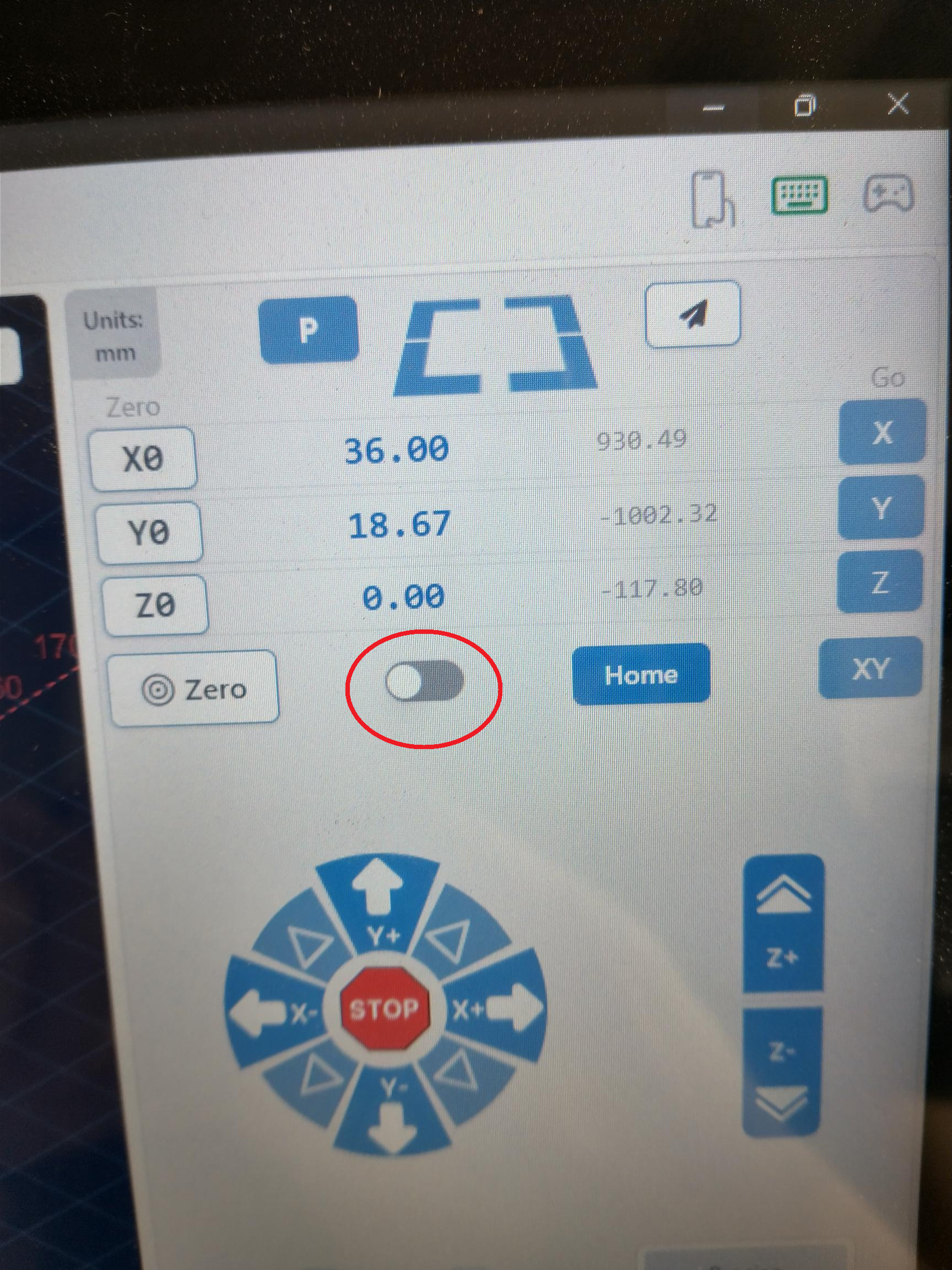
Then, to home each axis separately, click on the HX, HY, or HZ buttons.
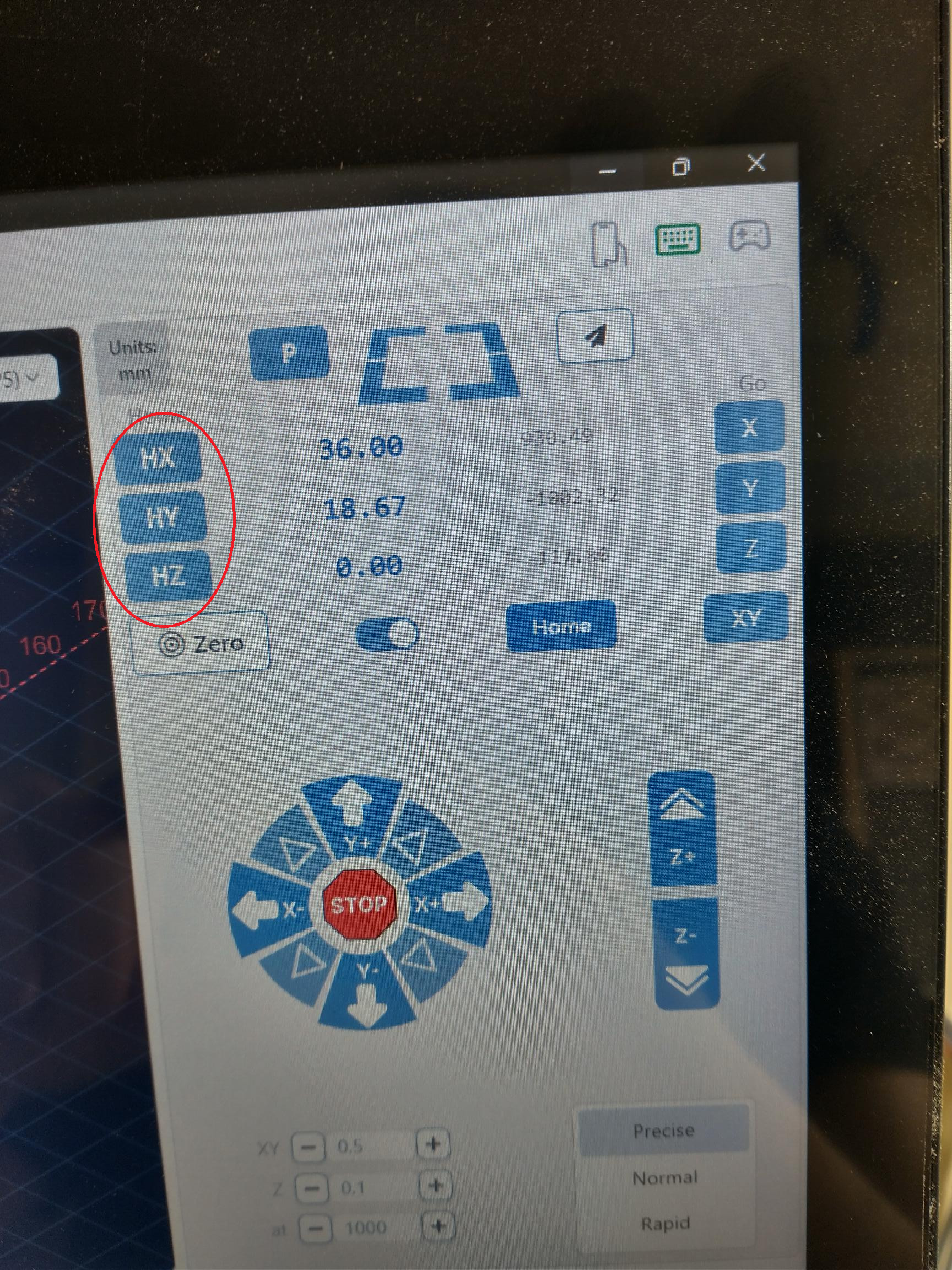
That is all you need to do. No manual jogging required.
To home them all at the same time, just click the Home button
You won’t believe what was causing the problem. Remember when I said that the right axis bumper was not the same as the left? When I assembled the sensors for the Y axis’ I did it like the directions and threaded the nut and washer and then pushed it through the hole and tightened it down with the integrated bumper. So when i homed Y it would hit the bumper and alarm out. So i took out all the bolts holding them to the screw and referenced them to the plate and tried again. with the same result the Right and Left bumpers were not the same.
The cause of the problem was that the sensors where not aligned, and the solution was to remove the washer off of the Left axis. And that fixed it. It took three days to figure this out. Now it homes perfectly in all three axis’.
Thanks for all the help. Merry Christmas.
i would check to see if your soft limits in g-sender are on….if they are turn them off and try the home again. the soft limits are very querky and i and a friend have had problems with jogging and homing with them on so we have them turned off.
Mark/Jim
Thank you for the suggestion. I had verified that my soft limits were on. I am not sure why but by removing that lock washer off of the back it solved the problem. I think that by removing the lock washer it moved the sensor forward enough for the sensor to trigger properly. I’m going to take the win LOL.
@markielee1 I’ve seen the suggestion to turn off hard and soft limits multiple times but I don’t think that is a long term solution. Other than for troubleshooting an underlying problem, I can’t think of a reason why you’d want them off.