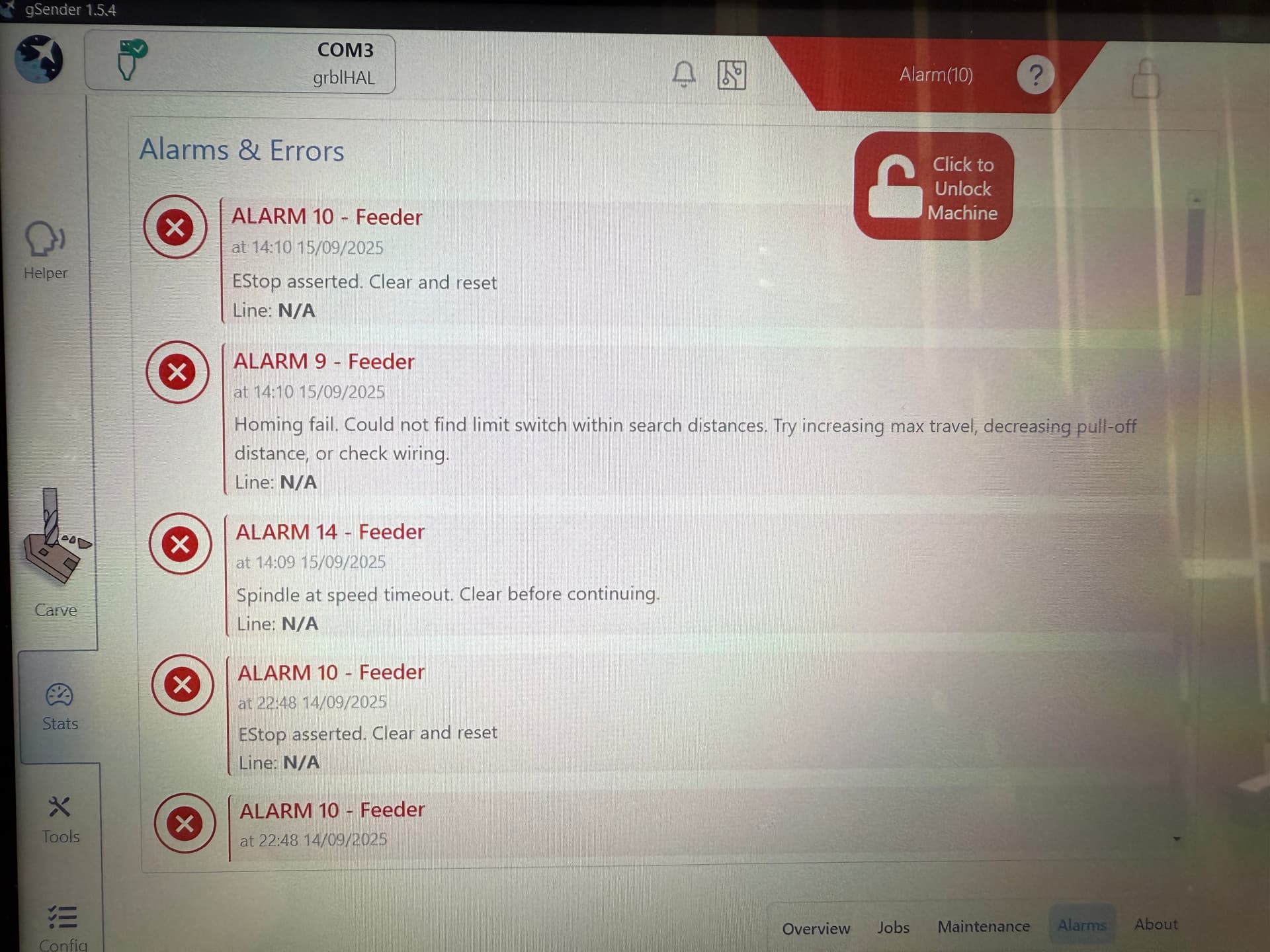
So the Altmill is up and running but I’m running into some error codes and was hoping I could get some help from the community. This is my first machine so I have no clue where to even start fixing these issues. Any help would be immensely appreciated.
First off, when homing I’m getting Alarm 8: homing failure. Pull off travel failed to clear limit. Try increasing pull off setting or check wiring.
Secondly when manually jogging to the extreme ends (left and right) of the x axis as well as the extremes of the y axis I get an Alarm 10: E stop asserted. Clear and reset.
Thirdly I tried surfacing just to see if it would do it despite the errors, I press start and get Alarm 2: soft limit reached.
Fourth, It is slamming into the sides even though the sensors are set up. The troubleshooting manual says to check the $22 homing cycle settings so I will do that tonight. It also says “If the settings are correct, reposition the sensors to be farther out from the endplates”. I’m assuming this means to put them closer to what they’re supposed to be sensing, correct?
I have been advised through the Facebook group to turn off soft limits and hard limits, and to check my pull off distance. I will try that tonight and then reassess. In the mean time any help will be met with tons of gratitude.
Congrats on having the machine at home. Sorry to hear that its not without bumps. Please know that we all have had some of these allthough, when your machine runs for a while without them, they are quickly forgiven and forgotten.
Did you loo, at tne troubleshoot manual provided by Sienci? A lot of answers are to be found there.
Thank You for your response. I was unaware of a troubleshooting document. Thanks for the link. I will reference that to see if I can find any fixes to these issues.
Welcome to the forum. What problems are you having exactly? An issue that has been reported frequently recently had to do with the inductive sensors being improperly set, especially the one for the z-axis.
If you cannot home your Altmill, the sensors is what I would look at first. I’d start with the z sensor. It may be set too far back and is not stopping the mill when homing, hence why errors are being generated.
First, check to see if the sensor is working. Put a metal object in front of it. The tiny LED at the back should light up and gSender should display an error. If it works, the sensor may be set too far back in the plate.
My issues are really well summarized by the OP in this thread. I have an altmill mk2 2x4 with the 80mm 2.2kw sienci spindle option. I’m also using the G computer with the latest updates to the firmware.
At this point I’ve tried troubleshooting for about 12 hours searching in the community forum, reading them common issues doc, watching sienci videos on YouTube and searching the FB group. Initially the machine was hitting hard and soft limits quite hard which would cause an alarm that required cleaning. I believe the sensors are now set correctly. Unfortunately I tried to make the z sensor more exposed (or pushed out further) which resulted in the sensor being crushed by the spindle holder. It’s mangled but does seem to illuminate when triggered by the metal wrench. The errors I’m getting are: 1, 8, 10 and 14. When I try to move the x axis, I’m getting an Alarm 10 and it immediately halts.
@Jahuntle Did you home the machine by pressing the homing button at the top right of gSender. That will move the spindle to the high rear left as it sets the homing limits.
@Jahuntle And if homing is your issue, don’t forget to re-home every time you power on the SLB. Some people leave it on all the time but I power off everything if it won’t be used for an extended period.
Thanks, I’ll start a separate thread. When I returned to it this morning, I clicked the home button and it did travel to the home position but once there these alarms occurred.
I think the homing sequence is z-y-x . If it goes to the rear left corner, your z is probably ok.
Check the inductive sensors to make sure they are not set too far back (but also not too far forward). You do not want them to get hit by the gantries as they approach.
Also check that they all light up when you approach a metal object. Do them one by one. Each time, the LED at the back of the sensor should light up AND gSender should trip an alarm 14. (I just checked mine and they all do that except the right Y inductive sensor - so I’ll have to check that out).
Also check the wiring for them. When I itinually set up the sensors, the LED lit up on one of them but it was still not working. Turns out one of the pins on the Z sensor was bent and not engaging in the connector. Also check the connections on the SLB.
And as mentioned before, verify all the dip switch settings.
I think that sensor is just for squaring the AltMill but I don’t know if it does it automatically or if it’s something the user has to initiate. In any case I’m wondering if the right Y is only powered during that process. Just thought I’d mention that WAG!
I think are right correct. When I attempt to joke it goes to the right rear and triggers the alarm 10. Both y axis sensors are lit up red. I put a metal wrench in front of the x axis and the red light comes on but I’m not getting thr 14 alarm.
My issues are really well summarized by the OP in this thread. I have an altmill mk2 2x4 with the 80mm 2.2kw sienci spindle option. I’m also using the G computer with the latest updates to the firmware.
At this point I’ve tried troubleshooting for about 12 hours searching in the community forum, reading them common issues doc, watching sienci videos on YouTube and searching the FB group. Initially the machine was hitting hard and soft limits quite hard which would cause an alarm that required cleaning. I believe the sensors are now set correctly. Unfortunately I tried to make the z sensor more exposed (or pushed out further) which resulted in the sensor being crushed by the spindle holder. It’s mangled but does seem to illuminate when triggered by the metal wrench. The errors I’m getting are: 1, 8, 10 and 14. When I try to move the x axis, I’m getting an Alarm 10 and it immediately halts.
I think are right correct, it is not completing the homing process. It goes to the right rear and triggers alarm 14. Both y axis sensors are lit up red. I put a metal wrench in front of the x axis and the red light comes on but I’m not getting an alarm.
I also took this picture of the y2 axis sensor so you can see how close it is to the bump stop, possibly too close.
I also noticed that in the motor config, I can jog the y and x but not the z.
 Something’s Up - Sienci Community Forum