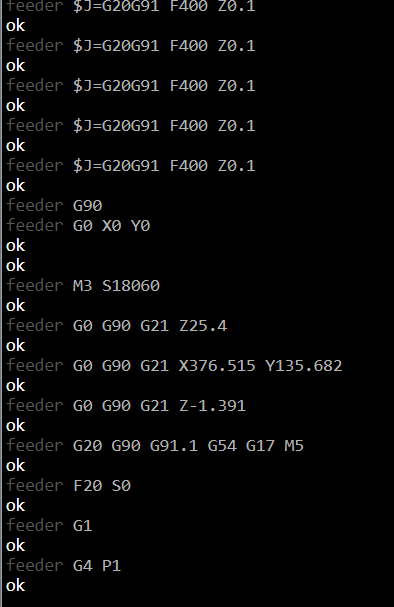
I have had this issue that pops up when the machine has an error during a carve and the machine stops. I clear the faults I verify the origin point and if everything looks good I try to restart the job at a point about 2000 lines prior to the last line it ran. I have in my settings to turn the spindle on upon Program Start and Program Resume. The annoying part is the spindle will spin up and the machine will jog over to the location of the line I told it to start at but the spindle then turns off.
I have tried restarting gsender and restarting the control board and reloading the carve program, along with all 3 at the same time. The spindle always stops shortly after starting from a particular line of code.
The console shows an M5 command is sent to the controller which must be happening every time. That stops the spindle from running. I don’t know if there is a way for that command to be removed from the process of starting from a particular line of your gcode?
Looking into this, start from line adds the parsed spindle modal from the file but that values defaults to M5 (Spindle off). This is what’s causing your issue - the file doesn’t contain the spindle start command, the start event does. We’ll look at not including a spindle modal at all if it’s not a M3/M4 in an upcoming version.
I’m experiencing an issue with gSender 1.4.11 when resuming a job after a pause or restart. My setup includes a GRBL controller and a spindle (M3 S1000).
Issue Description:
When I restart or resume my job (after a feed rate correction), the following happens:
The spindle starts correctly with M3 S1000.
The job resumes and moves to the correct position.
Unexpectedly, an M5 command (spindle off) is executed, even though M5 is NOT in my G-code.
The machine continues moving, but the spindle remains off unless I manually restart it with M3 S1000.
What I’ve Tried:
Verified my G-code: No M5 is present after the tool change.
Checked event handling in gSender: I added M3 S1000 to stop, start, pause, and restart. Still, M5 appears in the console.
Ran $$ to check GRBL settings: $32=0 (not in laser mode). $30/$31 are correctly set.
Tested with another sender (UGS): No unexpected M5, only happens in gSender.
Looked for macros or scripts that might trigger M5, but found nothing.
Question:
Where does this unexpected M5 come from, and how can I prevent gSender from sending it?
Has anyone else encountered this issue? Any insights would be greatly appreciated!
I submitted this issue as an official bug and I received the response below from Kelly Zhu from Sienci Labs.
Thanks for your patience in the matter, one of our engineers Johann was able to replicate the issue and here is his response:
We have replicated the issue and it’s being actively investigated by the team as a potential bug.
To elaborate, gSender’s “Resume from line” feature only respects restarting the spindle when spindle commands (M3/M4 SXXXXX) are included inside the gCode file and will stop the spindle with an M5 when no spindle command is detected in the .nc file. This logic runs after any programmed events gCode which is why the spindle starts up and stops almost immediately.
At this time, there is no workaround for this issue and the only resolution is to include spindle command in your gcode, this can be easily accomplished manually by opening the file in notepad and adding in an M3S18000, or by asking your CAM program to include such a command when exporting the code. We understand that this may not be the workflow that you are looking for. Our software team will work to rectify the issue.
Thank you for bringing this to our attention.
I changed the formatting for this thread but this was as of January 2nd, 2025. Since the latest version of gSender is from December I am hopeful this will be resolved in the next release of gSender.
Hello everyone,
this is an extremely quick answer, which has helped me a lot. Thank you to everyone involved.
I am very curious to see if the next version addresses the problem.