ATC with one 6 tool rack

I am working on setting up a second CNC dedicated to smaller projects and have limited space. I really like the look of the ALT mill 2x4, I do however need an ATC for this project its half the point of getting a new CNC.

That said I also need to have the workspace available to hit minimum 24x24 work area. From my understanding you loose about 5 inches off the Y Axis.

So my question are two fold.

  1. If I use just 6 instead of 12 tools is there any reason I cant hit the full 25 inch depth, I will modify the rack if I have to, cut it down to 5 or something, I have confidence I could if necessary figure that out.

  2. Has anyone adapted the rack to live on the side along the Y axis instead of across the back of the machine. I realize this may require removing or modifying the dust shoe but other then that is there a practical reason this cannot be done?

While I am here a couple other side questions.

  1. Does the Z axis stepper have a break? My Shapeoko used to drop the tool into the bed if an estop was hit I cant have that happen. Fixed that with a gas strut.

  2. How does zeroing the tool work, is there a touch off location to set the bit height like on a shapeoko? I saw the AutoZero Touch Plate as an accessory but that appears to be for setting the zero of a piece of material not the endmill specifically. I assume with an ATC the machine would have to be able to zero the bit when it pick a new tool.

Thanks! Hoping to place an order if I can verify the machine will do what I need. I am not afraid to put in a little work to get it there, I have been tinkering and scratch building various machines for a long time.
Ah I can answer 4 myself, I missed this before in the video, I see it has a a button just like the shapeoko.

UPDATE 1
The forum won’t let me respond so I will edit this post I guess

Thanks watching some videos I missed before asking questions. I did email there support but all I received was a canned answer. I can try a phone call

It appears there is a lot of automation in the ATC it may be harder to mod it if I had too then I thought. I had assumed it was a passive thing where you teach the tools on the rack. So far I haven’t found explicitly what they are doing but the video I was watch it seems they have prepacked code that can automatically detect the racks and tools and possibly auto locate the tools as well.

That said I still haven’t found anything the states how they are sectioning off the work volume they may just draw a hard line in the sand if any tool rack is detected across the whole back.

**UPDATE 2
**
Forum still will not allow me to make a new post so this is what I have so far.

For anyone Interested in the question of available space with an ATC tool rack this is what I have so far.

I asked
If you use a 6 tool rack are you able to use the full area of half of the bed? Or is there any way the rack could be installed along the Y axis so you only loose area on ones side?

Response
Thanks for your question! On the 2×4 AltMill, the 6‑tool rack is designed to sit at the back of the machine along the Y-axis. It cannot be installed along the side to only affect one half of the bed. The design doesn’t allow for that.

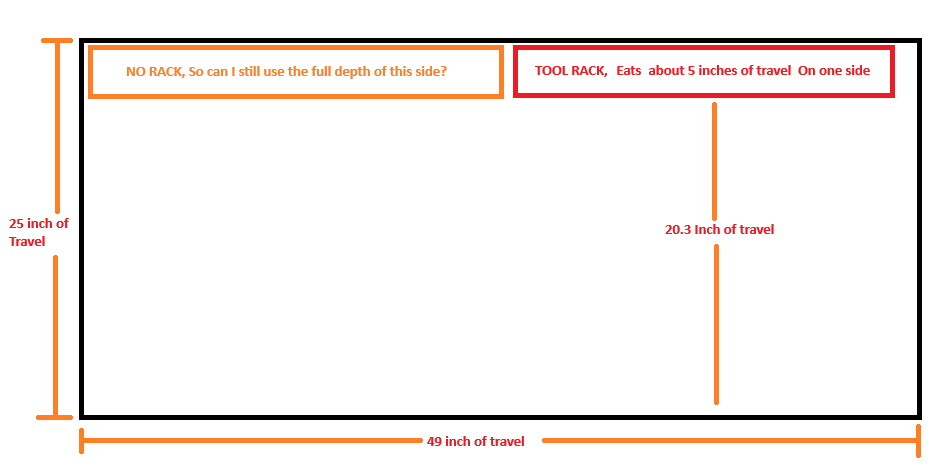
With the 6‑tool rack installed, the usable Y-axis travel is reduced by about 5.3″ at the back, leaving 20.3″ of travel. The width of the bed is unaffected, so you still have full X-axis travel.

The good news is that the tool rack is detachable, so you can remove it whenever you need the full Y-axis cutting area.

You can see more details about ATC compatibility and travel here: https://resources.sienci.com/view/atc-specifications/#compatibility

Kind Regards
Stephanie from Sienci Labs.

I am unsure why other then an over abundance of caution why you would loose the ability to use the 5 inches of workable space on the side without a tool rack. The rack appears to be to sit with 6 tools on the left and 6 tools on the right, and each half rack appears to be independently removable for what I can see. I tried to re-ask that question with a drawing as it seemed to be misunderstood . If they respond will post it.

@Miasmictruth You might want to call Sienci and ask them. I don’t think the ATC has shipped yet so you may not get accurate information from the user community.

I don’t think the ATC is shipping yet. Thisis what Sienci says:
BATCH 1 PRE-ORDERS SOLD OUT. Expected delivery date late February/early March 2026 (orders made before Jan 11, 2026.)
***BATCH 2 PRE-ORDER OPEN (orders placed after Jan 11, 2026.) Estimated delivery date May/early June 2026. Watch for social announcements. *******

Having said that, here are my WAG’s
1)no
2)no
3)no (but based on my 4*4 Altmill, this is not an issue unless you have some substantial weight hangin off your z axis)
4)the Sienci store web site shows a tool setter as part of the ATC package although it is not specifically mentioned.

Lastly, you would be better off asking Sienci support since the ATC is not shipping yet.

I have the official answer for question 1 :slight_smile:

I asked:

If I have the ATC rack only on the right side of the machine, can I still use the full depth of the left side of the machine?

The reply:

*Thanks for clarifying your intent. I spoke with the engineer and he says that you can use the area to the left of the tool rack. Hope this helps. *

Kind Regards,
Jason
Customer Support Manager
Sienci Labs

1 Like