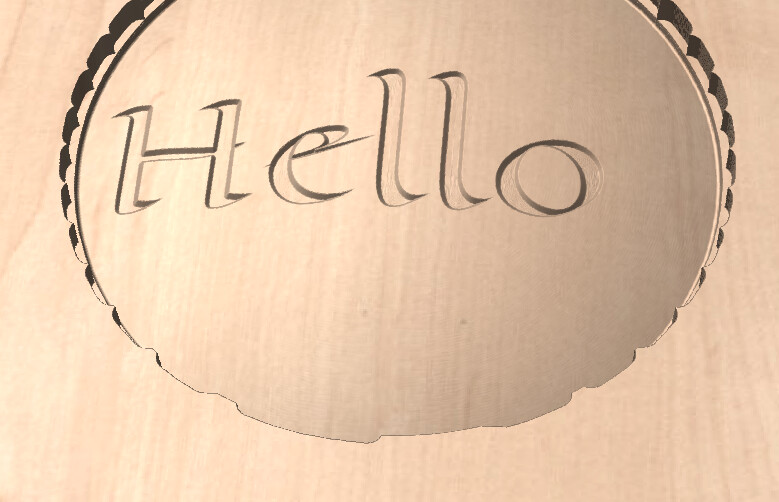
I need to carve some text on a curved surface. This is not curved text on a flat surface.
I used to have a Next Wave Shark HD520 and the software allowed you to have multiple Z settings in your project to allow for different heights. I can figure out how to do it in gsender. Is this what the workspace settings are for.
@tiermanc The advice that @Chucky_ott provided is correct provided that you either created or imported a 3D model into VCarve. How did you create the curved surface that you want to carve into?
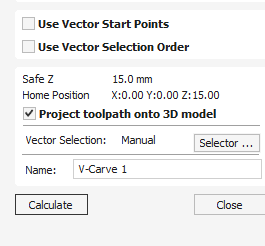
@tiermanc In order for VCarvePro to carve on that curve, it needs to “know” what the curve is. Since you have vcarvepro, you cannot create a 3D model. You may, however, be able to use one of the clipart bowls if the arc of the bowl is the same as the arc of the page holder. If that works, you simply create a toolpath for the “bowl”. You don’t carve it. It’s just there so that vcarve knows the arc of the piece,that you want to carve the text into. That’s what “project onto the 3D model” does.
@tiermanc It’s not too difficult to do. You can also use any 3D modelling application to create a model of your page holder, then import that into vcarvepro.
Edit. Do you have a 2D vector of the profile of the page holder?
@Ninefingers gSender has no way to “know” the shape of the material. It is not included in the gcode that it reads. There are several CAD/CAM applications that can accommodate this, as has been mentioned previously.
I’m curious how the New Wave Shark is able to do an “unlimited zero” that enables them to carve on curved surfaces? Isn’t that something they could add to gSender?
@Ninefingers I believe this is called height mapping or surface mapping, which gSender currently does not do. It has been requested, but mostly for doing circuit boards. If you search on those terms, you’ll get plenty of hits.