I’ve looked through the 1.6.0 release threads, and while I see a lot of ATC discussion, I haven’t found a specific request for unlocking the manual tool table / nicknames for those of us on non-Sienci hardware.
I am a gSender user running a RatRig Rodent with a FluidNC controller. I’ve recently updated to version 1.6.0 to take advantage of the new Tool Table features.
I am using VCarve Desktop (v12.5), which I purchased directly through Sienci Labs. My G-code is generated with correct T-numbers and tool names, such as T12 (BEAST Roughing).
The issue:
The Tool Table and the ability to see or edit “nicknames” seems to be hard-locked to the SLB controller. Since gSender detects my controller as FluidNC/Grbl, the ATC/Tooling widgets remain hidden or “unavailable.” This is frustrating because I am only looking for the manual tool table functionality to keep track of my bits during a job.
I have even tried manually editing the gSender.json file to force toolTableEnabled: true and atcType: "manual", but the UI seems to override or ignore these settings because of the missing “ATC flag” from the firmware.
My request:
Could you please consider unlocking the Manual Tool Table (nicknames and tool list) for all users, regardless of their controller? As a customer using Sienci-provided software (VCarve) and gSender, having that visual overview of my tools during manual tool changes (with my fixed tool sensor) is a huge safety and workflow improvement.
It’s not really a case of just unlocking it for other controller types. The problem is that the tool table is a firmware functionality, that specifically needs to be compiled into grblHAL. The entire component is based around the grblHAL tool table implementation, so fundamentally is not compatible with other firmwares.
I’m not sure how much sense it would make to allow it to be used on other firmwares since the only functionality that would be relevant is nicknames - every other portion of the table would be irrelevant since the information is simply not there via the firmware.
If we were to explore this, it’d need to be as an entirely new functionality. And to be honest, if we were doing that I think I’d rather explore parsing line comments as tool identifiers/tool ids from the file over adding just a nickname functionality for non-grblHAL firmwares.
i’m also using fluidnc, an i don’t have to use the newly integrated too table, i just have my tools marked and numbered.
i also have all the tools i use in fusion, so when i generate a project, the tools are already in the .nc file, i also fixed my post processor so i can see the next tool if i have a project with multiple tool changes in the gsenders tool change prompt
also i figured i can just use the 3d probe to find the corner in XYZ and then start the .nc file, the first tool alway has an M6 , like M6 T21 ( face mill), where the probe is still in the spindle, gsender sends me directly to the tool lenght sensor, i probe the 3d probe on it to determine the lenght and the change to T21, after that is always the next tool and gsender tells me witch one.
I’m not sure if I understand the issue correctly, as gSender is already reading and presenting the tool numbers generated in Vcarve from the gcode file.
What I’m asking for is simply a way to enter automatically or manual, if that is the only way, the text string from the gcode file or another meaning full text next to the Tool number, you already present in the new gSender .
Not having this information means that I will have to write the tool names in an Excel sheet myself, which is a pity now that the information is so nicely presented in the gcode file.
But as I said, I can also live with having to enter the information myself, as long as it is a one-time job for each tool number, e.g. T107 1/4 Radius form tool
Thanks for the technical explanation. I understand that the full Tool Table integration is tied to grblHAL, but I’m hoping you will consider a simpler “bridge” for us non-grblHAL users.
Since gSender already identifies the tool number from the g-code, would it be possible—as a shorter-term solution—to simply allow gSender to display the comment string (the text in parentheses) that follows the T-command?
VCarve and most other CAM software already output the tool name right there. If gSender could just “echo” that text string in the tool change prompt, we wouldn’t need a complex database or firmware integration to know which tool to pick.
Is this “parsing of line comments” something you might implement in the near future, or should I stick to my manual Excel sheet for now?
This actually does also apply to grblHAL users on the Longmill MK2.5.
I also get frustrated with only being presented with a Tool number during Tool changes on my Longmill MK2.5. I have to have a separate list in my shop to identify what those tools are. Don’t forget that there is also the human error factor in that sometimes I meant to identify one tool with a description but got it mixed up with another and wrote the wrong description down on the list. Lastly, there is also the added uncertainty of coming back to an older gcode file and not remembering if it’s version 1 or 2 and not being able to tell which tools it’s going to use in each of the various steps (because changes do happen). I have altered my post processor to now include the tools’ descriptions and I see that Sienci now has their own post processor to do exactly that except that it doesn’t haven any effect on the Longmill .
Not everyone is going to migrate to the Altmill and I believe that Sienci agrees because their development of the Longmill MK3 has a lot of the features/functionality that come from the Altmill.
Please go one step further and either implement the Tool table for the SLB or at least use the descriptions that can be generated in the gCode file and display them in the Tools timeline.
There are actually three of them. The links to them are in Step 1of the ‘ATC Before you begin’ page <here>. Two for Vectric and one for CarveCo.
I’ve attached the first Vectric file here for your convenience.
It’s very similar to the default VCarve post processor called ‘Grbl (mm) (*.gcode)’ except that is has some extra Tool Change (including adding a Tool’s description) and Flood on/off commands. I did a few basic tests and everything seemed to work fine in my (non ATC) system. The only thing that doesn’t work on my system is that the tools’ descriptions from the file are not displayed in either the Tool timeline on the visualizer or in the Tool change wizard screens.
@rblondeau Thanks much for that, Rob. As I don’t have a tool changer and am using gSender 1.4.12, I’ve never looked beyond the post processors for grbl, my laser module and the Vortex. I learned something new.
For absolute clarity, it was never once said this was an AltMill only feature - I said it was a grblHAL firmware feature. Once the SLB firmware gets publicly released, it will contain the tool table compiled in as a feature by default.
That said, I also said we’d look at alternative solutions in this thread.
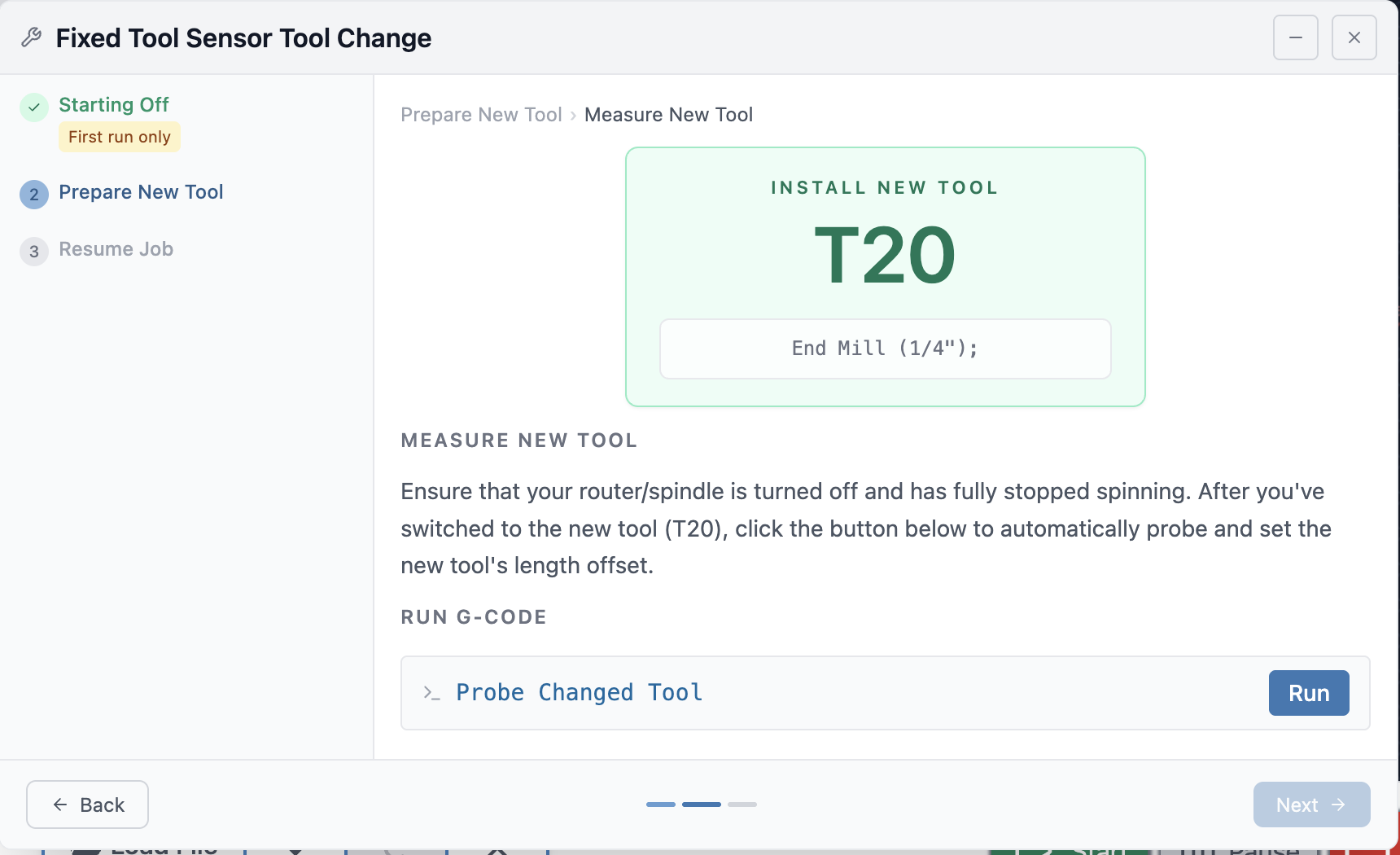
Part of this will be displaying any line comments within the tool change wizard on tool change steps as part of a larger wizard UX improvement.
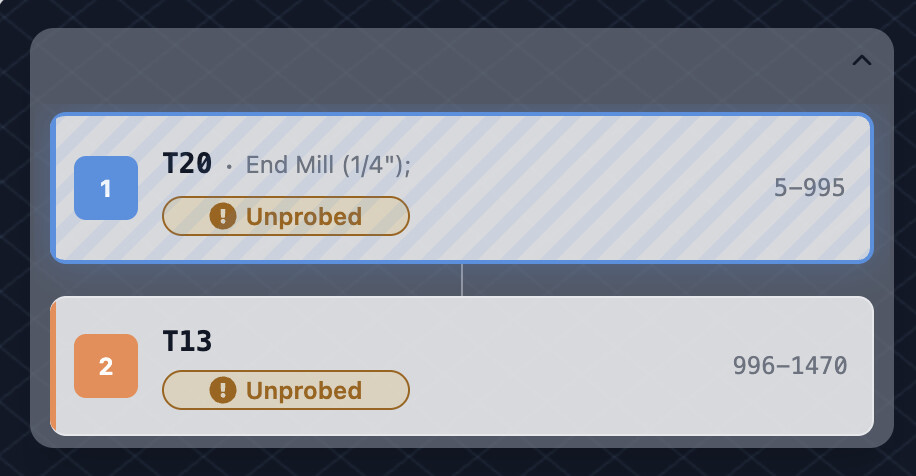
Another part will be showing any comments in the tool timeline if a nickname is not set in the tool table/user is not using grblHAL. As long as the post processor is annotating useful information (like our provided one), it will be shown.
If you want fun then you should get yourself a Tool Length Sensor and switch to grblHAL. Although it is nice to have tool changing simplified by this, where I have found it hugely beneficial is in the reduction of the number of gcode files that I have to save in VCarve and then load into gSender. With grblHAL you can include multiple different tools in one gcode file. I do intricate end grain inlays so I have a lot of gcode files per project.
@rblondeau I have an SLB and have been using grblHal for a very long time. I have no issue creating separate toolpaths for individual tools. I am a hobbyist in no screaming hurry to get my projects done. I also do inlays in end grain pieces, but that has not pushed me to the tool length sensor. I have no quarrel with those who want that feature, though. I guess that I am something of a luddite in this particular context.
I am a bit of a non slb user myself and would like to vote for this word in the nickname contest.
My Anglican language knowledge isn’t up to par to know the meaning of this particular word, and I refuse to use modern tools like dictionaries or tutors to cheat and look smarter than Uncle Bob who invented° Bob’s paradox. I rather just stare at a word and think…
 .
.
 .
.