The plugin system is available for testing as of 1.7.0-Edge-1.
Plugins are a flexible system that lets both us and the community at large develop standalone tools to be used within gSender outside the bounds of the normal release schedule.
While we’d like UX/bug reports to continue to be in main thread/Github/separate threads, It’d be nice to have a consolidated list of any plugins people have made and a list of resources for people to use.
Anything that can be cross-compiled to a web friendly format and run inside an Iframe can be used.
This thread will serve as a place to share any plugins they have developed or are working on. We’ll likely formalize the sharing process at some point in the future, but for now this is a consolidated place.
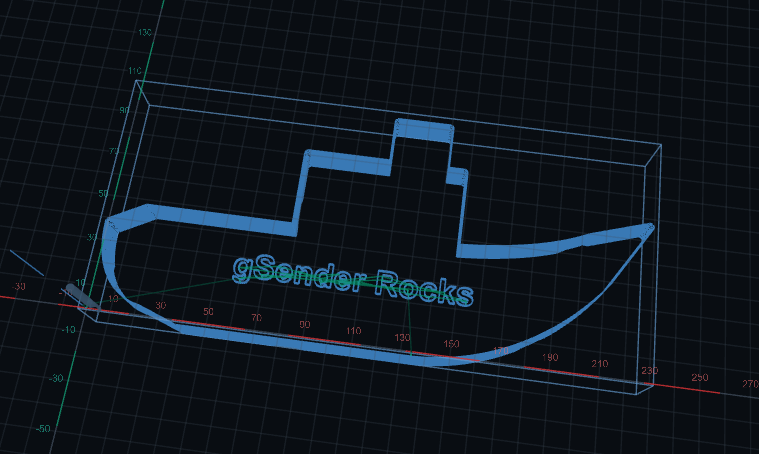
This is a extremely basic demo plugin I made to test out the system implementation. It’s a very basic CAM tool - that lets you easily configure and generate a toolpath for a sign to cut.
After setting up your CNC, there is a large context switch for new users to have to design something to carve, export it, open it and setup to carve. This is meant to close that gap - what if you could easily design something quick and easy to carve at the press of a few buttons within gSender without that context switch.
This is a very good option if you want to test how plugin install works in gSender.
Usage
Most of this should be pretty intuitive, you can type specific values but the default buttons are generally easy enough to use - pick a shape, font, text, carving options, setup and move your tabs and you’re good.
Here’s a guided process of my making by boat - ready to carve in 30 seconds:
A new version of the plugin SDK has been published, expanding some of the functionality available to plugins.
This includes a new Storage API, allowing plugins to save and retrieve settings and values between application and plugin runs.
Plugins can also now subscribe to controller events, getting all messages emitted from the backend to use as they please.
You can now register UI elements on the visualizer as a drawer so plugins can add elements to the Carve page.
You can now query the machine to return and parse all responses to a specific command, or add generic parsers that listen for specific controller messages and react to them.
We’ve loosened restrictions to allow access to other browser APIs like Camera and Microphone.
Hopefully this covers a lot of nice-to-haves when it comes to plugins and allows greater interaction with the application as a whole as well as flexibility when talking to various controllers.
Built my first plugin - SDK and Development setup were straight forward, install process is clean into gSender - Only gap was I had a need to navigate back to the carve screen that is not exposed in the API
Surface Height Map is a community gSender plugin for measuring a work surface at a regular grid of probe points, then applying those readings to a supported G-code toolpath. Calibration is saved independently of any one job, so you can map the material or spoilboard once and use that map to preprocess files whose XY footprint fits inside the mapped area.
The plugin creates and loads a new compensated copy. It does not edit the selected source file. Its first supported workflow targets metric, absolute, linear G-code on GRBL-compatible machines.
Oh dear, here goes my stalling buying a 3d probe I wishlisted when the first request for height mapping were posted in the forum and I vowed to update gsender above 1.2.1 as soon as it would be availeable. Oh bleep, I need to learn how to use the new gsender interface now…
@bakStaaJ Another useful function of this feature would be to export the height map to a STL, without correcting an existing g-code file.
For example, someone on this forum wanted to generate the surface profile of an electric guitar (or bass). Using the probe in the mill would be useful for that.
I made a very simple one - soldered a wire to a small square of copper clad PCB and an alligator clip to the other wire - plugged it into my sensor port.
I added this - the only clunky thing is the plugins operate in a sandbox that does not have access to the file system, so you have to copy and paste the STL into a text editor to get it out of the plugin.