yeah, that’s fair, I didn’t consider that. As a UI developer, I also know how annoying it could be to make those all dynamically scale if there were 3 axes vs 4, so I won’t do that.
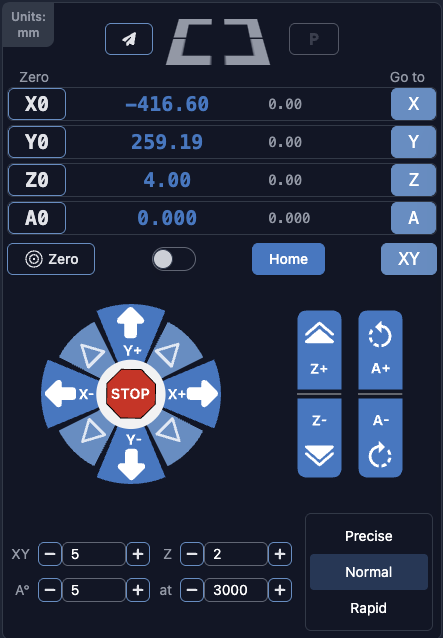
I still do mis-touch the zeroing controls and the goto controls though, and I’m not sure what I would do about that if it were me developing this. As an end user the obvious choice is either “buy a bigger touchscreen” or “get a mouse”, but you guys do sell a whole integrated touchscreen computer for this, so I assume you have a vested interest in making this UI good for touchscreens.
I can see going to a two-touch UI there making things a lot smaller (touch a “Zero” button and a small modal appears over it with large buttons “X”, “Y”, “Z”, and “A”. Similar for goto.). If that were done you could likely narrow the table of machine/workspace coordinates, and put the buttons vertically beside that.
Likely the easier fix for this is making the coordinates part and the jog part into two tabs in the side panel. That would effectively double the space you have.
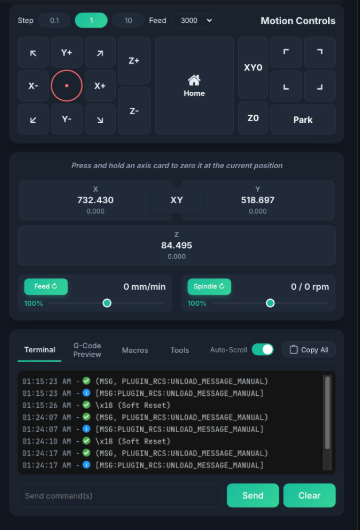
Edit: another interesting take on it, NCSender combines the coordinate display with the zeroing controls, and has a wider button layout, making all of the buttons more square. I havent tested this, but I would expect the squarer buttons to be better for a touch screen. as well, it is a touch-and-hold on a large button for zeroing, which is safer IMO.
@walid_kayhan I made this suggestion before but I’ll make it again.
When you are using the jogging controls, you don’t really need the visualizer. So why not decrease the size of the visualizer and increase the jogging controls size when you’re not running a job.
…or use a tabbed interface, separating the items based on when they are used.
Agreed. I can obviously only speak for myself, but the things I use the visualizer for are:
is the correct program loaded?
which corner did I set as my work origin in fusion?
It would be completely fine (to me) for it to be entirely on a different tab or to be reduced to half or a third of the size it currently is, in order to make inputs into the machine less error prone. I generally have a good idea where the machine is by just watching the machine, so I don’t generally watch the visualizer while the machine is running.
There isn’t a way to just hide the visualizer now, right? I think it would be helpful to have the ability to open a floating resizable jogging control window. The existing window can be left as-is but have ability to open a jogging only window that you can move around and resize as you see fit.
Hey folks, gSender 1.6.3 is now publicly available.
Here’s what’s included in this update
New stuff you can use
Support for the new LongMill MK3 profiles.
A new flashing option for the upcoming SLB-Lite using UF2
A new TLS installation wizard, found in the Accessory Installation tool. It walks you step by step through picking your probe locations and setting up your toolchanging routine.
You can now set a custom feed rate for the final probe movement, instead of it always using the default Rapid speed.
The SD tool now lets you upload several files at once instead of one at a time.
The toolchange wizard now shows a “pending” state while it’s finishing up moves, and it pops up a little closer to when the actual tool change happens, so it feels more natural.
Smoother and more reliable
Changing toolchange or passthrough Config settings now applies right away, no more reconnecting or reloading your file.
Fixed a laser/PWM issue so it works properly without unexpected spindle behavior on grblHAL
Feeder Position variables pos{axis} and mpos{axis} are now always converted to millimeters, even if your machine is set to report in inches (13=1)
Homing status shows up more consistently for machines that are already homed when you connect.
Tool Timeline Probe status now considers non-0 values probed, not just negative values.
Job progress is easier to read with a new background behind the line count.
Made several changes to prevent your Config settings file (sender_rc) from getting corrupted, and if it somehow does, the app will no longer fail to start.
Firmware profile updates
Updated to support the latest grblHAL firmware, including changes to how lasers and PWM work.
Bugs squashed
Fixed the tool timeline showing the the original, non-remapped value when minimized
Fixed a probe dialog bug where connectivity tests would falsely show as passing if enabled when opened
Fixed a display issue in the Config tool when undoing changes to certain values.
Fixed the single-axis homing toggle appearing when homing disabled.
Fixed the park shortcut to worked when the firmware reports homed status
Fixed job progress not updating properly after tool changes pausing progress.
As always, thanks for your continued support and feedback. If you run into anything unexpected, let us know!
Full Changelog
Added LongMill MK3 profiles.
Added flashing path for new SLB-Lite using $UF2.
Added TLS installation wizard to the accessory installation tool.
Added ability to specify feed rate on final probe movements — default 0 continues to use G0; any other value uses G1 Fx where x is the configured value.
SD tool now allows uploading multiple files at the same time.
Added pending toolchange state to the toolchange wizard while already-planned lines finish their motions, and delayed wizard appearance until closer to the actual M6 command.
Updating the toolchange passthrough setting now updates the controller without reconnecting or reloading a file.
Updating the passthrough setting in Config updates that option without requiring a file reload or reconnect.
No longer swaps spindle min/max for grblHAL, so PWM can be used as a laser without issues.
pos{axis} and mpos{axis} feeder variables are now always returned in mm, regardless of report-in-inches ($13) status.
Homing status on connect for already-homed grblHAL devices is now more consistent.
Tool probe status now allows positive values — only 0 is considered unprobed.
Probe status badge in the tool timeline now only shows when using grblHAL with ATC=1 (tc.macro exists).
Added background to job progress line count for readability when the visualizer is disabled.
ATC options tool is now disabled if no SD card is mounted.
Improved reliability of Config Store truncation.
Added various updates to prevent the ConfigStore file (sender_rc) from becoming corrupted.
Corrupted ConfigStore files no longer block application startup.
Various firmware updates for the latest grblHAL core version.
Updated grblHAL profiles for the new firmware release — mostly related to laser/PWM2 behaviors.
Entering laser mode on grblHAL no longer swaps $30 and $31 with the laser equivalents.
Fixed tool timeline not reflecting the remapped tool number after minimizing.
Fixed issue where opening the run probe dialog with connectivity would cause all future connectivity tests to pass immediately.
Fixed issue where restoring an altered EEPROM value in Config without applying wouldn’t update the UI with the correct value in the Config tool.
Fixed toggling single-axis homing on and then off in the on-state not showing the original “go to” buttons.
Fixed backwards logic on the park shortcut, allowing usage when homed.
Fixed job progress not updating correctly after a tool change was handled via one of the wizard strategies.