I know I said I would try to keep quiet but I’m baaaack.
No questions this time, just a vent.
Now that I have control of my spindle via RS485 through the controller I am finishing up all the stuffs I have to do to make this thing sing. Go to use my touch off probe and no joy, it’s already saying it’s touched and ready to cycle.
More homework online and I’m seeing that the lights mean something as they light up. Mine says it’s probing all the time, whether the probe is connected or not - and that this could mean a new controller is necessary?
So far on this thing I’ve had an X axis motor torch itself on clearing e stop, buying an RS485 wire for $26 shipped only to find it didn’t work, and now this.
I’ve got a show in 6 days introducing new products and I have things I need to cut, accurately, and that’s belly up now because if it’s deemed I need to replace the controller to fix this issue, that’s another week and a half of waiting.
I love the machine, the customer service is great and prompt, but they really need to introduce an electrical QC to prevent some of these issues before the stuff leaves the front door. This doesn’t put me off for what the machine is, but these issues sure can make a person wary of what could pop up in the future..
@Crazy8sCommando Does the touch off probe do something that is impossible to do by other means? I know that will not solve the issue, but it may make it possible to meet your show requirements.
I can try, I’m just leery of “cross your fingers” when it comes to expensive tooling. When I’m setting things up I’m getting an alert about “Tool 0 has not been probed” or something like that (we’re in the middle of a thunderstorm right now, I don’t want to risk anything..) so if there’s nothing probed can I still run a job?
I’m not sure if the controller will keep looking for a probe and ignore manual setting zero or not.
Nope, I was thinking of the inverted probe signals as well, I saw the article about flipping various combinations of the probe and the tool setter settings.
Unfortunately no, I’ve opened a trouble ticket with them and sent along video and pictures of the issue and some of the threats I used to coerce the controller to behave.
I tried plugged, unplugged, checked for shorts or cracked connections and nothing changes the inevitable.
It’s just hurry up and wait now
I guess I was just spun up because I’ve seen how happy everyone is with the product while I was researching which machine to get, and now suddenly I’m saddled with a string of unfortunate events lol
@Crazy8sCommando I don’t have your setup, but more often than not, I don’t use the probe/touchplate for setting XY 0. I do use it most times for Z0. I never have an issue doing it this way.
I appreciate that this does not solve your longer term problem. I was merely suggesting a way in which you can make your commitments.
Not being used to the controller (and being exceedingly frustrated lol) I wasn’t sure if the alert about the tool not probing was bricking the ability to use the machine. I can still move forward, just much slower.
I had this exact same thing when I replaced my router with the spindle. It turns out that I had the wires from my touch plate reversed. When I was using the router it wasn’t a problem but because the spindle is grounded to the control board, attaching the magnet to the spindle was the same as touching the wires together. I reversed the touch plate’s wires where they connected to the control board and the touch plate started working fine again. Sienci’s support spoke to one of their technicians and identified my issue right away.
My problem is a little bit different, it doesn’t matter if I have the probe plugged in or not - it’s still detecting a touch when I start the probe cycle and the white light on the board comes on the moment I unlock the machine from e-stop.
To make things even more exciting, I received a replacement controller today because apparently it’s a board issue..Same problem.
So now I have 2 controllers to send back to them with the same “touching on probe start, alarm 4, doesn’t matter if you have a probe hooked up or not” white light on the board.
Apparently I have seriously luck when it comes to this machine.
This sounds pretty weird. One faulty unit, possible, two faulty units same problem, not impossible but it does raise a brow. Could you, before sending things backs (do you need to send back faulty units? I have not heared nor believe sienci having a dedicated repair service. I think you can keep, dispose or send it to someone whom we are nkt going to identify as me blabla bla.)
Anyhooo, just out of bed, I am not able to focus or stay on topic in this state so I need to get to what i was trying to say soon or I will go on for ever starting with Hi and ending up explaining when a glass is half full and when half empty and that it has nothing to do with mind set. Dammit, I went there already didnt I?
Quick! Could you unplug everything from your slb besideds power supply and maybe the estop and see if the probe light is still on?
Sorry for your problems and having to read trough my justoutofbed post. I truely hope the slb problem can be solved soon and you get to the happy chipmunk part of the equation.
@Crazy8sCommando On the Facebook page, Adam Filipowicz (user @MrExo3D on this forum) is reporting the same thing. I wonder if this could be firmware related? I would be interested to know when Adam started getting this error. Before or after updating the firmware. Maybe he’ll chime in now that he has been tagged on this post.
@Crazy8sCommando I am facing the same issue you are with the touch plate and have also received a replacement SLB-EXT board with the exact same result on the new board.
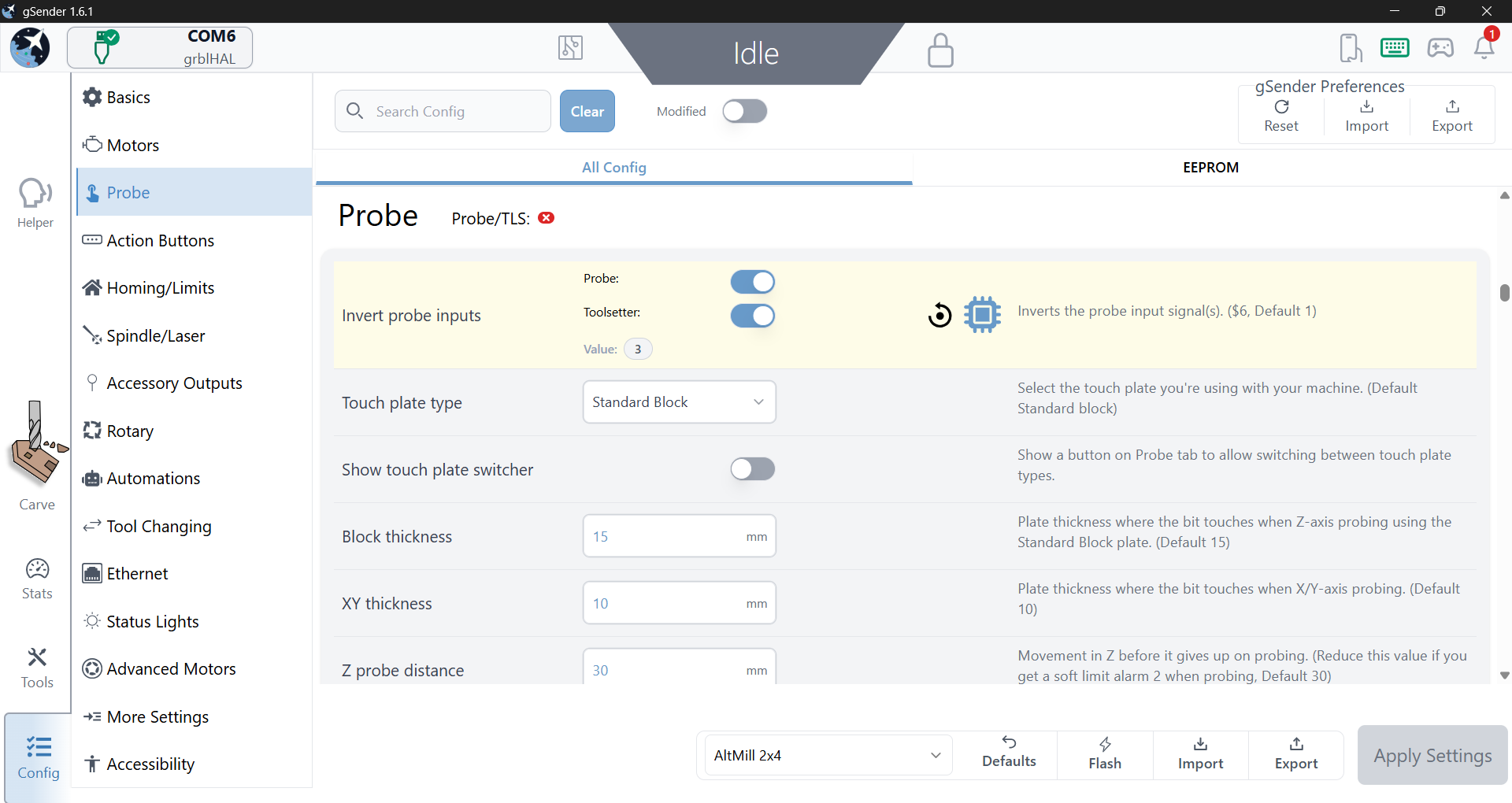
I did find a work around by setting the Invert probe setting to 3 by enabling both Probe and Toolsetter to enabled. The probing now works without alarm but I am not required to touch off the bit before starting the probe cycle. Not perfect but it works. I did share that feedback with Sienci Labs support.
I am wondering if this is a bad batch of boards or bad firmware like @Chucky_ott suggested.
I did play around with those settings while I consulted a shaman to help release me from whatever curse I am facing. (And sorry Eddie, I asked about having to return the controller and they said yes - so this round they’re getting a 2fer because they can have both of my controllers at this point.)
While I was not able to get an xy probe going, I did the same as you and turned both settings on and got the Z probe function to cycle. It’s still limiting my ability to run parts though since I have radiused corners I need to machine from. Craft market season is ramping up around here (Oregon) so this is really putting a hitch in my plans to attend.. If I can’t make products it’s not worth a $180 slot fee.
I’m hoping it is a simple fix. Sorry about your problems as well, in a way I’m glad it’s not something my dumb is doing to cause it.
It’s 6am, been up since 4 chomping at the bit to give sienci a call. .
Oh, and to add insult to the injury - my rapidchange atc is showing up today.
Thanks for the update. We were informed yesterday that there is currently a bug in the latest version of gSender affecting the probe function, so there may not actually be an issue with the controller itself.
This bug is expected to be addressed in gSender 1.6.2. You can also go back to version 1.5.7 to get everything to work correctly.
Lol yep - I got my coffee, sat down and got ready to (gently) rip into a support person and got that same email!
Fingers crossed it works!
Edit: I’m communicating with the tech support guy that’s been putting up with m…I mean, helping me out and he says that 1.6.2 might be released next week
To clarify, this is not a gSender issue. It’s a firmware issue. You need to reconfigure your EEPROM value for $6 to be 3 (both toolsetter and probe enabled).
Reverting versions will not fix it - this is a issue with the new firmware being shipped out that will be fixed in the next firmware update (not gSender).
Either type $6=3 in the console, or manually enable both options in Config:


 luck when it comes to this machine.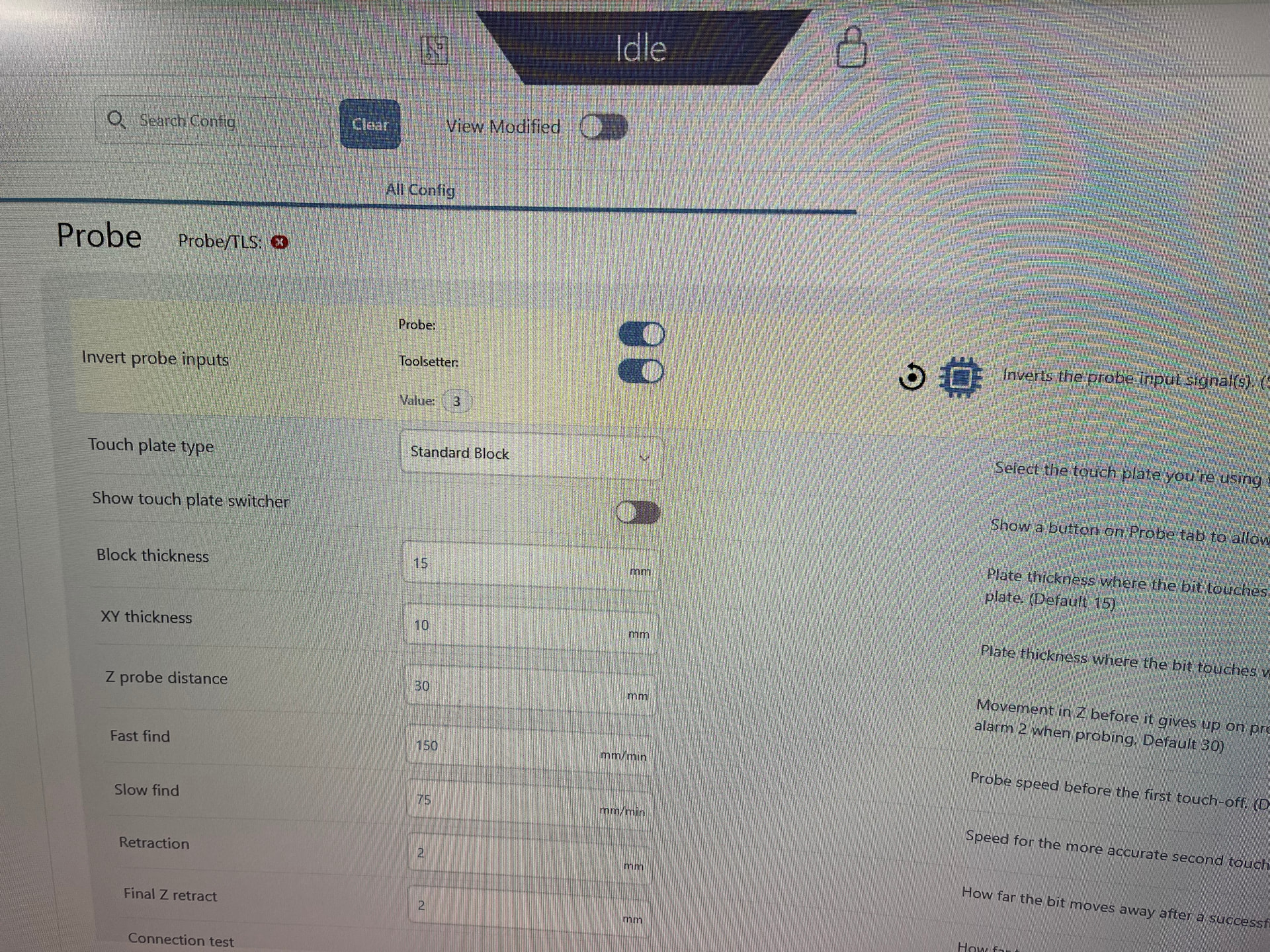
 is doing to cause it.