I’m looking to add a laser to my Altmill and I don’t know what I would need. I am looking at the laser tree k20pro. Do I need to get the control board and other accessories?
Thanks for all the help.
I’m looking to add a laser to my Altmill and I don’t know what I would need. I am looking at the laser tree k20pro. Do I need to get the control board and other accessories?
Thanks for all the help.
@Edward-Bigham From what I can read on their website, from my personal experience and from the experience of others here, I would say that you need to inlude their external power supply with your order.
I don’t have the Altmill with the SLB-EXT. I have a Long Mill with the SLB, and I need the external power supply for my laser module.
Maybe your SLB-EXT can power the laser. I doubt it but I can’t be sure.
If no one here with an Altmill can help, contact Sienci.
You will need the external power supply. I believe it comes with the k20 pro, I don’t remember ordering as an extra but that was a year or two ago.
I was wondering if it needs its own board or will it work with just the slb ext?
@Edward-Bigham I believe that we may be talking at cross purposes. That laser comes with the control board that talks to the pwm on the SLB EXT. That is not the power supply. In addition to that, they sell a power supply. That simply takes mains power and converts it to the DC that the control board and laser need.
Thanks. That’s what I was wondering. It looks like they sell just the laser and then you have to upgrade for the board and power cables
@Edward-Bigham You could be correct. Their website is not clear. The packing list for the laser includes the driver adaptor, a power supply, the mounting plate, etc. Then, in the frequently bought together window, they seem to say that the board and the power supply are not included.
It strikes me as being misleading at best, dishonest at worst.
If I were you, I would call them to see exactly what is included
Hence the questions about what I would need to purchase. Thank you for your help.
Interested in this upgrade as well. Following!
I went back to double check my order for the Laser Tree K20 pro. I ordered the laser, air pump for the air assist, and an extra lens protector for the laser, nothing else. I received everything I needed to get the laser up and running. I also have the Sienci labs lazer that they used to sell. I do mostly engravings and the one thing about the laser tree unit that I sometimes have issues with is the short focal length above the surface of the material being engraved. I sometimes carve a frame into a piece of material then engrave inside the frame. If the frame is deeper that the focal depth I can’t use the laser tree and must use the sienci laser with its interchangeable lenes.
I received an email last night from Laser Tree saying that “Yes” the LT-K20-Pro Packing List shown on their web page does “include all items pictured”.
Does that mean you have actually been able to get Laser Tree K20 to work with SLB? I have perused volumes of material and can’t figure out which one of the pins on the SLB laser connector is PWM/TTY and which one is ground. I’ve tried both and gSender can’t test it 
@JimBob9x Assuming that the Lasertree unit connects to the PWM on the SLB as many other laser modules do, the tech manual for the SLB indicates which pins are which.
Are you looking for something else?
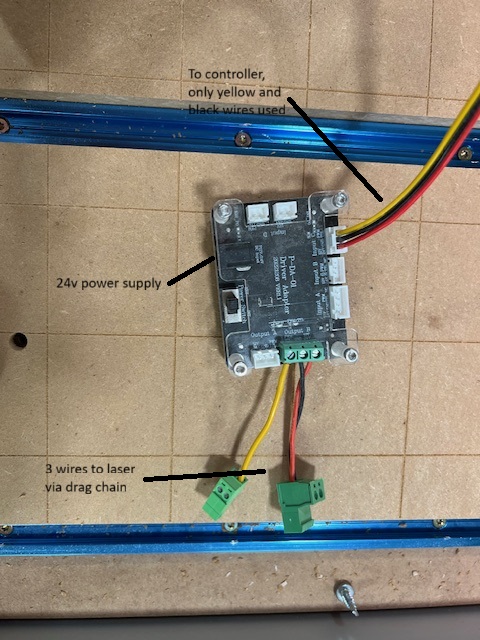
I have used it many times with my old SLB, I upgraded recently to the SLB-EXT and have not used it since that upgrade but am sure it will work. How can I help you getting yours functional? Maybe take a picture of my wiring setup?
I just got my k20 pro hooked up on an LB. But I’m having issues that the laser comes on but doesn’t go off. Pic of someone’s functioning setup would go a long way
@Edward-Bigham What are your $30, $31 and $32 settings?
I don’t have a laser. I’m looking to get one. I think your question is for someone else.
@TechMonkeyMatt What are your $30, $31 and $32 settings?
@Edward-Bigham Sorry about that. Tks for letting me know.