LaserTree K60 problems

I’ve just installed LaserTree K60 on my AltMill, followed all videos and instructions. The laser works.

I have a few problems:

  1. Spindle/Laser selection dropdown shows only default spindle. If I click on it it shows “No Options”. Default spindle is set to H-100 (2.2. kw from SL), spindle 1 to SLB_LASER. I can set default to SLB_LASER and it will work, but switching with hard reset every time is, obviously, a no-go. Tried different combinations of default spindle and spindle 1,2, set it to different things. Sometimes briefly it would show the dropdown, but after restart it goes to default spindle only again.
  2. After using laser spindle does not work. It shows “spindle on”, but it does not turn. I saw that there was a bug in firmware 6 months ago. Does anybody know if it was fixed?
  3. When I switch SLB-EXT off with the switch the laser starts to fire in pulses like every half a second! I switch SLB it on and it stops. It looks like even when the board is switched off there still some current leaking to the K60 adapter board and it fires the laser. Very scary and dangerous.

Does anybody have any ideas how to fix that?

Thanks

Are you using the latest firmware from 20260525? I thought I recall an issue with laser in the previous version.

No, even though I’ve got the machine just a couple months ago it came with 20230917 firmware. Do I need to flush it with the latest one?

BTW the issue with the laser firing by itself seems to be related to LaserTree. If the adapter board is disconnected the laser fires. I briefly checked SLB-EXT laser output with oscilloscope; it seems to be normal and there is no output when board is switched off.

It is likely not be related then but anyone trying to help diagnose the issue would likely want the latest firmware flashed at least to rule that out.

@novos40 FWIW, I have the lasertree 20W v2. I believe that it is a well made unit, but I had firing issues with it early on. Unfortunately, I bought it from amazon and didn’t get to test it until the return period was over. I went back and forth for weeks with lasertree support. I will say that they were responsive. However, all they ever did was ask me to conduct more and more tests. These tests required me to have an oscilloscope and a volt meter, and be willing to make test wires. I have the volt meter and would have been willing to make test leads,but it was clear to me that their tech demands would never end. So, I told them that they had achieved what I believed was their objective. I gave up.
I got help from another member here, who is an electrical engineer and who had helped me in the past. With is help, I got mine to work.
My only advice is to return it if you can. Your problem is not the same as mine, so my solution - which I seem to have finally found - will not solve your issue.
I’m sorry that I cannot be of any help.

I was able to solve most of my problems, but not all

Spindle/Laser selection problems were solved by gSender and firmware upgrades to the latest versions (thanks SL for support)

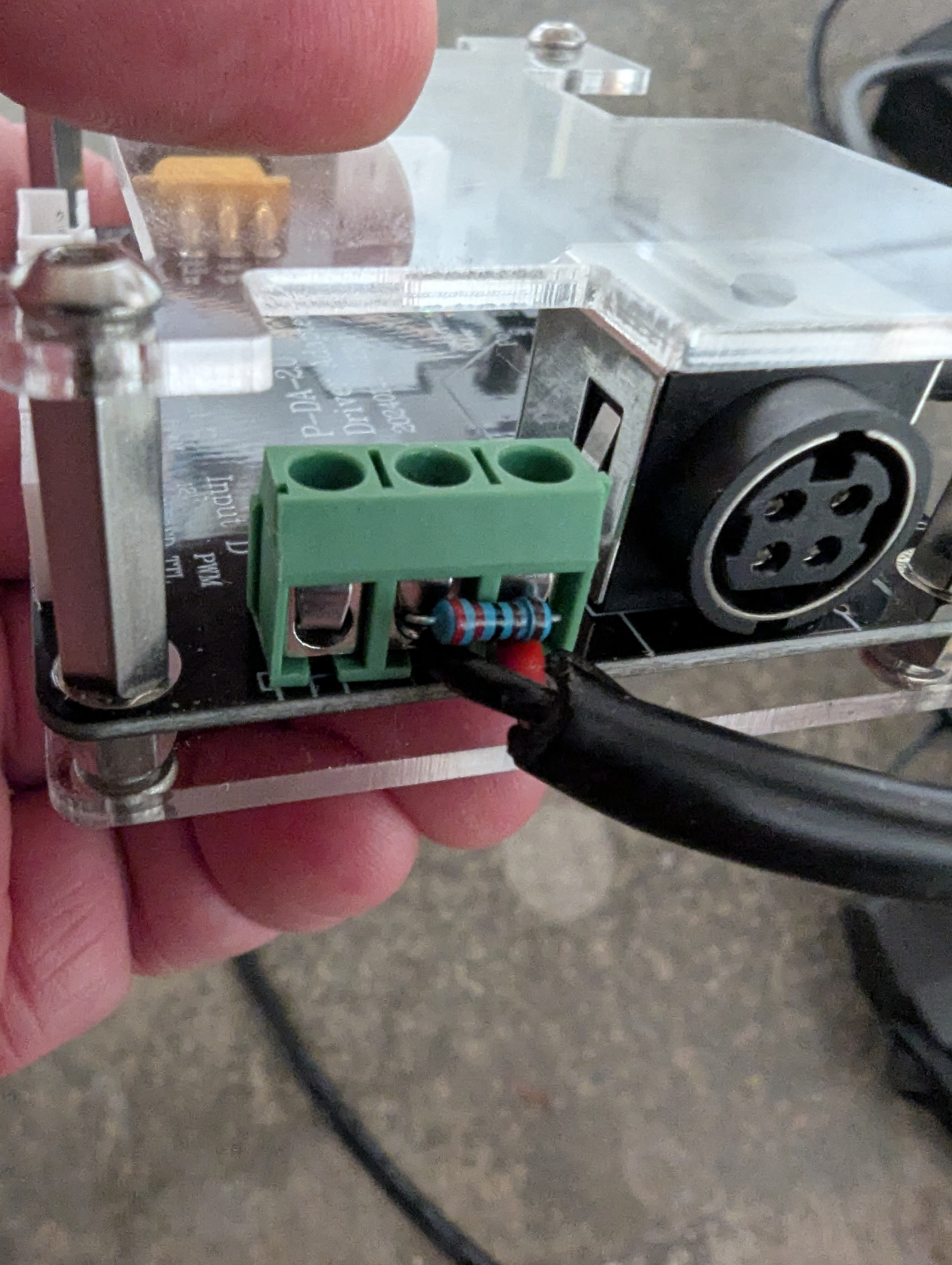
Laser firing by itself was solved by adding 2.2 kOhm pulldown resistor at the adapter board input (see attached jpeg)

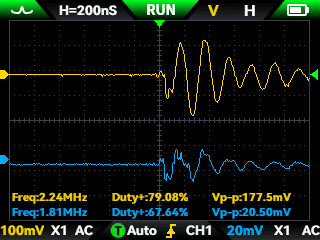
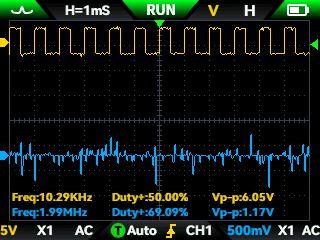
If anybody is interested, I used oscilloscope to check the signals (see attached bmp files)

  • 10.bmp and 15 bmp when board is disconnected
  • 13 and 14 are PWM off/on without pull-down resistor
  • 15 disconnected board with pull-down resistor
  • 16 PWM on with resistor

Yellow line is PWM and blue is 24v, both relative to GND

As you can see the main problem is very low quality of 24v power. Lots of noise. Resistor improved things significantly, but not completely. I could add some capacitors to further suppress the noise, but I don’t have time to experiment with different capacitance values. I’ll just add a full blown DC EMI filter and hopefully be done with it.

Laser Tree is indeed responsive (takes a day or two to get a response) and trying to help, but you need to check their responses for correctness. They suggested to add 100 mkF capacitor between GND and PWM which is way too much. In the next email they apologized for mistake as they meant 100 nF which makes much more sense. I’ll probably add the capacitor too. Hopefully it will solve the remaining problem of red cross flashing randomly. As they explained the red cross and laser are mutually exclusive so red cross should be on when laser is off and vise versa. I guess the reduced noise is not enough to fire the laser, but still enough to make red cross blink.

So the laser itself seem to be well built (still need to try it out and cut something), but power brick is of very low quality and there is no noise filtration. The PWM signal from SLB seems to be good.

I’ll update whether DC filter will solve the problem for good.

10.bmp (150.1 KB)

14.bmp (150.1 KB)

13.bmp (150.1 KB)

15.bmp (150.1 KB)

16.bmp (150.1 KB)

@novos40 Thanks much for this. I’ll be watching to see your results when you put the DC filter on. Mine is still intermittently good, so I can use all your results to improve it, I’m sure.

Everything is working now

TL;DR All problems were solved with shielded cable and 1mkF capacitor between GND and 24v wires

I was finally able to solve all my problems now. I did further investigate with oscilloscope and tried to test different system in isolation to reduce number of variables. Here are the results:

  • The power brick is actually OK. The noise I was observing was coming from step motors. The clue was that the interference mostly started after you use step motors in some way, e.g. move machine or use spindle. I figured that after machine comes to stop there is still some signal to hold motors in place and not to allow any unexpected movements. You can check whether you can move the spindle, for example, by hand when switched off and switched on. You can’t move when power in on due to holding voltage on the motors. It’s still a mystery why the noise absorbed mostly by 24v wire and much less by PWM wire. Maybe it’s just more visible on 24v since it’s a steady signal and PWM rectangular signal contains virtually all frequencies. Maybe it [also] depends on how AltMill’s motor cables are constructed and whether they are shielded or not
  • Grounding will depend on how you mount laser module to the machine. K60 has true ground meaning that ground wire is directly connected to laser aluminum enclosure. If your mount is conductive as mine, you will connect GND to the machine itself. That is, there will be no electrical resistance between GND and any part of the AltMill. SLB-EXT however does not connect its GND to the machine. It does connect to the ground wire in your power outlet connector. Thus when laser is mounted, the machine body will be connected to the ground wire via laser enclosure and when laser is removed, it will not. I guess for the AltMill itself it does not matter, but having a big chunk of metal as a ground is usually good for high frequency noise absorption. If you mount your laser on a non-conductive mount (e.g. on plywood or plastic adapter) your situation will likely be different and you may see different noise levels

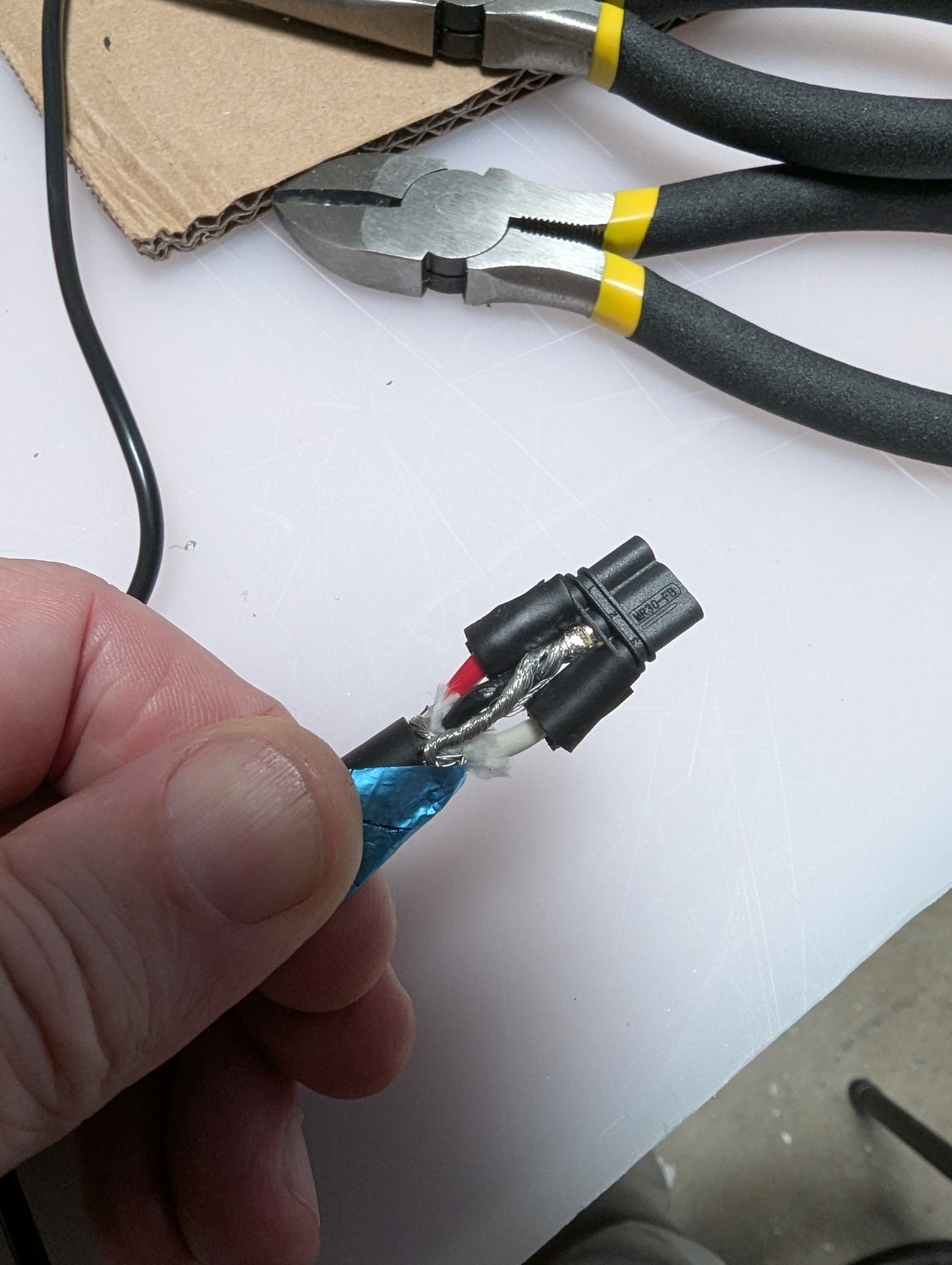
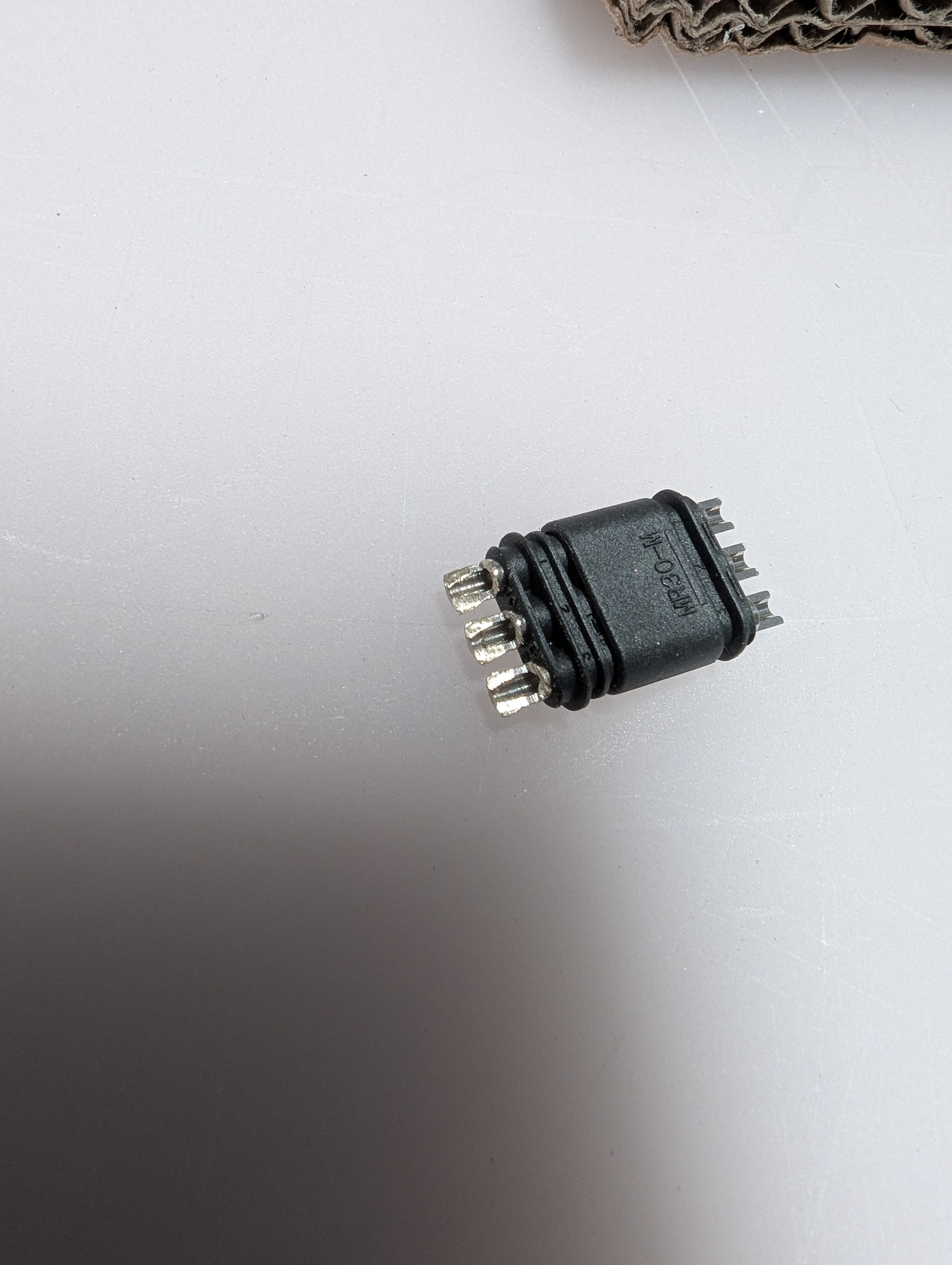
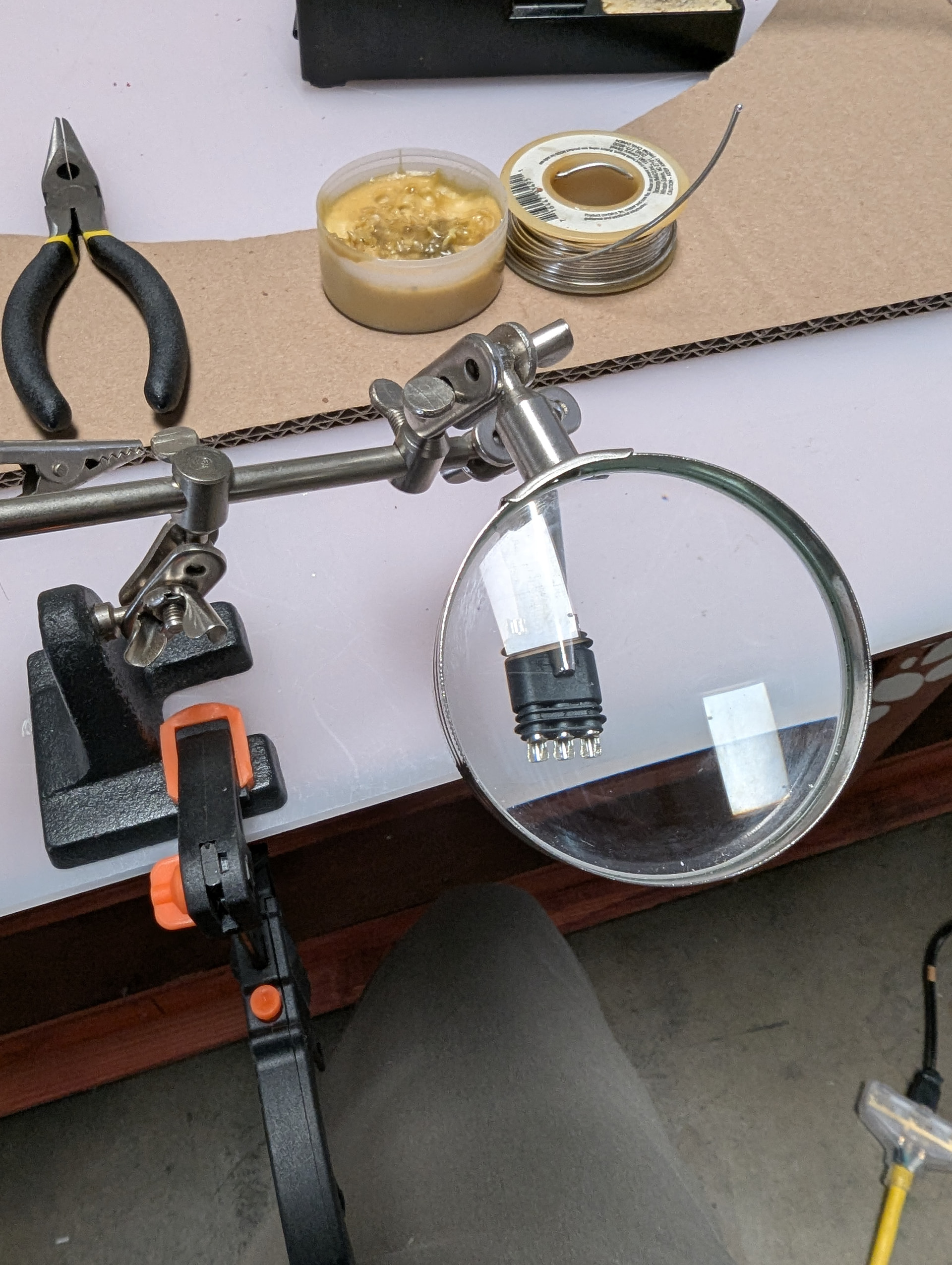
Now about the cable. K60 power is rated to 10Amp so given that cable length must be at least 6 meters I’ve decided to go with 16 AWG 3 conductor double shielded cable (https://www.amazon.com/dp/B0CR19VC9J?ref=fed_asin_title). MR30 connectors (https://www.amazon.com/dp/B0GJSBW33S?ref=ppx_yo2ov_dt_b_fed_asin_title) are recommended to use with 18 AWG wires (which are rated for less than 10A) so soldering connectors was a challenge. The connector is rather small so you’ll need some “third hand” to hold it while you manipulate the cable and soldering iron (see pictures). I recommend to partially file the metal so it’s more flat and makes soldering easier. I had to crank my 100W soldering iron up to 400 C so it could quickly heat up the solder without destroying the connector. I recommend to put some blobs of solder on both wire and connector and then quickly heat it up. It does not produce the soldering quality you’d normally after as the solder does not envelope the entire connection, but it does produce reliable result. You’ll have only one try with each wire as trying to unsolder it will require to heat up the entire metal part of the connector and it will likely ruin it. I did ruin a couple of connectors until I’ve figured this out. See the pictures.

I’ve soldered the shield to the GND on both ends of the cable which is a normal practice when dealing with high frequency noise. Soldering at one end usually used for lower frequency noise. When I’ve tested the cable there were still some small noise visible on oscilloscope. It would probably be OK to ignore that, but I’ve decided not to take any chances and also soldered 1mkF capacitor between GND and 24v wires as part of the cable. I did not want to modify neither laser module nor the adapter board.

I recommend to spread out the copper threads of the GND wire and shield threads, mesh them together and tightly wind them up together before putting solder on it. If you wind them up separately then they will likely to separate when you try to solder them to the MR30 and you’ll ruin the connector trying to fix that.

30 feet of cable is a rather too long, but I’ve used the full length so I’ll have options for how and where to arrange laser power and adapter board under or on the side of the machine later on.

Cable between SLB and adapter is easy. You’ll need connector for the SLB (https://www.amazon.com/dp/B0GJY9H6DC?ref=ppx_yo2ov_dt_b_fed_asin_title), some length of 2 conductor cable (https://www.amazon.com/dp/B0BJ63YQMT?ref=ppx_yo2ov_dt_b_fed_asin_title) and simply screw everything together. No soldering required unless you want to solder 2.2kOhm pull down resistor and 100nF capacitor to the cable. I’m not sure if resistor and capacitor are still needed, but decided to keep them just in case.

Now laser works just fine, no flashing no blinking of red cross, no problems, at least for now :-).

Hope this helps. I’ll describe my mounting plate in another post: https://forum.sienci.com/t/lasertree-k60-mounting-plate-design/26949

P.S. I did try to use DC filter (https://www.amazon.com/dp/B0B9KQW12W?ref=fed_asin_title). It actually made the problem worse. Laser was constantly firing. The magnetic interference created by the filter’s coils was so strong that PWM signal was completely distorted even it was bypassing the filter, just by proximity. I guess the filter would require serious magnetic shielding in order it to work.
@novos40 Thanks very much for this. I’ll need to read it a few more times before I actually implement your solution.
One thing that I can add is that on the official Lasertree Facebook page, I went back and forth with a guy who, when I told him what my CNC controller is - the sienci SLB - he told me that I don’t need the Lasertree interface board at all. In fact, it can be the source of issues such as the ones that I am having. I have not taken it out of the loop yet to test that out, though.

That might be true if your laser is of low power variety. In this case, I guess, you can use the power provided by SLB if it’s sufficient to run your laser. I have K60 which can take up to 10A of current to run. I did not check the spec, but I doubt that SLB can provide that kind of current. Even if it can it would probably be quite loaded which, in turn, can lead to overheating of SLB. I don’t want to risk it. Thus I use external power supply and LaserTree adapter board with switch set for external power.

Besides, it appeared that the long control cable is the source of noise, certainly not the SLB nor the adapter board. It works much better with the short cable provided by LaserTree. Also I still like to have pulldown resistor to prevent accidental laser firing in case of disconnect or SLB switch off. I’m going to suggest to LaserTree to add it to their design as it’s outright dangerous when 60W laser fires by itself when you decide to power cycle SLB.

@novos40 Good points. I need to study what the facebook guy said, but I believe he was keeping the separate power supply, but using the pwm from the SLB directly to the laser module.

@novos40 In all your research and trials, which “on” command have you settled on in your post processor, M3 or M4? I have received conflicting advice between Lightburn help and the Lasertree help. In fact, the Lasertree help seemed to go back and forth, seemingly not knowing the effect of each of them.

I’m just starting with lasers so I’m hardly an expert, but my understanding is the following:

  • M3 starts laser in constant power mode so it’s suitable for cutting or dot-based engraving (i.e. dithering)
  • M4 allows variable laser power so it’s more suited for gray scale engravings with different levels of black

You would need variable power when machine accelerates/decelerates while laser is on to maintain the same level of laser energy delivered to the surface of material. If you’re cutting then it does not matter al long as it’s enough to go through. For engraving it matters if the level of black you’re getting depends on that energy (which it may not BTW). I guess depth of engraving will almost certainly depend on delivered energy.

So I guess it depends on how software/firmware interpret these commands and whether it can calculate appropriate power changes while machine is moving. Laser itself only gets PWM signal so it should not care how the signal was generated.

I’m getting the idea that you should always test any new material first to figure out the optimal settings anyway. M3/M4 selection can be a part of this testing to see if it matters. Again, if the only thing you do are dots and cuts then you should see no difference. For continuous application it may matter if machine changes speeds while laser is working.

A good explanation is here: https://github.com/gnea/grbl/wiki/Grbl-v1.1-Laser-Mode

1 Like