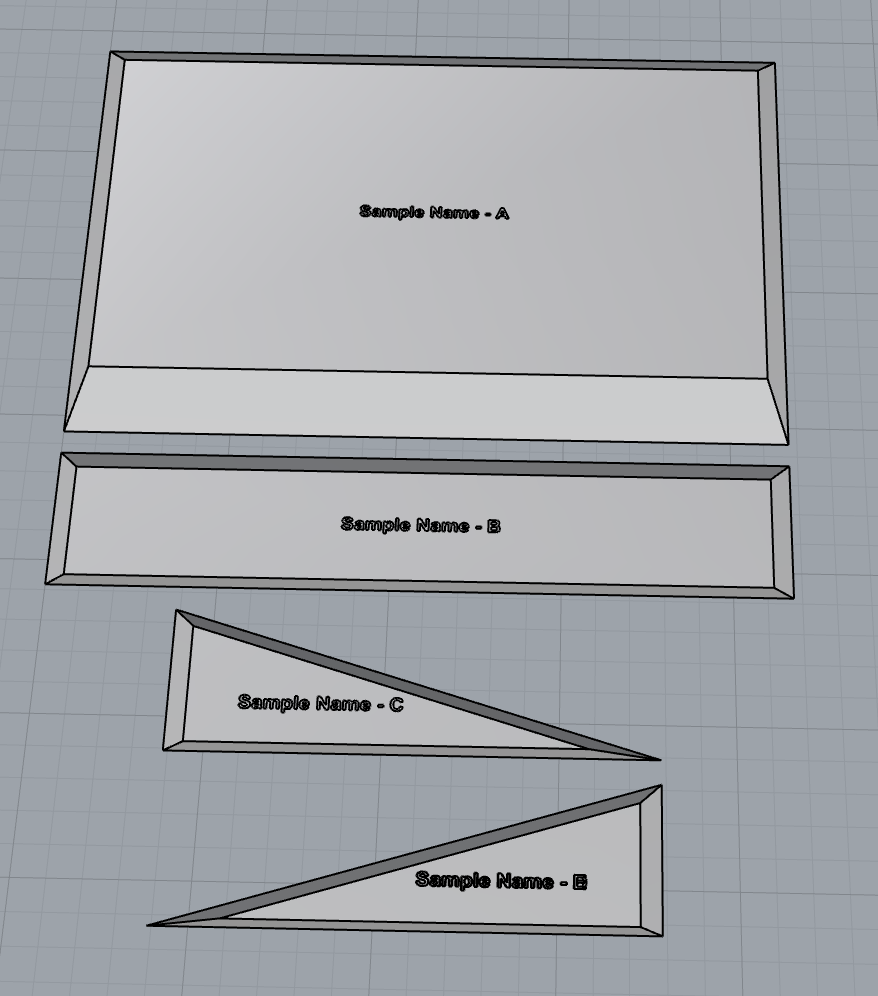
Getting ready to make my Altmill order, I have some work flow questions.
I have an experienced CNC user that has another brand machine and has suggested a few paths for my work flow. Running it by the pro’s here to dial everything in.
I am a Mac person that does all my drawing work in Rhino. A lot of my work will be either 3D type carves or flat pieces of PVC foam board with custom shapes and miters cut into them, photo below. From what I understand I have two options, well probably more options than that.
For the PVC projects-
Rhino Mac / import STP into Fusion Mac, generate G-code / send to CNC attached to a Mac or PC
Rhino Mac / import STL onto V-carve Pro PC, generate G-code / send to CNC PC.
@jBones I know almost nothing about Rhino, but I can say that if you are going to include VCarve in the process anywhere, there is no value in using Rhino at all. The shapes that you have attached can be done very easily in VCarve in minutes. From VCarve, you would use the grbl mm or grbl inch post processor to create gcode and gSender will read that.
This is just a small sample of what I draw and find Rhino far superior to Fusion, in my opinion, for drawing very elaborate organic shapes, most of which get sent to a 6 axis machine to process. For this particular use I have a script in Grasshopper/Rhino that makes parts for me by entering a few quick pieces of data. I this case it is a mold for my concrete casting process. The script then slices the mold into individual pieces, lays them flat and nests them on a sheet for cutting. Each part a different size and draft making each piece to be cut with dimensions and degrees of miter. I can do 10 molds in a matter of minutes producing the parts I need as well as the appropriate final renderings, layout drawings and labeling for the rest of my processes. Basically these pieces are drawn out automatically in the process. I just need to know how to introduce them to the work flow.
In a perfect world I would export as STL, open in V-carve and go to town, didn’t know if it was that simple.
vCarve will handle an STL file like any other 3D model. Import the model, create a clearing and finishing toolpath and you’re done.
If you use an SVG, DXF, or create vectors directly in vCarve, then you have a multitude of toolpaths to select from. It’s more involved than using a 3D model but easy just the same. And whatever you carve would probably be called a 2.5D project as opposed to a proper 3D project.
If you work with a model, that’s what you will carve. If you use vectors, you can modify the tool paths depending on the end result you are looking for.
But if you are going to use Fusion and a STL model, no need to use vCarve. Fusion will create the g-code for you. But I find that it’s easier to do in vCarve.
@jBones Part of the issue with these discussions is the vague and frequently contradictory terminology used in the magical world of CAD/CAM.
I guess that I’m simple To me, something that has length, width and height is 3 dimensional. The CNC world seems to have invented a creature not found anywhere in nature or real life - 2.5D. They don’t stop there, though. Some refer to 4D projects. I’ve asked, “what is the 4th dimension”. I’ve yet to receive a valid answer.
In your case, without seeing the projects, I suggested svg rather than stl only within the context of using VCarve. By my definition of 3D, you can easily create 3D projects from svg files. The will have length, width and depth - ergo, 3D.
Many, many users of VCarve create projects using the CAD/CAM definition of 3D, when it is not at all necesary for the end result and most of the time is much less efficient than using what Vectric refers to as 2D tools.
Enough of my blathering. Good luck with your projects. As has been said, I don’t understand the benefit of bringing models from Rhino or Fusion into VCarve. However, each to his own.
I have seen that, looking into that as a second option, being a newbie wanting to start with established software first and have that as a back up. Would be great to have a completely Mac work flow and stay in Rhino which I use on the daily.
I hear you. I have been looking for a way to get fewer programs in my stack. I’m not a fan of program/platform hopping.
Karoro Cam’a super-power is all paths are based on Rhino geometry. It gives you a level of control you don’t get with Vcarve. But it focuses on individual paths unlike vcarve which can be configured to output multiple paths.
Vcarve is great and once setup it outputs an Altmill ready file that just works. On the down side it’s interface is very PC and has its own way of doing things.
I do like Karoro Cam’s approach and I’m hoping it has some success so the developer can continue to evolve it.
Another interesting G-code generator is Kirimoto. It is open source.
For me it is unfortunate that Rhino Windows has build in CAM capabilities, but me on the Mac side does not. I do love Rhino and it more that serves my business ecosystem. I also drank the CoolAid and have only owned Macs since their first offering, again serves my uses perfectly. Seems overkill to operate in Rhino and then go to Fusion just for the CAM side of things. Hopefully Vcarve Pro fills the gap between.
I may just go ahead and get the gControl Panel Computer and get my feet wet with the work flow between Rhino and Vcarve as I am placing my order for my Altmill. I can just attach it to the machine when it shows up.
@itsnotlevel I’m not sure what you are asking of me, Paul.
To go back, the point that I was trying to address with the OP was that the pics that he posted showing what I understand are molds could be done much more efficiently using vector files than model files. I realize that may not be true for all the jobs that he does.
I also understand that we all work differently. There are no absolutes. I was simply saying that I don’t understand the concept of designing in one CAD/CAM and exporting into another CAD/CAM project if the first will generate the necessary gcode for the machine. I dabbled with Rhino 5 some years ago when the shop bought a Laguna CNC lathe. With Rhino 5 and Rhino Cam, it would have been counterproductive to include VCarve into the job process.
As to chiming in with complex projects, I guess “complex” is different for all of us, so at the risk of embarrassing myself, I’ll respectfully decline. You can always look at the projects that I have posted. I don’t post many of my projects, but those that I have posted are a reasonable sample of what I do. This is a hobby for me, so I tend to do one-offs. Since I have a laser module, a rotary axis and a vertical holding set up, I play a lot with new things and make MANY mistakes.
I’m far from expert in VCarve, but if you have any specific questions, I’ll try to help. For expert advice, I go to the Vectric forum. Those guys are wizards.
I totally agree switching between different CAD/CAM softwares (Rhino/Fusion) is not the best choice and clumsy. I did think abut switching to Fusion but I am fairly locked in with Rhino. I have dozens of Grasshopper scripts that I use regularly that lock me in, and I like the software. My thought on VCarve is that it would be just a Gcode generator and a go between from creating stuff and my machine. I’m sure I will utilize it for more in the future. I’m used to some amount of work around being a Mac person, I hope Rhino will make a Mac friendly version of Rhino CAM in the future but for now I need to do a bit of a shuffle.