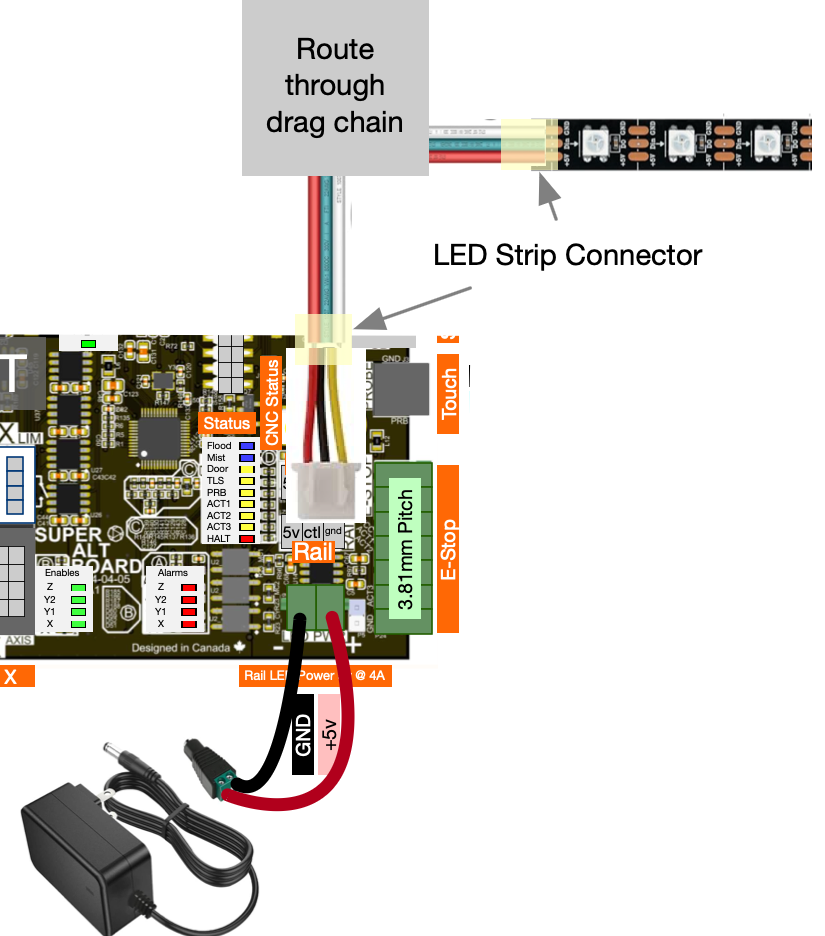
I am trying to find some lights to install on my SLB and run them to my X Rail. I only want white, so I can see what’s going on. Does anyone have a source for them? A link would be great. Thank you
Sean
I am trying to find some lights to install on my SLB and run them to my X Rail. I only want white, so I can see what’s going on. Does anyone have a source for them? A link would be great. Thank you
Sean
@SeanH The SLB technical manual has a link to a strip that Sienci tested. It will shine multi-colour, but you can set the parameter in gSender to only shine white.
You have several choices here - as Grant said, you can use the RAIL Neopixel output with a strip of WS2812B LEDS and a firmware setting for “just white”, or you can use one of the switched connectors (SWT1 or SWT2) with an external power supply and a single color strip. Both these allow you to control the light through g-code commands and macros in gsender.
You could also go “old school manual” and bypass the computer control completely: just get a LED strip made for under cabinet / bedroom use that comes with a wallwart, cables and an in-cable on/off/dimmer switch 
Amazon searches:
Neopixel ws2812b led strip
white led strip
Or make a WLED controller & strip
I would say the best part of connecting directly to the SLB would be the control via SLB/gSender.
I guess I am really dense. I can’t figure out what will plug into my SLB. Can someone give me a link please?
Hi SeanH,
Here’s a link to the led strip section of the slb manual.
If you use the WS2812B Neopixel solution, you will need
Wire together like this
Pay attention to polarity (5v and ground for power supply, +5v, DIN and GND for LED strip)
Pay attention to the arrows on the LED strip - they must point away from the connection to the SLB
Keep the length of wire from the SLB to the LED strip as short as practical - long lengths lead to problems.
So.. since this discussion had caught my eye coupled with the fact that I just so had a BTF-LIGHTING 60-led WS2812B RGB strip lying around for a different project that I have not started yet, I figured I would give it a go.
Not sure what I may have done wrong but not getting the expected results.
In Firmware, set $665 (rail) firmware settings to 61 per instructions to include on-board LED (tried 60 as well) - Saved and Power Cycled the SLB each time.
With ext 5V power connected to SLB the LEDs were on and white.
Started gSender, with the normal start-up Error, LEDs still White
in Console, entered M356 P0 Q2 - no change, still on & white
tried M356 P0 Q0 - no change, still on & white
tried M356 P0 Q1 - no change, still on & white
At this point I turned off the SLB to write this email and noticed that the LEDs were still on & white so I unplugged the external 5V power supply and they turned off.
I wired according to the image/instructions in Technical Manual - SuperLongBoard and reviewed Jim’s guide as well as the image in the preceding message…
Power is in and LEDs plugged into lower/Rail port.
Any thoughts?
@whitewolf I have nothing on the “always white” issue. The issue of the led staying on when the SLB is turned off was discussed here
In short, Chris said that this was normal.
Thanks for the link - that is definitely disappointing and misleading based on what is written in the Technical pages.
Alas, I’m sure I can sort that out with HomeAssistant or something.
As far as the always white part, I am at a loss. I just rechecked the packaging and the direction of the strip to make sure they were RGB and I wired properly. (Yes and No change).
@whitewolf With respect to turning them off, I expect you could work out a relay installation. You will see in the link that I sent you that I originally was wrong in my advice, since I never simply turn off the SLB. It is on a power bar with other things and I kill them all. Included in those “other things” is the power brick for the LED string.
My SLB is connected to a Z-Wave outlet that is connected to a UPS.
I’ll likely plug the LED power into another Z-Wave outlet and have them triggered together.
That said, if I can’t get the colors to work, I may remove the entire setup or switch to an ESP32 and WLED and see if I can get the MQTT signals to trigger different lights.
Thank you. I hate trying to figure out all the parts and pieces. I have this stuff on order
Continued my issue in a different, more related thread - but think I resolved it with an added resistor on the data line.
@whitewolf Thanks much for reporting back. I’ll close this topic.