Ubuntu deprecated unprivileged kernel namespaces by default as of 24.04. There is not a workaround for this on the software side.
You can read more about the change on the Ubuntu release in the security section:
It’s more likely we’ll update the documentation on how to add a AppArmor profile to Ubuntu or disable it completely (easy but please don’t do this). I know some distros (Mint, specifically) already rolled back this change.
Thanks, I will read up on this but I question your assertion that there is no work-around for this. The reason I am saying this is Prusa Slicer. It comes as an AppImage and works just fine in Ubuntu 24.04. I should note that the current version of Prusa Slicer, which was released rather recently, has two versions with the second version specifically compiled for Ubuntu 24.04. It runs just fine! The version for non Ubuntu 24.04 fails the same way as gSender does. To me this says that ‘clearly there is a software answer’ to this issue.
Just had a look at the release notes you mentioned. They offer several fixes including a suggesting re AppArmor profiles. Unfortunately this is well above my pay grade. They also speak about a new release (24.04.1) that is expected to be released on Aug 15 … maybe that will include a fix of some sort.
Anyway, as you said, documentation on how to add an AppArmor profile would be great and should do the job.
I followed the instructions in the Ubuntu release notes and everything works now (at the risk of higher security vulnerability)!
Specifically:
Disable this restriction using a persistent setting by adding a new file (/etc/sysctl.d/60-apparmor-namespace.conf) with the following contents:
kernel.apparmor_restrict_unprivileged_userns=0
Reboot. This is similar to the previous behaviour, but it does not mitigate against kernel exploits that abuse the unprivileged user namespaces feature.
You can question what you like, but it’s not the fact that it’s an AppImage, it’s the fact that Electron/Chromium requires namespaces. You don’t see it in PrusaSlicer because it’s not an Electron application.
This effects us because we are using Electron - and that’s the consistent factor across the majority of the other affected apps (VSCode is the big one, but any issue will show a number of other impacted applications).
It’s not fixable on our end unless A) Electron changes or b) you fix it on your operating system.
I did testing with a variety of Raspberry Pi OS and gSender combinations in the spring, and eventually gave up attempting to use the Raspberry Pi platform. The last working combination seems to be:
Raspberry Pi 3B+
32bit Buster OS
gSender 1.2.2
If the Pi 4 can support the 32-bit OS you might try that combination.
I also needed to increase swap, and performance was still really slow in the visualizer.
My current platform is Debian Linux on Intel or ARM (using the AppImage), and I’ve also run gSender successfully on macOS.
I would think though that since the images are on the download page they are actually installable in some configuration. It would be nice to at least know what if any config has been validated so people know whether to try with their current setup or try an update to hit the validated config.
I am looking to install and use gSender on a Raspberry Pi 5 for a grblHAL Controller.
Is it supported for the Pi5 or should i go with Pi4? Is 2Gb Ram enough for basic use or do i need 4Gb?
Runs on Pi4 for sure, Pi5 would be better in terms of overall speed.
I would try for an 8GB if possible but 4GB will run (slower). I personally would not attempt on a 2GB (but it might work).
I ran mine on a Pi4 8GB with 10" touchscreen for a little while. It worked okay albeit the file loading & graphic rendering was sluggish.
So it really depends on what you have available or what you are willing to deal with for ‘time’. If a few extra seconds here and there don’t matter then you should be good!
Im currently building a touchscreen based controller for my CNC and in the process of working some things out i tried using a CM5 devkit i have.
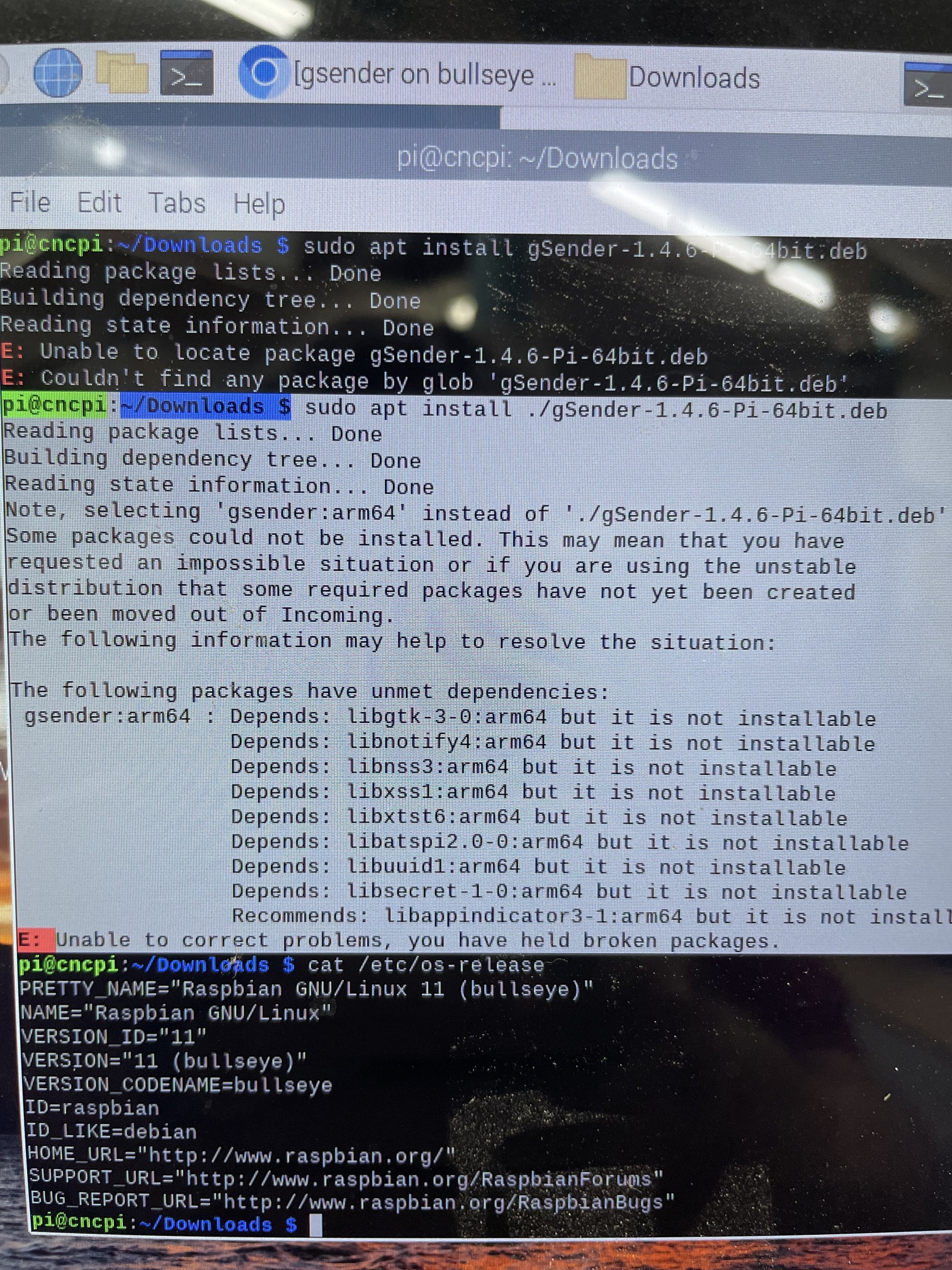
Ive seen various posts about gSender not working on Raspberry PI OS but no mention of the fact that Pi OS switched at some point from X11 to Wayland.
i tried both deb and appimage PI versions of 1.4 which wouldn’t work (would give command line output e.g “gSender --help” but no window, however because I know of other problems of software not working on wayland i tried switching back to x11.
right now I currently use a raspberry pi 4 on the long mill mk2 and I have been using the normal gsender. but I have been wanting to try to get it on my raspberry pi. I have tried my best without success. does anybody know how to do it or knows about a tutorial on how to add it. update: I have had success adding it but my raspberry pi 4 is too slow and laggy/annoying to use so im just using an xbox controller and a long ethernet to my laptop (I dont really have room to put it anywhere near my machine rn) I do recommend using an xbox controller as a jogging method great if you dont have a dedicated screen right next to your cnc
I originally had installed it on a Pi4 and then a Pi5 successfully but never “used” it on my AltMill. I verified it started up but ended up getting the gControl by the time I had the Altmill assembled.
Thank you @IceRayer for the suggestion, we’ve added a note about the dependancies to our guide here Compile gSender - gSender already, but I will look into adding a note on the Installation documentation as well