gSender 1.4.11
SLB firmware 5.05b on LM Mk1
Vortex with closed loop stepper
Actual run time of the run was 2:26.
At the start of the job, the time remaining was 126 days.
At 95% finished, the time remaining was down to 1 day +
At 98% finished, the time dropped to 12 minutes.
All the timers froze and the job continued for another 5 minutes.
I would like to see a more realistic remaining time indicator for rotary projects. The job that I am running now will likely take a little over 2 hours. The remaining run time, after 9 minutes in, was 470 days!
This is a vcarve project, with the gcode created with the Sienci Vortex post processor.
I am not using the slider to change feed rate.
This is not the exception. The remaining time for rotary projects is meaningless for every project.
@gwilki, as of 1.6.0 Edge 3 Walid has done a bunch more work on rotary time estimation, to the degree you should mostly get reasonable results now, would you have a chance to try it out? It’s likely we’re still missing a few things so getting some feedback before we merge it into main would be great
@chrismakesstuff I should be able to try it out within a few days, Chris. To be fair, I am still running gS 1.4.12, so, for all I know there have been improvements in the gS 1.5.x series. I’m not ready to move off 1.4.12 in gS, but I can install and run edge without jeopardizing my gS installation.
I’ll get back to you asap.
@chrismakesstuff In the thread on the release of the new Edge, a member said that the last time he installed Edge along side gSender, when he went back to gSender all the shortcuts for his macros were gone.
Is this a possibility with my gSender installation if I install the new Edge?
@chrismakesstuff Tks, Chris. I wasn’t thinking. I can likely try this out on my test Uno. I’ll give it a go later today or early tomorrow and report back.
@chrismakesstuff OK, I’ll start with the good news. Edge does load much faster than gSender.
Now for the test. I loaded a known good gcode file for a vase that I cut on the Vorted quite a while ago.
In gSender 1.5.7:
The file took less than a minute to fully open and display the stats in the lower left corner. The visualizer was dark.
A few seconds later, the visualizer showed the rotary image. The start button was active within another second or so.
I clicked on start and within a few seconds, the job started to run.
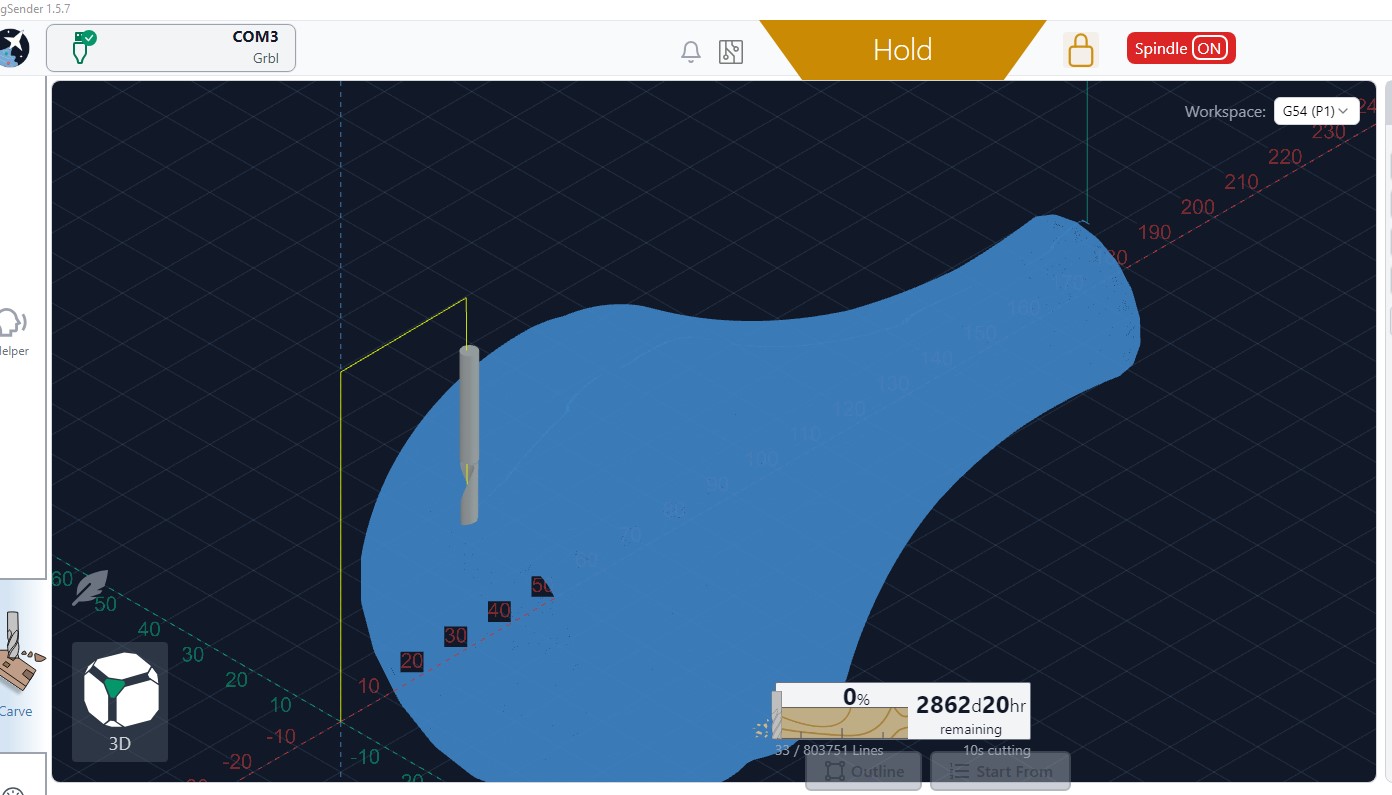
The time remaining showed 2862 days and 20 hours. I’m attaching a screencap.
In new Edge:
The file took 2 min to fully open and display the stats in the lower left corner. The visualizer was dark.
Just over a minute later, the visualizer showed the rotary image. However, the start button was not active
2 minutes later the cursor changed from a pointer to a hand and I clicked on the start button.
20 minutes later, it had not started. No button was active. I closed Edge.
Are you seeing similar load time issues on non-rotary files? It looks on our end like it’s specifically an issue with the rotary visualization changes (I can also reliably crash the renderer using your file) but similar sized non-rotary files still perform as expected.
@KGN I’m running a flat job now, Kevin, and it seems fine. I am going to try to find a flat file of similar size. The one that I am running is quite a bit smaller. I’ll report back asap.
edit: I just tried a flat file that is just over a third of the size of the rotary file. Edge did not freeze. It seemed to me that it was running a bit slower than the same file in 1.5.7, but not so much slower that I trust my own observations. Here is the file.
We’ll have some fixes likely in the next Edge targeting this - I’ve made some pretty substantial changes to how parsing/visualizing works with some significant gains that were long overdue.
I have a manifesto written about the work that went into it for explanation internally that I need to figure out how if/how to share externally. The TLDR is about 55% faster parsing/visualization WITH ~33% less memory usage for most files and 75% faster/85% memory reduction for rotary files. The rotary row in this table is your specific file, for reference, showing improvements over 3 run median:
File
Total ms (OG vs now)
Total delta
Parse pipeline ms
Parse pipeline delta
ColorBuild ms (OG vs now)
ColorBuild delta
Transfer bytes (OG vs now)
Transfer delta
mb-6
837.1 → 364.4
-56.5%
478.3 → 348.4
-27.2%
324.6 → 0.0
-100.0%
37378156 → 24377068
-34.8%
mb-14
1909.6 → 766.8
-59.8%
1196.0 → 733.5
-38.7%
660.1 → 0.0
-100.0%
74176760 → 48376152
-34.8%
mb-28
3539.1 → 1571.4
-55.6%
1980.6 → 1510.2
-23.8%
1395.4 → 0.0
-100.0%
141018180 → 91968388
-34.8%
Rotary
4054.6 → 988.4
-75.6%
3172.8 → 916.4
-71.1%
721.6 → 0.0
-100.0%
362950312 → 48458848
-86.6%
It’s undergoing testing but will likely be part of Edge-4 - hopefully you can try then with better results.
@chrismakesstuff I haven’t played with Edge 4 yet. I’m having an issue with the PC that I use with my test Uno. I’ll get to it this week and report back.
Edge started very quickly. A big improvement over all previous versions of gSender.
I loaded the same rotary file that I sent as the bug report. When I clicked on start, the screen went black, then a few seconds later, a pop up gave me the option to verify the file. I clicked cancel. Again the screen went black, then it put me back to the main screen. I clicked on start. Nothing happened for several seconds, then the job started. The time showed a respectable 2:30. I let it run to completion and it actually took 3:09. So, very close.
When I tried to close the file, the screen again went black and I received a maintenance reminder. I chose to reset it. Nothing happened for several seconds, then a window popped up showing the run time of the last file was 4:06. Strange, as it had said 3:09 when it ended. I tried to close that window and after several seconds, the maintenance window popped up again. This time, I clicked on cancel. Again, I waited for several seconds and the file run time popped up again, and this time it read 4:11. Keep in mind that the file was not running. However, some timer was clearly running in the background.
I started gS 1.5.7 on the same machine. As expected, it took several minutes to open so Edge 5 is a big improvement in that context.
I opened the same file. It opened much quicker in 1.5.7 than in Edge 5.
I started the file and it showed that it was going to take days to complete. So again, the win goes to Edge 5.
To sum up, Edge 5 opens in the time that a program should. It shows a much more accurate run time than gS. However, Edge seems to be using a lot more resources as every click response happens in slow motion. Plus, it keeps popping up the maintenance reminder even after I reset it. Finally, there is something wrong with the run time counter as it seems to keep running long after the job is finished.
Keep in mind that this is running on an Uno, not an SLB. It is running under windows 10. The PC has 16Gb of ram, but only 2Gb of Dram.