New to gcode so it is still confusing. I am trying to write a simple macro to move to a particular location. Example: I am working in inches. I want the spindle to move to X= 36.995, Y= -31.934. I suppose I would want the spindle to raise to max Z for safety, then move to the specified location.
@mikehoover Do you want it to move those distances from where it is when you run the macro (incremental) or to move to that location from XY0 ( absolute)?
What machine do you have. Does it have limit/homing switches?
I have an Altmill 4x4. I would like to move from where ever I am currently.
@mikehoover Understood. Keep in mind that you may well trip the switches by moving that far from the current position. For example, if you are sitting at X 20 and you tell it to move 36" from there, you would be outside your max of 48" and you will trip the limit switch.
What are you hoping to achieve?
1 Like
Sounds to me like he wants to go to the absolute position mentioned and not a relative position. Doing a relative move makes no sense for a macro like this (IMHO)
Seems pretty straight forward (note, this is off the top of my head so not tested in any way)
G90
G0 Z6
G0 x36.995 y -31.934
First line sets absolute mode, second line raises Z, final line goes to the position requested.
I am likely forgetting some house keeping steps but this is what I would start out with.
1 Like
One macro might move to the front so I can change the bit.
@mikehoover Then @Jens is correct. You do not want to move incrementally from where you are. You want to move to an absolute position regardless of where you start.
1 Like
You’ve gotten some good advice so far IMHO. I’d like to expand on what @Jens mentioned about house keeping steps.
I have found @NeilFerreri’s macros to be helpful in learning to write my own. They are for CNCjs but gSender was created from CNCjs so they are relevant and well documented. You can find them on GitHub.
Not all of the macros have these sections but depending on the macro it’s important to save and restore the modal state so that things behave the way you expect after the macro is run. For example, if you were in relative distance mode and ran the macro you’d be in absolute distance mode after the macro is run.
This macro has a section to save the modal state.
; Save modal state
%WCS = modal.wcs
%PLANE = modal.plane
%UNITS = modal.units
%DISTANCE = modal.distance
%FEEDRATE = modal.feedrate
%SPINDLE = modal.spindle
%COOLANT = modal.coolant
And a section at the end to restore it.
; Restore modal state
[WCS] [PLANE] [UNITS] [DISTANCE] [FEEDRATE] [SPINDLE] [COOLANT]
3 Likes
Since you are using an AltMill, and should have limit switches/homing, I would think you could use G53 (machine movements) for repeatable locations since they will be consistent after homing. G53 is not modal so you can use it pretty safely in macros to get to set locations.
%UNITS = modal.units
G21
G53 G0 Z-1 ; 1mm below the max z travel
G53 G0 X... Y... ; Travel to wherever you want your fixed XY location to be.
; Add a line here if you want to travel down to a set Z position using G53
[UNITS] ; restore previous units
This is pretty similar to how the park functionality works for example - setting a set location and G53’ing over to it on button click, but is obviously extensible through macros in that you can have multiple set locations.
4 Likes
Thanks for the info folks! I tried this with success:
G20 ;// inches mode
G53 G0 Z0. ;//spindle to max height
G53 G0 X10.5 Y-42. ;//move to convenient position at front of machine
I haven’t messed with the modal data structure (yet). Seems like mandatory reading. So, if I understand correctly, the modal data structure stores CNC settings that remain once set. If you change any of them in a macro, then they will remain changed UNLESS you reset them back to their original state. So, an oblivious newbie CNC’er could dork up their settings with macros and get unexpected and perhaps disastrous results later on.
So, with _Michael’s example, you copy the modal data, do your business, then reset modal data back to what it was before you started, ie, tidying up after yourself when done.
Thanks and cheers!
Grbl/HAL modals are specific g-codes that persist on the firmware side unless explicitly changed or the board is hard/soft reset.
In the UI, they correspond to the “CNC Modals” section of the machine information flyout, or the $G output.
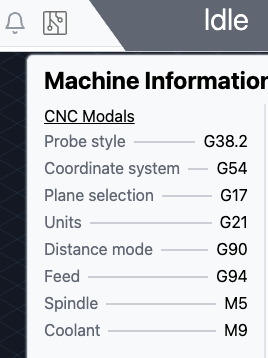
They are generally things you want to set once and have persist so it should be intuitive - thinks like spindle direction can be sent once and not need to be resent with every line, or movement type as examples.
The reason for storing and then restoring modals in the macro is to avoid situations where you’ve change something that will impact your tool path (like changing the units from metric to imperial).
It’s technically redundant but generally a good idea to do for any custom g-code/macros because it can lead to issues that are hard to diagnose.
We make a large number of these general data points (modals, position, etc) available in our macro expression evaluator because they are useful for the above - that’s the modal object you’re seeing in the macro itself.
Your CAM software will largely handle it for toolpaths themselves.
1 Like
That’s a bunch of foolishness that I wouldn’t mess with. Just normal Gcode works fine. If you were to use something like G91 then just type G90 after you’re done and it’s back to normal. Any code you post should have a startup command anyway to make sure of this. I like to start with G0 G90 G54 G17 G20 that way I know everything will work as expected. If I happen to use a G55 work offset…well I know to go in the Gcode and change that right quick before running. G53 works good for machine position if you want something to be roughly in the same place everytime but keep in mind…these machines DO NOT HOME EXACTLY TO THE SAME PLACE EVERYTIME. Expect 15 to 20 thou difference each time you home. If that’s not critical then use a move like G0 G90 G53 Z0.0 NEXT LINE X36.995 Y-31.934 If you don’t want it to move so fast just put G01 instead of G0 and add F100.0 or some feedrate that you are comfortable with. Anytime you have questions about Gcode feel free to reach out to me. I do this for a living in a machine shop and this is childs play to me. Good luck Pardner.
That assumes that you were in G90 before you ran the macro. Maybe that is safe for this use case but only because you defined G90 to be ‘normal’. I don’t think it’s safe to assume the state a modal will be in at macro invocation while writing it.
My G-code files always set the modals at the begining but what if I do other things before the next job?
I don’t write G-code or operate machines for a living but I’ve enough programming experience to know bad things eventually happen when state is assumed rather than checked or cached and restored.
1 Like
FWIW…
I created a simple Macro to home the machine and go to a specific location that I frequently use as my “Zero” position to correspond with my Carveco program:
$H
G10 L2 P1 X0 Y0 Z0
g0 g90 g20 x12 y-40
;// SET CURRENT WORKSPACE ZERO TO CURRENT POSITION
G10 L20 X0 Y0 Z0
I don’t have to always go to the home position, but if I start up the CNC and I need to home it anyway, this works. I have an Altmill 4x4.
1 Like
This is why I said always have a startup line in your post processor or gcode. G90 is VERY normal, G91 is not. Jog moves of course are G91 but your normal Gcode such as that written with Vcarve Pro or something is not gonna be writing with G91 moves. Some of these overcomplicated things some are writing I’m afraid is only gonna confuse beginners. Keep it simple and things will go well usually.
1 Like
@lcmetalworx I’ve given my previous post some thought, even before your reply. I know I didn’t get the wording right and it was a knee jerk reaction related to programming in more complex languages. I got stuck on returning the modal to what it was and your suggestion didn’t do that. But all the modals have sane defaults so it’s reasonable to return to that state.
Other languages have given me the mindset that if it doesn’t work all the time you shouldn’t do it at all. So while I didn’t get this point across in my post I was thinking in terms of any modal in any state with any possible user and didn’t think it was a good idea at the time.
I don’t have tons of experience with G-code as I mentioned and it’s almost always generated for me so I don’t have write it often.
Take care,
_Michael
1 Like