Hi all,
I wanted to share something that tripped me up while setting up my new SLB, in case it can help improve the docs and reduce confusion for others.
Context
-
Brand‑new SLB (replacing a failed X‑Controller), bought within the last month.
-
Using gSender, SLB firmware flashing guide here:
https://resources.sienci.com/view/slb-firmware-flashing/ -
My
$Ioutput shows:-
Firmware version: 20230917at the top -
BOARD:SuperLongBoard_B5.0.5bfurther down, along with the SLB‑specific plugins
-
So the board is clearly running a SuperLongBoard_B5.0.5b build.
Where the confusion came from
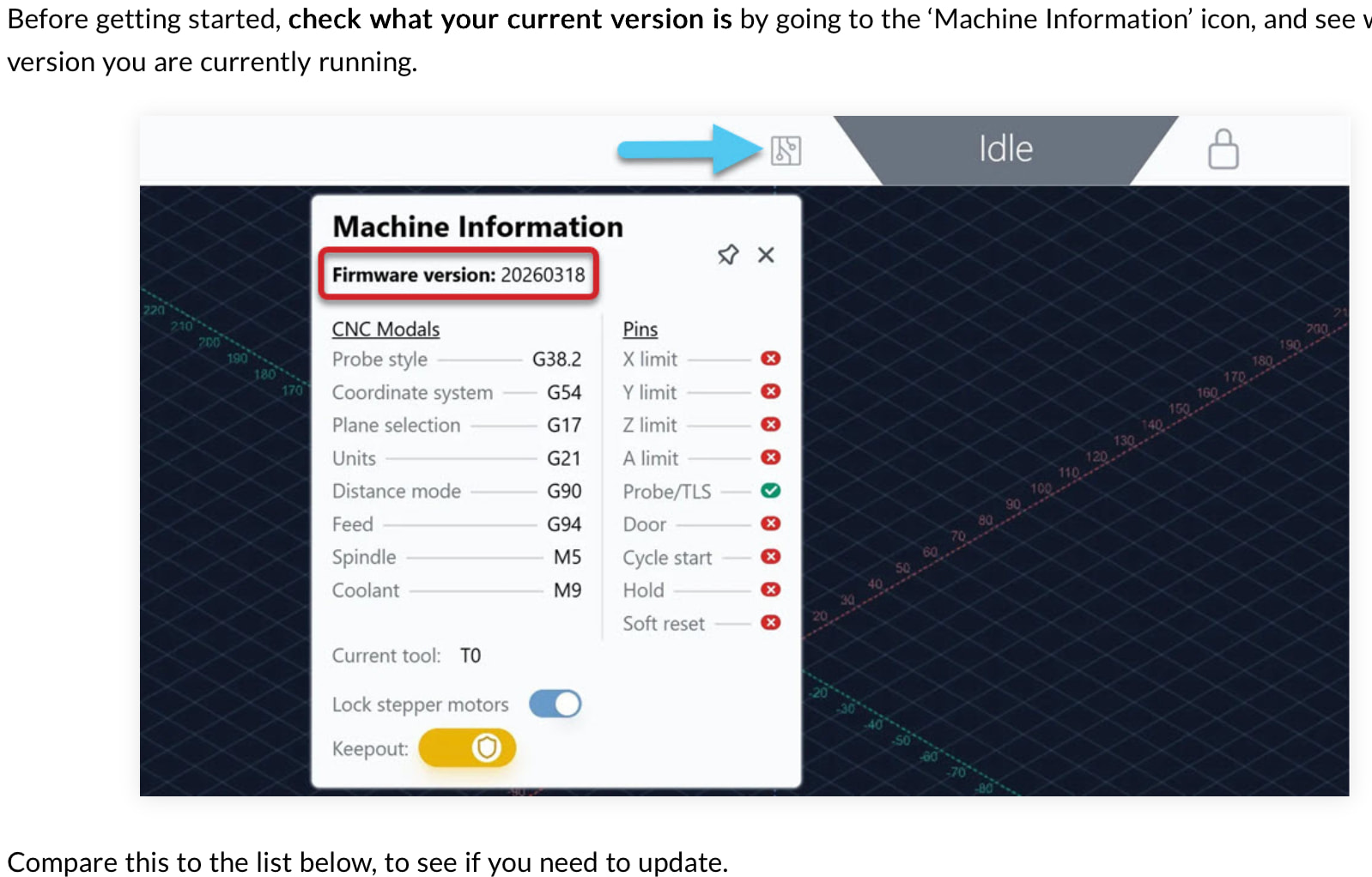
On the flashing guide, there’s a screenshot of the Machine Information popup that shows:
Firmware version: 20260318
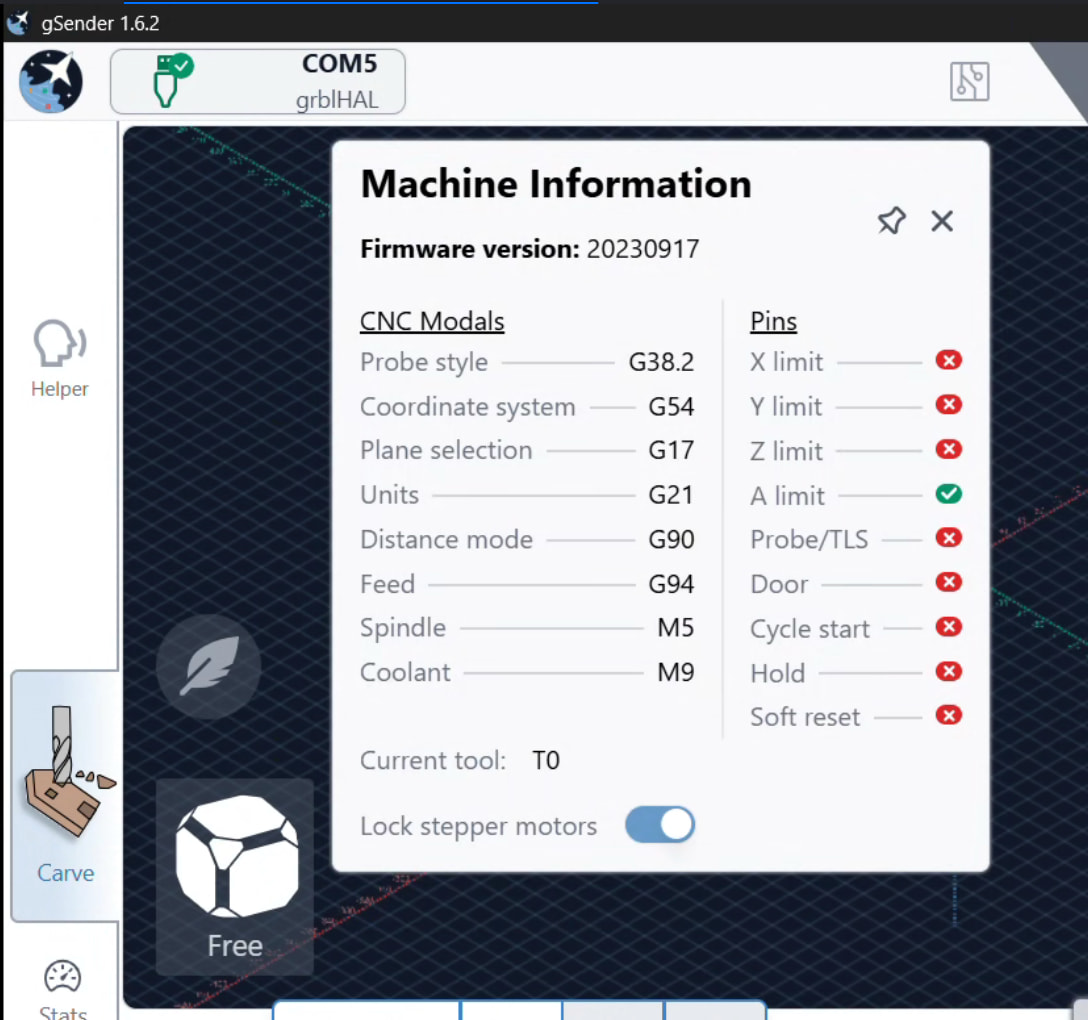
In gSender, the same Machine Information popup on my SLB shows:
Firmware version: 20230917
Side‑by‑side, that really looks like “my brand‑new SLB is still running ancient 2023 firmware while the doc shows a 2026 build,” which is what led me to assume I must be out of date and start reflashing.
After a lot of investigation (including DFU/Zadig driver work and reflashing), it became clear that:
-
The “Firmware version: 20230917/20260318” value in Machine Information is actually the GRBL/grblHAL core version/date (the
VER:line from$I), -
While the true SLB firmware identity is the
BOARD:SuperLongBoard_B5.0.5bstring and related driver/plugins, which did not obviously tie back to that numeric date.
In other words, the SLB firmware package (e.g. 5.0.5b) can sit “on top of” a GRBL core build that still reports 20230917, so seeing an older date there does not necessarily mean the SLB firmware itself is out of date. But the UI and docs currently present that date as the “Firmware version”, which makes it very natural to think “mine is old; the screenshot is new.”
Why this matters
Because the flashing page and video say “flash, then check your firmware version,” and highlight that Machine Information field, I ended up:
-
Assuming my board shipped with outdated firmware because the date didn’t match the example,
-
Spending time chasing a “missing” update that may never have existed for my exact board,
-
Only later realizing that the BOARD:SuperLongBoard_B5.0.5b line in
$Iis the real indicator of which SLB image I’m running, and that the 2023 date is just the underlying GRBL core.
The DFU driver work was important anyway (flashing didn’t behave correctly until Zadig was sorted), but the reason I went down that path at all was the apparent mismatch between “Firmware version: 20260318” in the doc and “Firmware version: 20230917” on my brand‑new SLB.
Suggestions
A couple of small changes could make this much clearer:
-
In gSender’s Machine Information popup for SLB/SLB‑EXT:
-
Either relabel that 8‑digit number as something like “GRBL core version”
-
Or add a separate line for “SLB firmware: SuperLongBoard_B5.0.5b” and clarify which one users should look at when checking they’re on the latest SLB build.
-
-
In the SLB firmware flashing doc:
-
Explicitly state that on SLB, the board/firmware name (e.g.
SuperLongBoard_B5.0.5b) is the authoritative “which firmware am I on?” value, -
And that the 8‑digit date shown in Machine Information is the GRBL base version, which may not change with every SLB firmware release.
-
I’m attaching two screenshots:
-
The one from the flashing guide showing “Firmware version: 20260318”.
-
My Machine Information popup showing “Firmware version: 20230917” +
$IshowingBOARD:SuperLongBoard_B5.0.5b.
Hopefully this helps tighten up the docs/UI so that other new SLB owners don’t go chasing a phantom firmware update just because their GRBL core date doesn’t match an example screenshot.
Thanks for all the work on SLB and gSender—once I understood the layering (GRBL core vs SLB firmware), everything else made a lot more sense.