LM 2.5, Vectric Pro. On several jobs I have done, the Vectric estimated time for V-Carving and Profile cuts was double the time indicated by gSender. The actual time was very close to the gSender information. Do not need to have exact same time estimate, but two to one is of concern. Suggestions? Thanks
@Retiree You can set a factor in VCarve to account for the discrepancy. It’s not great, either, but, depending on the project, it will get you close.
1 Like
Interested in learning more. What factor? how to set? Many thanks
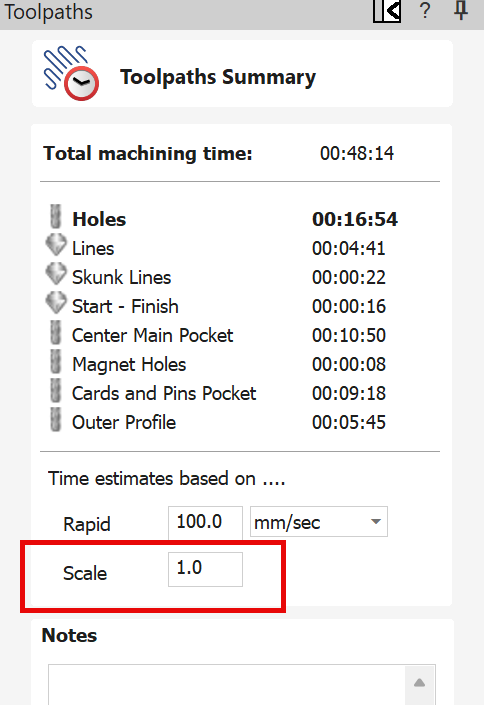
Version 12.013. Just checked - it is the current one.
Thanks for “Scale” info - will try it.
@Retiree Be sure to set your rapid rate to the rate you have set in your firmware settings. Otherwise, the estimate will be off.
Still have a problem.
Set the “Scale” Toolpath Summ as indicated. Do not understand “firmware settings”.
Just ran a job:
Vectric estimate : 2:18
gCode estimate: 2:17
Actual: 3:15
Thanks
@Retiree You say that you set the scale “as indicated”. What did you set it to? Leaving aside gSender, if Vectric estimated 2:18 and the actual was 3:15, you need to adjust the scaling factor.
Or, you can adjust the rapid rate figure to match what you have it set to in your firmware.
In Vectric, Toolpath Summ, I set speed at 120 ipm and it estimated 2:18. I note that the clock in gS as the job runs is definitely not standard time. The relative time in gS (% complete vs estimated time) is fine, however, it is not actual time. I have no problem with adjusting the scaling factor, but, based on what? and why should not the clocks be pretty close?
@Retiree You set the scaling factor based on the difference between what Vectric estimates and the actual run time. The issue with this is that it will not be the same for all types of toolpaths. Vectric does not know your rapid movement rate or your acceleration. So, for pocketing and profile cuts, you may set one factor. For 3D modelling toolpaths, which generally include a lot of Z moves and speed ups and slow downs, the factor will be much different. Only experience will allow you to set values that may come close to the actual run times.
The speed that you set in your toolpath includes two values, XY and plunge Z. Vectric knows those values. It does not know your rapid rate. If you choose to use that in the time estimate, the max XY rapid rate for a LM 2.5 is 4000 mm/min or 157 inches/min. These are the defaults. If you have changed them, you would enter the value that you set.
You may want to read the vectric help files on this function to help you to decide.
Thanks for info. You are correct in that the time discrepancy was for a 3D Finish toolpath (how do you know this stuff? - amazing!). So, I played around with the S/W, and if I change the Scale factor to 1.45 for my particular job, the estimated time is within 5% of the actual for that toolpath. If I understand your comment, the complexity of the model (as defined by Z-travel) seems to be the defining factor for setting Scaling Factor.
“Only experience will allow you to set values that may come close to the actual run times” becomes a guessing game for me. Not very comforting, but I understand it is what it is at this time. Perhaps an AI application?
Seems clear that gSender time estimate for a file is taken from the Vectric S/W. It would be useful, IMO, if gS would adjust the time estimate (based on REAL time) in near-real time as the job runs to provide a more realistic estimate to job completion. A suggestion for Sienci.
@Retiree I don’t know how gSender gets their number but I am almost positive it is not from the Vectric scaling factor. That information is not included in the gcode that the Vectric file that gSender uses.
As to how I know this stuff, no offence, but I read the Vectric help file. Also, the Vectric forum is an amazing source of information.
At the risk of the blind leading the blind, to my knowledge the time estimate is generated by parsing the gcode (job) file, determining how far and at what speed each move is performed and adding all these times up. Acceleration and rapid movement speed are parameters that are not specified in gcode so a time estimate applies a ‘fudge factor’ to account for that and the scale factor is a secondary fudge factor to try and improve the accuracy of the time estimate with the particular equipment being used.
The time a job takes is an ESTIMATE to give you a rough idea - it is not meant to be an accurate value.
More info. Changed Vectric scaling factor to 1.45 and estimate for cut was 3:20. Downloaded gcode and loaded file. gSender estimate is 2:20, ie., same as Vectric at Scaling factor of 1.0 . Coincidence?
Seems gS does not get time estimate from Vectric, so, how does it calculate the time? Like Jens indicates? Still the large disconnect between gS cut time on the visualiser and REAL time.