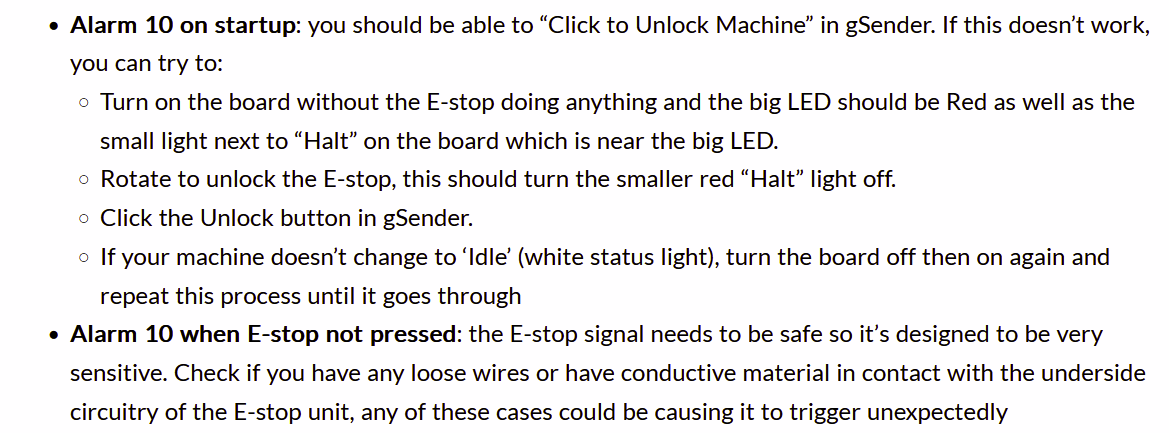
Not sure if this is the right area to post this question, but I am stumped. I normally get a Alarm 10 when I turn on my controller and connect to the machine. And normally when I unlock it, it goes away after a few seconds. Today I turned everything on and unlocked the alarm and all worked fine. Then I loaded a job and ran the first tool path. Once it completed, I raised the z axis and then moved the gantry on the Y direction so I could use the dust collector to clean op the part. (I’m making a new dust boot, but doing a few proof runs on less costly material). Anyway, when I got ready to run the next tool path, Alarm 10 was showing on the screen and I can not get it to unlock.
I have powered down everything. (Spindle, Controller, PC, etc) Nothing is seeming to clear this up.
I tried the $x on the command console, but nothing changes. About ready to restore to defaults, but would rather avoid that if possible, since nothing I have done lately should have impacted the settings.
At a standstill right now, so if anyone have advise or ideas, please let me know.
If you don’t find loose wires on the wiring of the estop, you might be stuck with a bad estop.
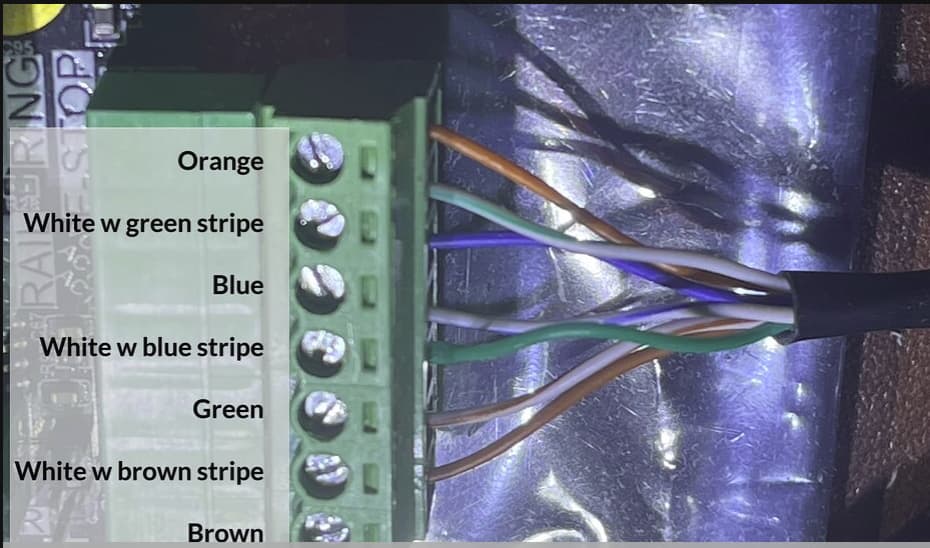
If you have a universal multi meter, you could check the estop by measuring the orange and white/green-striped colored wires with the meter set at low ohms or diode testing. EDIT: MAKE SURE YOU HAVE YOUR SLB POWERED OFF WHILE MEASURING.
If you cannot get a zero on the screen of your device, you can do a last check. take a piece of electrical wire and short the orange and white/green-striped wires at the connector in the SLB. This simulates an e-stop that is released.
If you get your machine to run with the bridge, you either have a damaged wire in the e-stop cable, a loose wire at the e-stop switch or an e-stop switch that is not functioning.
In either these cases it might be a good moment to get a ticket and have siencitists help you towards a solution.
EDIT: MAKE SURE YOU HAVE YOUR SLB POWERED OFF WHILE MEASURING.
Can you home your machine without tripping an alarm? If not, I’m guessing there’s an issue with your inductive sensors.
When I first setup my Altmill and tried to home it, it constantly generated error 10. Turning the e-stop cleared it but didn’t resolve the issue. It turns out my z sensor was set too far back.
Same thing happened to me today! Machine was also making clunky sounds when moving in the Y direction. Also had HOMING issues. I found the left stepper motor had lost it’s power (found by attempting to manually rotate the coupler - should not be able to rotate if power is applied). Cable had came loose on the SLB.
I have not tried to restart and home the machine yet. Hopefully all be well tomorrow!
Thanks for the ideas and suggestions. I will be getting out to the shop today and check these out. No network out there, so will give feedback tomorrow. Thanks so much for the input.
Have not had issues before, but I will check into this in case something loosened up. With the alarm, a lot of the screen is greyed out/inactive. I cant get anything to move till I get that alarm cleared. Got to be something lose or busted as I have issued the clear command many times. Maybe me being away for a day will make a difference.
If I have someone else look at it, I am sure it will clear right up! That’s the story of my life.
I had never had this problem before updating Gsender last week. I’ve been having the alarm 10 pretty much every day since. It goes away every time I power the SLB off then back on, but??? I have made no changes to my setup, already read the troubleshooting guide and checked all my connections, no idea whats up.
Well, It has been quite a while since I last posted here regarding the Alarm 10 issue I was having. Long story short, it is now fixed. I have to say that Sienci has been great in helping me get this issue resolved. It didn’t help that my Altmill is located in a area that does not have any network connectivity, so Turn around time from testing suggestions, providing the results to Sienci and getting feedback was 1 2-3 day turnaround. Most of that was on my end.
Anyway, at first we checked the e-stop but changes to that did not help, Then we disconnected all of the motors from the Controller and that still did not help, so we finally replaced the controller board and finally started to get things happening.
I don’t know how many times I exchanged e-mail with Sienci, but they never gave up on me. I have gone through so many highs and lows with this machine, but I think it is finally working as expected.
Part of what took me so long to get it finally working after the board replacement, is that the new board was set up for a Longmill configuration and I did not notice that until a few days of pulling my hair out. Not Siencie’s fault at all, but mine as I assumed rather than read all of the configuration setup details.
Once I got past the Alarm 10 issue, and got all the Axis working, I was ecstatic until I realized I could not get my spindle to work. After 2 days of trying all the various trouble shooting steps, I remembered that the Spindle VFD needs to be powered up first, then the controller then the gsender computer. Once I had all the right steps in the right order, every worked as expected. I still have not reinstalled my Vortex yet, as I want to let my machine and myself be productive for a bit. Sounds like I am scared and I am, but it worked just fine before, so I think I am safe.
The bottom line is that my SLB board went bad and they sent me a replacement board and got my machine back in business.
I will say that the folks I dealt with at Sienci are my heroes! I started working with Jason Kent who provided several tests to try out. Then I worked with Kelly Zhu who stuck with me through all the various changes and tests until we got it working again. I am so happy I bought my CNC from this company who stands behind it and provides support no matter how long distance and slow the process was (slow on my end). Sienci did not give up and leave me hanging and for that I will always be grateful.