Hi Sienci team,
Setup
-
gSender Edge: 1.6.0-Edge-5 (Pi AppImage)
-
Install type: AppImage run as user
rathbungs, autostarted; config at
/home/rathbungs/.config/gSender/gsender-0.5.6.json -
Hardware: Raspberry Pi (cncpi.local) running headless, connected to X‑Carve/X‑Controller
-
Access:
-
Laptop: macOS Safari and Chrome, connecting over LAN to Pi
-
Phone: iPhone, latest iOS, Safari/Chrome, connecting to same Pi remote UI (Edge)
-
What works
-
gSender starts automatically on the Pi as user
rathbungs(verified withps aux | grep gsender). -
Macros created or edited from the laptop (Safari/Chrome) appear correctly in the Macros list on the laptop and are stored in the Pi config JSON:
/home/rathbungs/.config/gSender/gsender-0.5.6.json(I see all 3 macros reflected there). -
Those same macros display in the Macros view on the laptop every time.
Problem
-
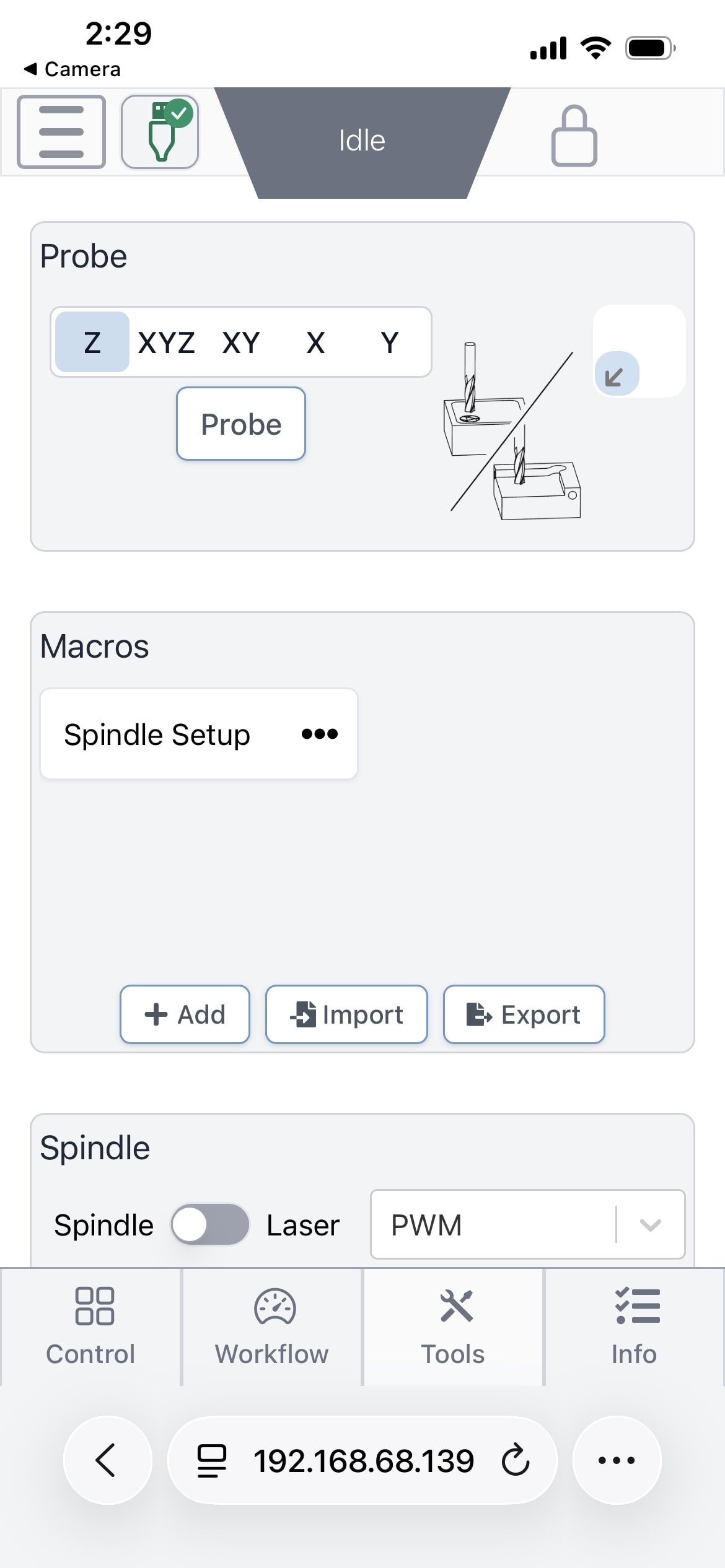
On iPhone Safari/Chrome, the UI shows the Macros section under Tools, but no Macros display.
-
If I use iPhone Safari to add a new macro, it appears to save (no error), and I can then see that new macro on the laptop (Safari/Chrome) and in the Pi JSON config file.
-
However, the Macros list on iPhone Safari/Chrome remains empty the whole time, even after reloads or reconnects.
So: macros are clearly being saved centrally on the Pi and read correctly by laptop browsers, but iPhone Safari/Chrome Macros view does not render any of them, including ones created on the iPhone itself.
Steps to reproduce
-
Start gSender 1.6.0-Edge-5 AppImage on the Pi (headless, user
rathbungs). -
From laptop Safari, connect to the Pi’s gSender UI, go to Tools → Macros, and create 2–3 test macros.
-
Confirm:
-
Macros appear in the Macros list on the laptop.
-
cat /home/rathbungs/.config/gSender/gsender-0.5.6.jsonshows those macros in the JSON.
-
-
From iPhone Safari/Chrome, connect to the same Pi gSender instance.
-
Go to Tools → Macros:
- The Macros panel appears, but the list is empty.
-
On iPhone Safari/Chrome, create a new macro (e.g., “iPhone Test Macro”, simple G‑code).
-
Refresh:
-
iPhone Macros list still empty.
-
Laptop Macros list now shows the “iPhone Test Macro”.
-
The JSON file on the Pi also includes the new macro.
-
What I’ve already tried
-
Full Pi reboot.
-
Closing/reopening iPhone Safari/Chrome; reconnect via the same URL.
-
Clearing website data for the Pi’s IP/hostname on iPhone Safari/Chrome.
-
Verifying that gSender is running as user
rathbungs(not root) and that the only gSender config in use is/home/rathbungs/.config/gSender/gsender-0.5.6.json.
None of these change the behaviour: laptop sees all macros, iPhone Safari/Chrome Macros panel is always blank.
Expectation
The Macros list on iPhone Safari should show the same macros that are stored in the Pi’s config JSON and visible on the laptop, and new macros created on iPhone should appear in that list immediately.
This looks like a mobile / iOS Safari/Chrome rendering or data‑binding issue in the Macros panel rather than a storage problem, since the data is clearly being saved and read correctly on the Pi and by laptop browsers.
Happy to provide:
-
Redacted
gsender-0.5.6.jsonmacros section. -
journalctlsnippets. -
Screenshots: iPhone Macros tab (empty), laptop Macros tab (3+ entries), and the JSON on the Pi.
Thanks for taking a look, and let me know if there’s anything specific you’d like me to test.