New user here, I wanted to check out the gsender software before pulling the trigger on an altmill. Coming from a 1F Elite Gen 1 I’m familiar with the basics of how the software should work. That being said I can’t even get Gsender to see or recognize my home server where I store all my cnc files. I use a server so I can design and create files on my big nice computer in the office then access the files on a basic computer in the garage. I’ve tried reinstalling and running as administrator but no luck. This is the only software I am having this issue with. Any insight would be greatly appreciated thank you!
What is the operating system of the gSender computer?
What is the operating system of your server?
Are they both on the same network? The IP address of your gSender computer and IP address of your server need to be on the same subnet.
E.g.
192.168.1.57 and 192.168.1.58 (the first three octets are the same)
If Windows for the gSender computer, I’d troubleshoot this from Windows Explorer and not from within gSender.
Since you are trying to access the server from the computer, I’d look at firewall rules on the server.
Hey Cameron,
I work with a pc running gsender at my machine and run a remote at my big fast luxurious design pc. Both pcs are in the same network. I never use the pc at the machine to load up a file. I always use the remote to load up a file to the machine. The files are mostly stored on the design-pc and after loading, I start the file at the machine ()though I could start them from my office with the same ease.) I have loaded up files from my network hdd into the remote. The machine pc does not have access to that location (never saw the need) but it loads just the same.
If anything, this could be a workaround for you to use, while figuring out why you cannot access your storage device directly, but I think it’s even more conveniant than having to load up from the machine. Design, drop file, walk over to machine ready to go.
@Cam135 Welcome to the group, Cameron.
I’ve moved your question from the UGS topic. As you’ve said that your issue is only with gSender, it better positioned here.
I’ve never had an issue opening files in gsender across my home network, using either USB or ethernet. How did you create the files that you are trying open. Since you’ve said that gSender is the only application with this issue, I assume that the garage computer can access your network in file explorer, correct?
The files were created in vetric and then saved to the sever HD. Yes both pc’s have access to the server. I could them access them on either computer and then load them onto a thumb drive which was then plugged into the masso. So this is the first time I’ve ever had a program not see the server file extension.
I am CERTAINLY not an expert network guy but I do have all my shop PC (4) and design PC networked (ethernet) and can access files from/to any device on the network. I do occasionally (usually after a Windows Update) with permissions and sharing getting reset or totally forgotten. However…
Your last sentence confuses me…..original post indicated you could not access files on your server while the last sentence (of last post) says “not see the server file extension”. Is it the file or the file extension?
Can you “see” files and their extensions on your server using Windows File Explorer? If so, gSender shoud see them as well. If you cannot see them in File Explorer the problem is not with gSender - most likely a sharing issue or admin issue.
If only the file extensions your missing, I think that is a Windows File Explorer issue.
@Cam135 Like @Lenp I, too, am a bit confused. In your second post, you mention a Masso controller. So, the files that you are trying to see in gSender are on a thumb drive in the masso, correct?
The Sienci tech guys can confirm this, but I don’t believe that gSender and Masso play nice together. If you move to an AltMill, the Masso will not be controlling it. gSender or another code sender will be, using a PC of some sort.
Sorry for the confusion. Gsender doesnt even show the server when i go to load a file. As in i have my c drive and my d drive then where my server should be there is nothing. Both pcs Run windows. One on 10 one on 11. When I open windows explorer or any other application the server folder shows up. It’s only gsender that doesn’t show up. A work around I found is to move the file I want from the server to a temp folder in my documents folder the I can open it in gsender but would be nice if I could have access to the server folder while in gsender.
@Cam135 Thanks for clarifying. I’m not sure what to tell you. My setup is like yours. I have my gcode files on my office PC. I have the drive that they are saved on mapped to a drive letter on my shop PC. File explorer sees the drive, vectric sees the drive and gSender sees the drive.
So, I know that what you want to do is possible. It may have something to do with how you have the drive mapped, but I can’t be sure.
@Cam135 how does the server show up? Using the UNC naming convention (\\server\share) or with a drive letter?
If UNC, try mapping it to a drive letter instead.
I’ll have to look when I get home, my techy neighbor help set it up so I honestly have no idea what UNC is haha
@Cam135 UNC is when you refer to the server using \\servername\share instead of a drive letter.
There is no drive letter in front of it. That I do know. It just says file share and I think it has 2 green arrows or dashes in front of the word file share.
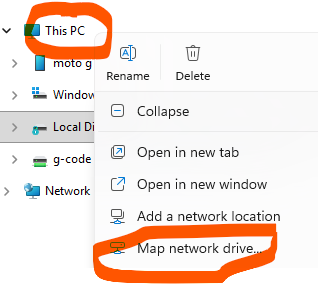
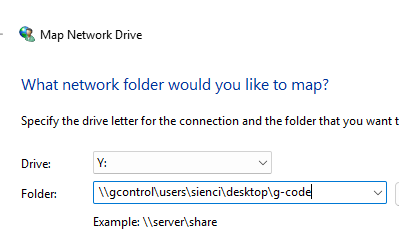
@Cam135 That might be the problem. I’m not at my computer to give you detailed instructions, but if you right click on File Explorer, you should see an option to Map a drive or file share. If you type in the UNC path that you see, it will assign a drive letter to it.
Thank chuck I’ll definitely look at tha when I get home.
@Cam135 In Windows 11. For the folder, you can manually type the UNC path or browse to the path you see in File Explorer
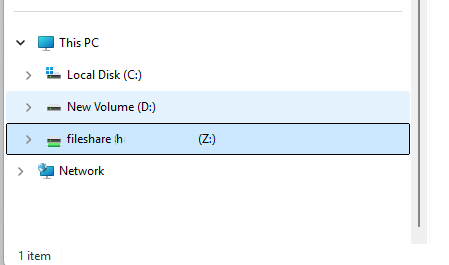
@Cam135 hmmm. Weird that you can’t see z in gSender. Map it again to another letter (F?) maybe?
Your internal network IP is likely 192.168.x.x. or 10.10.x.x. So no real security issue in showing it here and no need for the redaction.
@Cam135 oh, and when you click on Z, do you have to enter a password? Or does it automatically reconnect?
it connects automatically. Funny enough Gsender must have knew we were talking about it and scheming ways to force it to work and got scared. Because I opened it after renamed the Z drive to F and both Z and F were there. I love software! Thanks for all your help its very much appreciated.