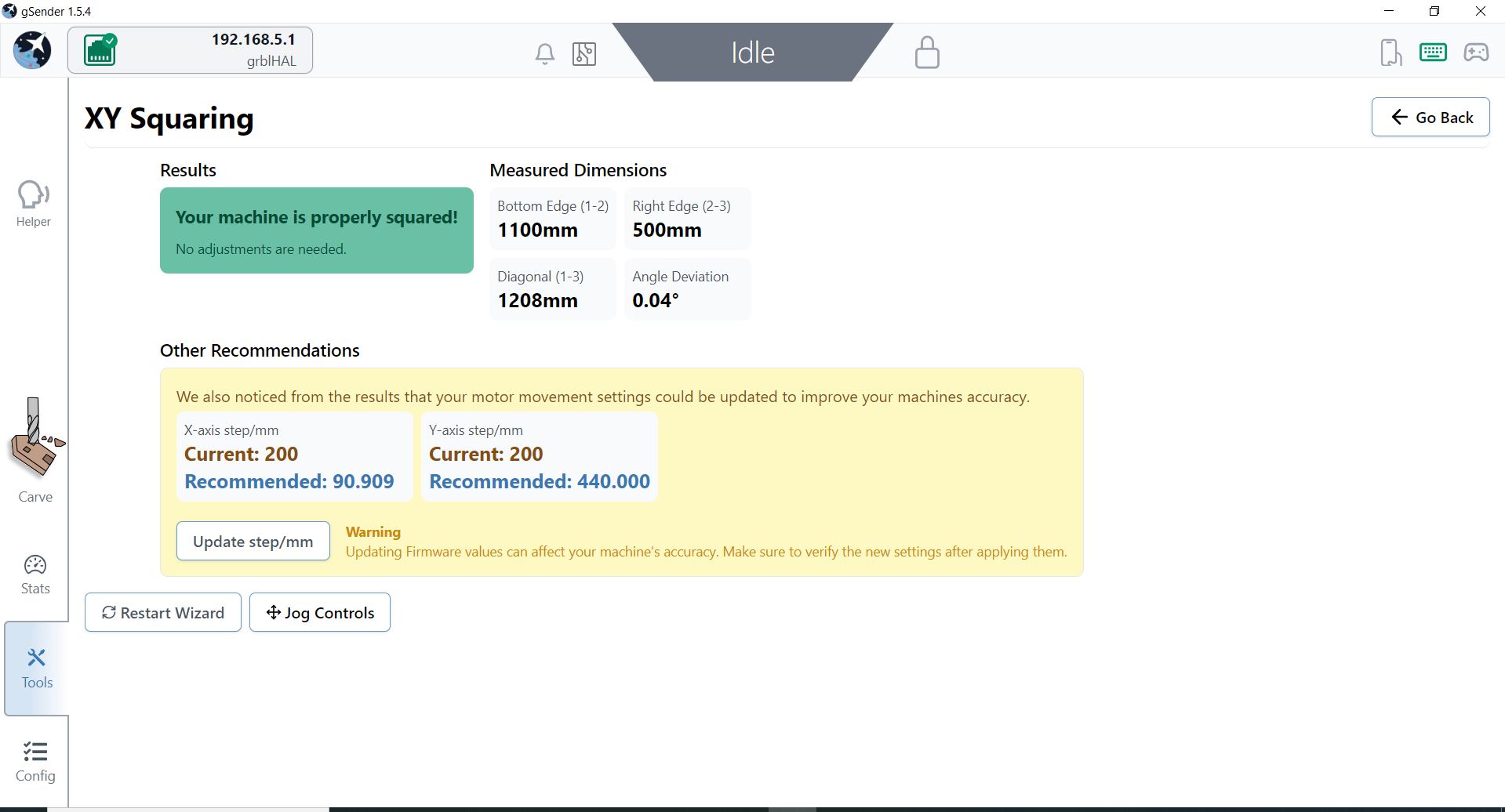
I’ve always been bad at wrapping my head around some of the gSender settings and making sure that everything is properly dialed in. I did my XY Squaring and everything on my machine is square, but gSender recommended that I update my Steps/mm for both the X and Y axis. Maybe I don’t fully understand what the values stand for, but they seem like big changes for a machine that is dialed in square? Please feel free to “school” me on why these values are correct.
X-Axis Steps/mm
Current: 200
Recommended: 90.909
Y-Axis Steps/mm
Current: 200
Recommended: 440
The steps/mm is related to squaring but just because the machine is square doesn’t mean the steps/mm is correct. If both the X and Y were of by the same percentage the triangle created for the squaring test could be a right triangle, just one of the wrong size.
That said, the numbers suggested seem way off to me. There is a separate test under ‘Tools->Movement Tuning’ that you can use to tune the steps/mm for each axis independently. Maybe that one will work better? I wouldn’t expect an axis to off by more than 1-2% never mind less than half of one and more than double the other.
If all else fails you can just do the math yourself as the equation is not that difficult. Let’s say your steps/mm is 200 and you move the machine 100mm but measure 99mm. The equation for that would be 200/99 = NewSteps/100. Solve for NewSteps is NewSteps = 20,000/99 or 202.02 steps/mm. You’d then round that to 202 and use that number.
Hope this helps. Also I’m assuming you have a Sienci machine because the defaults on my LongMill are 200steps/mm. If your mill is different you might need different numbers but it would be very obvious that your cuts are the wrong size if the suggested changes needed to be done.
Hi @Tpoole1988, I just looked into this and it appears to be a bug in the squaring tool. We’ll look into it and get back to you
@Tpoole1988 could you try repeating this in 1.5.7? It should be fixed now