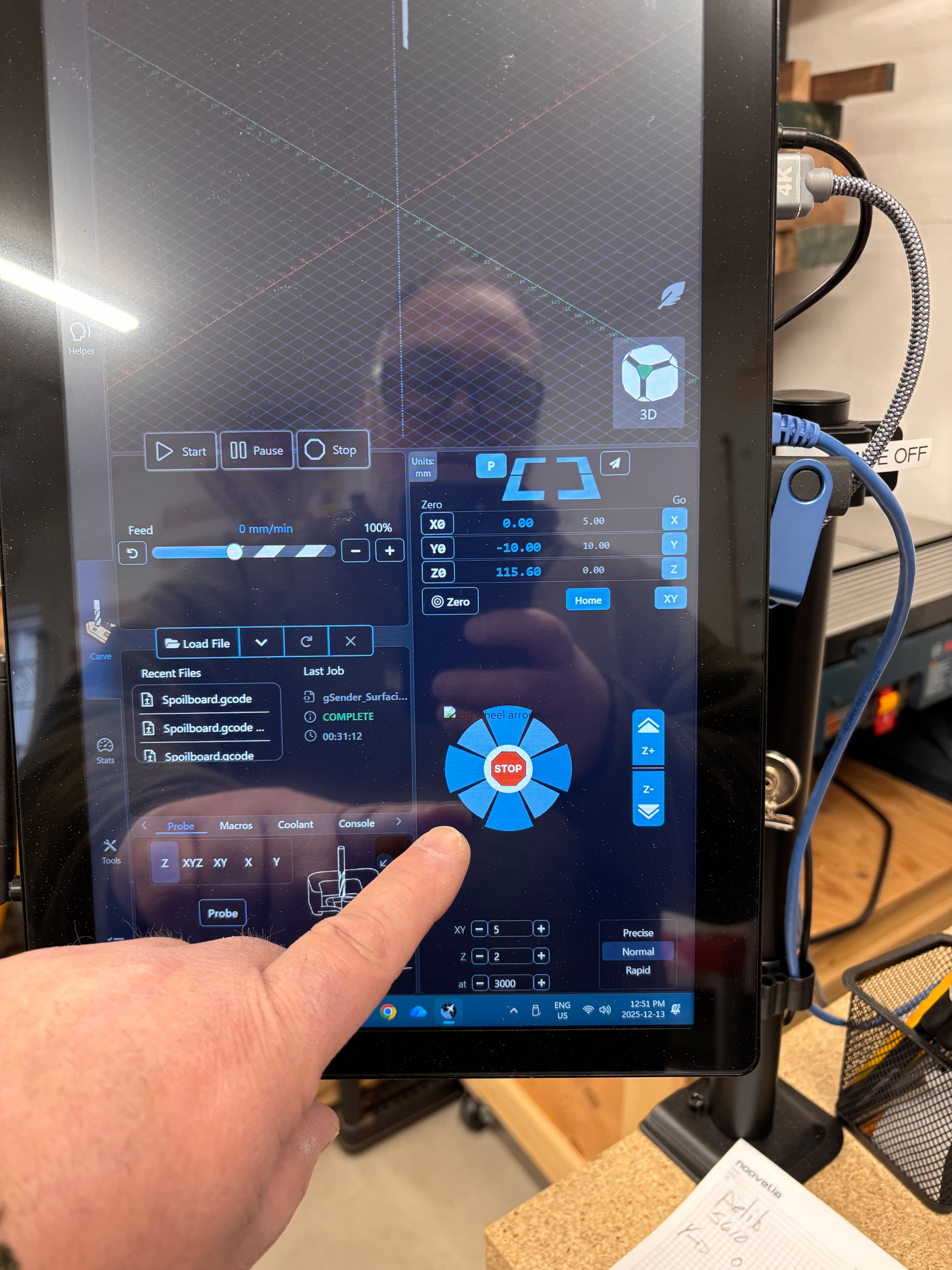
From time to time, my interface shows up like this. Do you have any idea what the problem might be?
I’ve seen gSender have problems if the screen resolution is too small. The recommended resolution for my CNC’s tv used as a monitor is 1366x768 and gSender didn’t like it and had layout problems. At 1920x1080 it’s fine but small text is sharper in 1366x768. I haven’t tried the smaller resolution in awhile to see if it’s gotten any changes in recent versions.
With your screen in portrait mode that could be causing the width to be smaller than what gSender wants.
Hi Michael,
I don’t think it’s the résolution because everything is fine except the jog arrows. I’d say the display works better in portrait mode than in landscape.
I see what your pointing at now! I’m used to the panel with jog controls being to the right of the visualizer and I thought you were pointing at the whole panel. If I split screen gSender I get the layout you have.
It looks like the jog buttons are made of two layers and the top one is missing. Out of my depth…
This is intermittent if the graphic doesn’t load on app start correctly - this should be fixed with packaging updates in gSender Edge and upcoming 1.6.0 release.