Hi,
I struggle a bit with getting the manual tool change to work in gSender 1.5.5. I use a Genmitsu 3020 Pro Max V2 CNC machine. gSender is installed on a Windows 10 laptop (fully patched). Connection is over USB.
Usually, my CNC jobs run just fine with gSender. Now, I started out with my first job that uses more than one tool. The gcode is generated by ESTLCAM, I tweaked the post processor to use a M0 instead of M6 as my machine’s GRBL does not understand M6.
No matter what I set in the Tool Change options (even “Ignore”), the CNC stops and I get the following error message, when the pause for the tool change is going to happen:
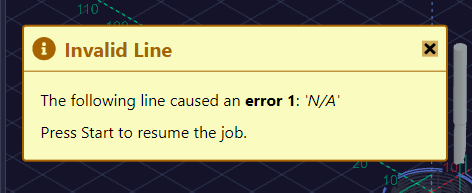
This is the console output:
[...]
ok
G02 X-4.7500 Y-8.2272 I-9.5000 J0.0000
ok
G02 Y8.2272 I4.7500 J8.2272
ok
G02 X9.5000 Y0.0000 I4.7500 J-8.2272
ok
G02 X8.0000 Y-1.5000 Z-9.6250 I-1.5000 J0.0000
ok
G00 Z5.0000
M05
feeder
G4 P0.5
ok
ok
ok
ok
ok
ok
ok
ok
ok
error:1 (Expected command letter)
If I resume, it simply continues with the job, even if I have enabled one of the wizards for tool changing.
If I remember right, I only saw the wizard once after resuming.
This is the gcode at the position where the tool change is going to happen:
[...]
G02 X-4.7500 Y-8.2272 I-9.5000 J0.0000
G02 Y8.2272 I4.7500 J8.2272
G02 X9.5000 Y0.0000 I4.7500 J-8.2272
G02 X8.0000 Y-1.5000 Z-9.6250 I-1.5000 J0.0000
G00 Z5.0000

(No. 2 Chamfer: Helical drill 1)
M05
M00
M03 S10000
G00 X11.5000 Y0.0000 Z5.0000
G00 Z-0.5000
G02 X-5.7500 Y-9.9593 Z-0.8333 I-11.5000 J0.0000 F300
G02 Y9.9593 Z-1.1667 I5.7500 J9.9593
G02 X11.5000 Y0.0000 Z-1.5000 I5.7500 J-9.9593
G02 X0.0000 Y-11.5000 Z-1.7500 I-11.5000 J0.0000
G02 X-11.5000 Y0.0000 Z-2.0000 I0.0000 J11.5000
G02 X5.7500 Y9.9593 I11.5000 J0.0000
G02 Y-9.9593 I-5.7500 J-9.9593
G02 X-11.5000 Y0.0000 I-5.7500 J9.9593
G00 Z5.0000
G00 X0.0000


M05
M30
(Sorry, I cannot upload the full gcode file as new user).
I tried sending this gcode with UGS without any problem, meaning it correctly pauses the job (HOLD) and can continue after tool changing.
I am not quite sure if this is really a bug or if I missed something crucial here…
I know that I can simply put the chamfering in a separate gcode, so no tool change logic is involved. This works as well but getting tool change to work would simply be a bit more convenient 
Thanks a lot for any support in this matter, Ben