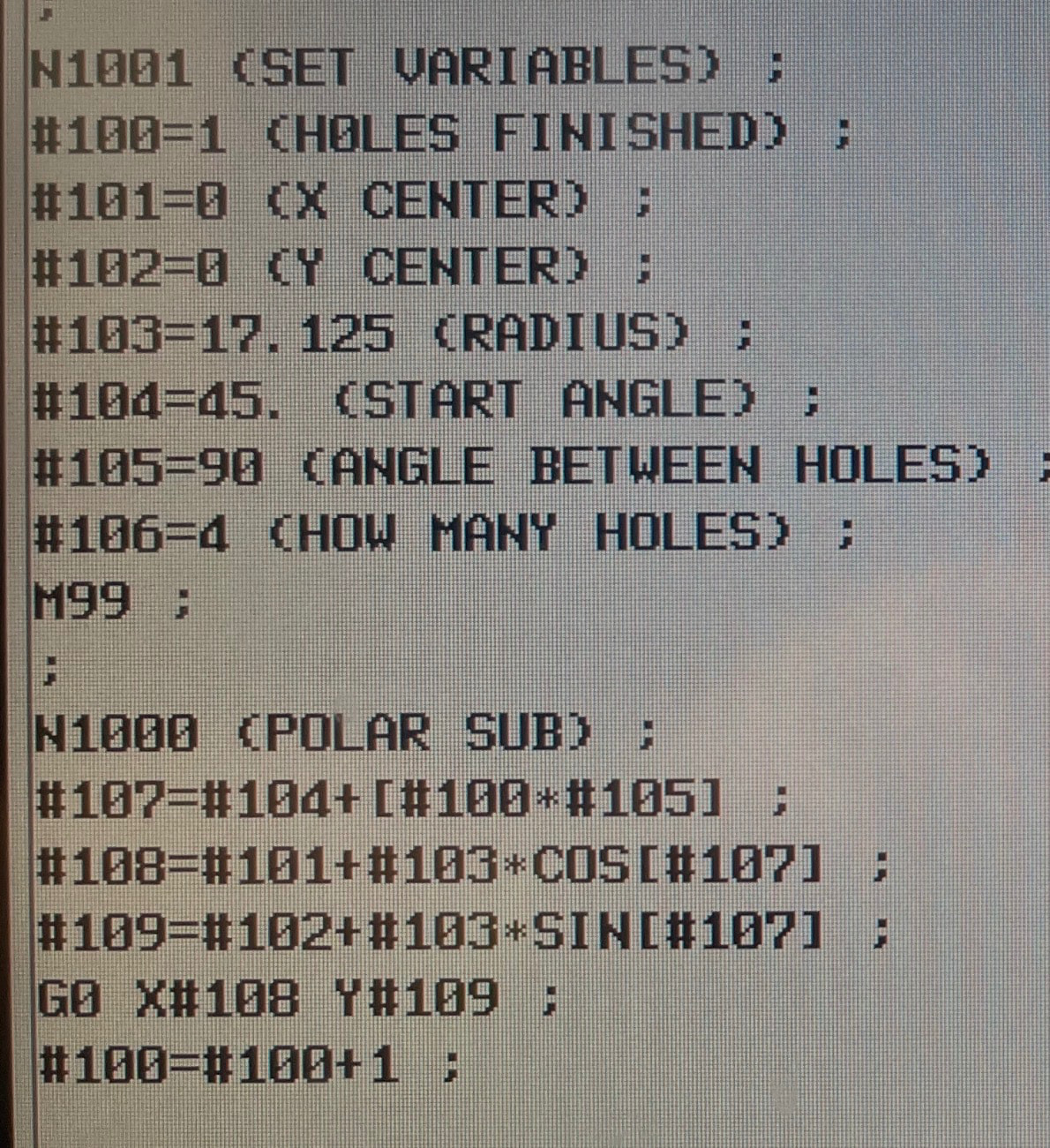
Does Gsender not allow mathematical macros?
for instance, this bolt circle macro:
If not, how are people working around this?
@scottwhisler Your syntax might be wrong. I think variables should be defined with % instead of #
Hi Chucky,
Thanks for responding.
Yes, this code is from a macro I wrote for a fanuc controller. I just threw it out as a sample of what I’m looking to do. I have not found success yet trying to do bracketed math calculations.
I read that some GRBL controls don’t allow them, hopefully Gsender isn’t one of them.
You weren’t super specific here on your file type or controller/firmware type so this answer will be equally non-specific.
If you are trying to write a gSender macro, you can do basic math/variables using the docs provided by Chucky. These expressions are evaluated through a ECMAscript interpreter before being sent to your controller so you’re able to use the full JS library for math functions on top of basic arithmetic. This will give the same result on grbl or grblHAL controllers since it’s evaluated before being sent to the controller by the sender.
So for example, you could use Math.cos(myVal) in your example
If you are using grblHAL, and are looking to write more in-depth g-code files or SD macros (not gSender macros), you are able to use NGC expressions, which are similar to linuxCNC standard and probably the closest to your Fanuc example. This must be compiled in to your grblHAL firmware.
In general, if it’s expressions/logic inside a sent file, you’ll need to make sure that your controller supports it, it’s not a gSender responsibility, it’s the firmwares responsibility to evaluate.
See documentation here:
We are using NGC expressions extensively in our new ATC system macros, so if you’re looking for real-world examples you can check out that repo:
Thank you for the reply.
I’ve only been here a short while, but it seems this is one of the most helpful and friendly groups I have had the pleasure of joining.
Scott, I wrote some macros that help probe corners, circular hole centres etc. with my 3D probe, and also one that uses circular geometry to calculate the rotary axis centre height (Z) by probing the outer curve of the chuck.
This uses Sin() etc amongst other maths, so hopefully gives you some insight into what is possible.
(PRB.YZ X-aligned Shaft CL-TOP with Trig-Centre-Calc Z zero)
; Set user-defined variables
%PROBE_LAG = 0.20 ; Lag from touch to trigger
%PROBE_TIP_DIA = 2.0 ; Diameter in mm
%PROBE_BLOCK_X = 0 ; Probe/puck thickness, X
%PROBE_BLOCK_Y = 0 ; Probe/puck thickness, Y
%PROBE_BLOCK_Z = 0 ; Probe/puck thickness, Z
%PROBE_PROBE_RANGE = 16.0 ; Range that G38.x will use
%PROBE_CLOSE_RANGE = 1.0 ; Distance to retreat before slow probe
%PROBE_PROBE_SLOW = 50.0 ; Slow probe rate for G38.x
%PROBE_PROBE_FAST = 150.0 ; Fast probe rate for G38.x
%PROBE_DROP_BY = 7.0 ; Distance Z drops before probing (typ double WITHDRAW)
%PROBE_WITHDRAW = 3.0 ; Distance axes pull back after probing
; Wait until the planner queue is empty
%wait
; Keep a backup of current system status
%WCS = modal.wcs
%PLANE = modal.plane
%UNITS = modal.units
%DISTANCE = modal.distance
%FEEDRATE = modal.feedrate
%SPINDLE = modal.spindle
%COOLANT = modal.coolant
; *** Ensure we are in the right mode
G21 ; Make sure we’re in mm
M5 ; Just to be sure, ensure spindle is stopped
G91 ; Incremental mode
G54 ; Ensure we are in ‘the usual’ co-ordinate plane P1/G54
; *** Z Probe, No Zero set *** Downwards is -ve
G38.2 Z[-PROBE_PROBE_RANGE] F[PROBE_PROBE_FAST] ; First probe quickly to find Z
G0 Z[PROBE_WITHDRAW] ; Pull up Z to clear chuck/centre
; *** Y Probe Start Position ***
%YSTART = posy ; Capture original Y centre
G0 Y[-PROBE_PROBE_RANGE] ; Move -forward towards front of machine
G0 Z[-PROBE_DROP_BY] ; Drop Z below top of chuck/centre
G38.2 Y[PROBE_PROBE_RANGE] F[PROBE_PROBE_SLOW] ; Probe TO +Y rearwards slowly
%wait
%YF = posy
%YFADJ = params.PRB.y - mposy
%PYF = params.PRB.y, PZF = params.PRB.z
G0 Y[-PROBE_CLOSE_RANGE] ; Withdraw a little -forwards
G0 Z[PROBE_DROP_BY] ; Raise Z to avoid conflict when moving
; *** Y Probe Rear Side *** Rearwards is +ve
G0 Y[YSTART - posy] ; Move +backward toward centre of chuck/centre
G0 Y[PROBE_PROBE_RANGE] ; Move +backward toward rear of machine
G0 Z[-PROBE_DROP_BY] ; Drop Z below top of chuck/centre
G38.2 Y[-PROBE_PROBE_RANGE] F[PROBE_PROBE_SLOW] ; Probe TO -Y forwards slowly
%wait
%YR = posy
%YRADJ = params.PRB.y - mposy
%PYR = params.PRB.y
%PZR = params.PRB.z
; Halve YF vs YR position difference eg: PYF=-210.0 and PYR=-190.0, YF=-10 and YR=10
%YDIFF = ((YF-YFADJ) - (YR+YRADJ)) / 2
G10 L20 P1 Y[-YDIFF] ; Set Y0 with compensations
%wait
; Move to Y centre, then re-probe Z to get exact height at CL
G0 Y[PROBE_CLOSE_RANGE] ; Withdraw a little +rearwards
G0 Z[PROBE_DROP_BY] ; Raise Z to avoid conflict when moving
G90 ; Back into Absolute mode
G0 Y0 ; Go to this new Y0
G91 ; Back into incremental mode
%YCL = posy
%PYCL = params.PRB.y
%MYCL = mposy
; *** Z Probe, No Zero set *** Downwards is -ve
G38.2 Z[-PROBE_PROBE_RANGE] F[PROBE_PROBE_SLOW] ; Probe for exact Z at CL
%ZC = posz
%MZC = mposz
%PZC = params.PRB.z
%ADJZ = (PZC - MZC) ; Diff between probe and mpos Z results
G0 Z[PROBE_WITHDRAW] ; Pull up Z to clear chuck/centre
; Calculate Z at centre of circle using ZC ± ADJ and 1/2 of (Dia = A/sin(a)) trig
(MZC: [MZC] PZC: [PZC] YCL: [YCL] YF: [YF] YR: [YR])
%ZDIFF = PZC - (PZF+PZR)/2 ; Height of Z triangle
%YDIFF = PYR - PYF ; Distance from back probe point to front probe point
%ATAN = Math.atan(ZDIFF / (YDIFF / 2)) ; this gives the angle (rads) of the acute corner
%APEX = Math.PI - (2 * ATAN) ; this is the apex angle of the triangle (rads)
%DIA = YDIFF / Math.sin(APEX) ; the diameter of the inscribed circle
(ZDIFF: [ZDIFF] YDIFF: [YDIFF] ATAN: [ATAN] APEX: [APEX] DIA: [DIA])
; Set ZCL to this calculated value
%ZWILLBE = PROBE_WITHDRAW + ADJZ + (DIA / 2) - (PROBE_TIP_DIA/2)
(PW: [PROBE_WITHDRAW] ZWILLBE: [ZWILLBE])
G10 L20 P1 Z[ZWILLBE]
; *** Wrap-up, No movement in XY or Z necessary
G90 ; Back into Absolute mode
; All done, Restore modal state
[WCS] [PLANE] [UNITS] [DISTANCE] [FEEDRATE] [SPINDLE] [COOLANT]
Andy, thank you so much!