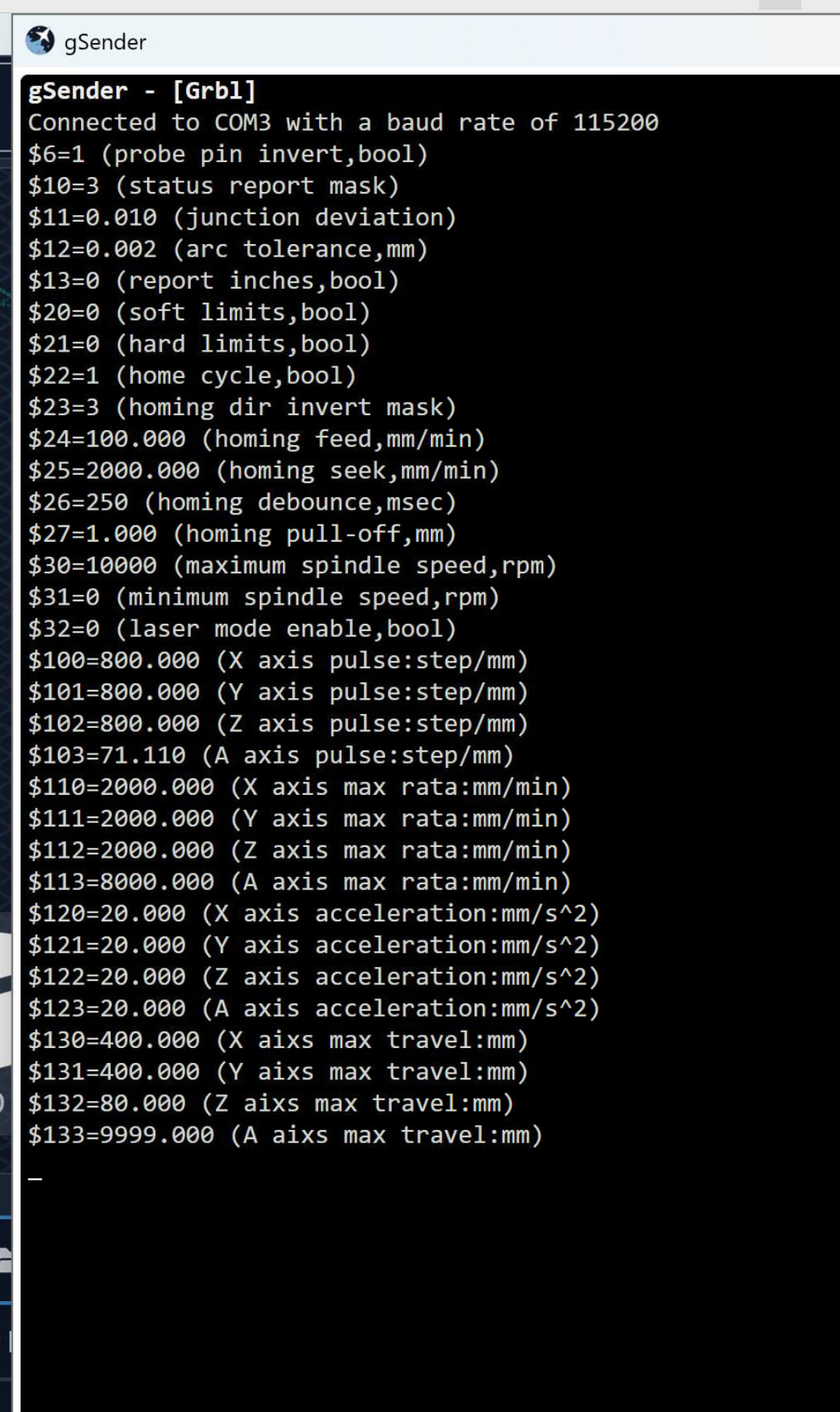
I started using GSender a little while back and have mostly enjoyed the software… I am, however, having a nighmare trying to use a fourth rotary axis…
I have a Sainsmart 4040 Pro Max, running GRBL
I am running into the following issues :
When jogging the A axis, the Y axis also moves… the 4040 Pro Max has a seperate A axis output cable for a rotary module and the Y axis does not get disconnected when using the a axis. (in fact disconnecting the two Y motors is quite difficult)
When switching back from Rotary mode to normal mode, the Y Axis resolution and rate is reset back to some arbitrary value. I saw another post from a year back saying there were plans for a default value to set it back to ( ) - this is missing from my UI, unsure if this was ever implemented
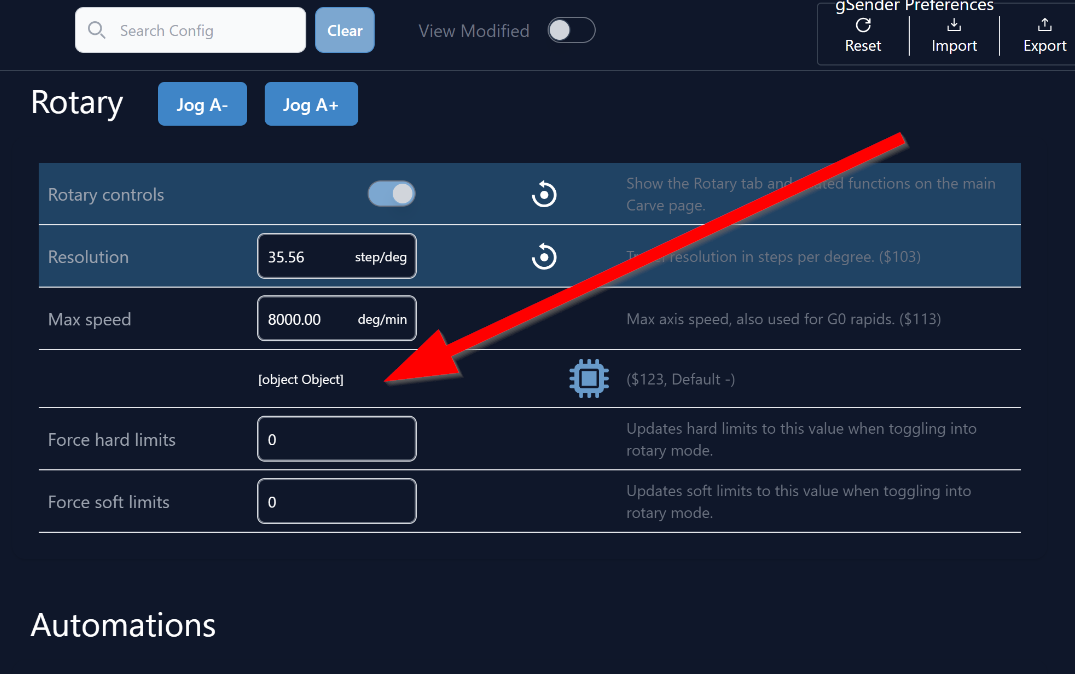
This may be the result of the update in the previous point not working but there is a UI bug in the Rotary settings where I just get a [object Object] value on the screen:
I am therefore unable to use my Rotary axis at all in GSender…. not with the Y axis moving all the time and it is a pain resetting my Y Motor values every time I switch back to non-rotary mode, if I forget my next job is shrunk to quarter of the Y size (as it resets the resolution to 200 instead of 800).
I’m sure that others here will be able to help more than I can. I’ve not even heard of 32-bit grbl.
I see one thing in your screencap that is not the cause of your problem, but will cause other issues down the road. You have $103 set to 35.56. According to the user manual for your rotary, that value should be 177.777.
Are you setting gSender to “rotary” or “4th axis”? Whichever one you have it set to, try the other one.
Thanks gwilki, thanks for pointing that out, you are correct, the value is incorrect, however my value is slightly different as I have a non Genmitsu 4th axis chuck…. I did all the calculations and now have it perfectly dialed in, rotating the correct amount of degrees in Universal GCode Sender (actually the correct value for me $103 is 71.11)
And yes, I set GSender to Rotary mode (on the main “carve” screen) before trying
@CplMulder My setup is completely different from yours so nothing that I have done may be relevant. However, when I went with the closed loop motor on my Vortex and using the SLB to drive it, I was able to remove the Y/A switch that I started out with. Then, as per the manual, I needed to change the gSender setting from “rotary” to “4th axis”.
Thanks again Grant, can you perhaps recall where you changed the GSender setting from Rotary to 4th Axis ? - can’t seem to find anything like that but this sounds promising …. I need GSender to see it as a completely separate axis to Y
I managed to get it all working ok using UGCS, just not in GSender, it seems unable to seperate Y axis from the A for me
(apologies for the slow reply… the forum bot keeps suspending me because I am new and posting a few replies)
@CplMulder Don’t you just love bots? What version of gSender are you running? I am still on 1.4.12 and I know the interface is different.
In 1.5.6, it’s not as intuitive as it is in 1.4.12. In the latter, the slider says rotary or 4th axis. In 1.5.6, it seems like the slider is “rotary” only. Turn it off. When you try this, be sure that nothing can be damaged, since my advice does not come with a warranty.
@CplMulder You, as well, Chris. I’m not suggesting a downgrade. 1.4.12 simply suits my purposes very well and I’m of the “if it ain’t broke, don’t fix it” crowd.
@SOHR I just tried it and it worked. I set grblHal as the default and checked the box for connect automtically. I shut down gSender and re-started it. It connected automatically to Hal.
It sounds to me that there are two distinct issues here:
That the Genmitsu is running a 32-bit grbl which means that the typical approach we took to rotary control is incompatible since we assume you’re running standard grbl which doesn’t have A-axis control, and thus we assume that you’ve swapped your Y-axis cable to the A-axis rather than the reality where you have two separate cables.
This means that to run the Genmitsu correctly, you need to connect using grblHAL since then that allows simultaneous 4-axis control, however newer versions of gSender are auto-connecting to grbl instead of grblHAL so that’s also causing issues.
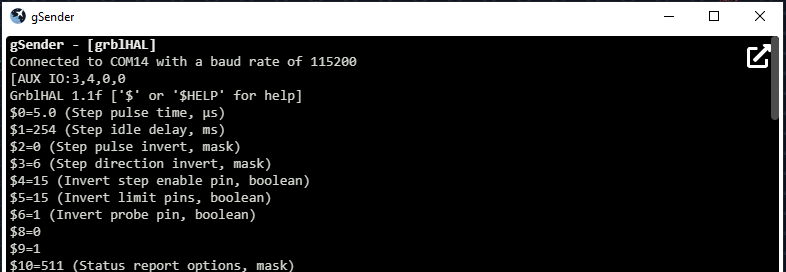
We could definitely fix the auto-connect issue here and that seems like it would resolve these issues the only information we’d need is if either @CplMulder or @SOHR you could copy from the console or send a screenshot of the initial connection lines for your controller in this thread - then we could modify the auto-connect to look for those lines and consider them as grblHAL instead of grbl. For example:
In recent tests, I’ve discovered that while I can establish a grblHAL connection in version 1.4.12, when I start a normal 3-axis machining operation with grblHAL, it is regularly interrupted at each milling line, and I have to manually restart the process.
It’s also worth noting that the $$ command in the console is not possible with grblHAL.
Currently, I’m working with version 1.5.6 in “grbl” mode for normal 3-axis machining, and it works perfectly.
For 4-axis machining, I had to switch to ugs-sender.
I have made 2 videos and uploaded it to my google drive.
One of it it will be show the connection with 1.4.12 and in the other one 1.5.6
Also .txt with concsole info.
Here is the link:
When it is connected to grblHAL in vers.1.4.12 all axis works,
$$ in console don’t work.
When i start a normal 3-axis machining operation with grblHAL, it is regularly interrupted at each milling line, and I have to manually restart the process.

 the only information we’d need is if either