I am having an issue where second side operations don’t quite line up to the first side. I verified the CAD/CAM model and I am trying to figure out what is going on.
To set up the second side I do an x/y probe to find the corner of the work piece. This then becomes my x/y zero. The model itself has it’s origin at the same point.
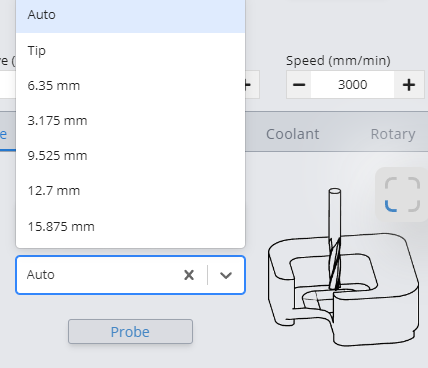
This might be somewhat unclear but I do not (at this point) want to get into the hairy details. My question is in regard to the auto probe. In the gSender settings you select which probing system you use. That is currently set to ‘auto zero touchplate’. On the right side of that setup screen is a listing of tools and you can even add additional tools.
What is the point of those settings? They appear to be non-selectable but there must be a reason why they are there.
In my probing to set up for the second side operations I have never selected a particular tool. Since the macro that runs measures both sides of the autoprobe block for both x and y. I assumed that it would just calculate the middle point which would seem to indicate that diameter of the endmill is irrelevant. I suspect that I have a basic misunderstanding here somewhere because there are tools listed and I am not using these listed tools anywhere in my procedure.
I would also like to add that the endmill I am using is 1/8" with a 1/4" shaft and the transition between the 1/8 and 1/4 portion is right around the top of the auto zero block. I am not sure if the probe touches the cutting flutes or the larger shaft.
More digging and I have found a tiny error in my model design so never mind …
I still would like to know why there are tools listed in the probe setup screen.
I am sorry to be dense but I am doing x/y probing with the auto probe and gSender does not allow me to select a tool. I do not understand the need since gSender can determine bit diameter when it touches off the auto probe block. Am I missing something?
a) Not everyone has an auto Zero touch plate where it calculates the bit diameter for you.
b) You can still use a specific bit diameter when using the Auto Zero probe which removes two of the touches for a quicker probe cycle. This lets you use the Auto zero block like a more traditional touch plate.
Ahhhhh … I figured it out with the help of your picture. I had not noticed the quick select field in the probe operations when the mill was connected.
Thank You!