This is not really a problem, more of a request. I am using the auto touch plate in combination with gSender and all appears to be working fine. After I zero the Z-axis, the tool retracts to a new position. The issue is that I would like it to retract higher so that I have room to install my dust collector “shoe”. Is there a place where I can change the setting as to how high it retracts?
3 Likes
Hello! @Jimc137, I agree! I have the same difficulty as what you reported. My current work around is I document the Z height after using my auto touch plate, raise it, install my dust shoe and lower it to the original height. While not perfect, it makes installing my dust shoe easier. Hope this helps!
Jake
1 Like
Hey Jake,
I beleive once it is zeroed, it doesn’t matter if you return it to it’s origional heigt. The zero-heigt remains the same unless you bang it into max height.
But, out of fear of losing my zero, I too bump the z up with a known amount (mostly 25mm) en drop it that same amount. mostly when moving xy direction to probe flatness around my stock using calibrate and a touch plate.
Needed it is not, but doing things consistantly helps minimize triggering and ensures recovering - after the sure to be made oopsy.
I wonder if the retraction setting is something usable if you use z-probe with the z-thickness set to the thickness of the required touch plate.
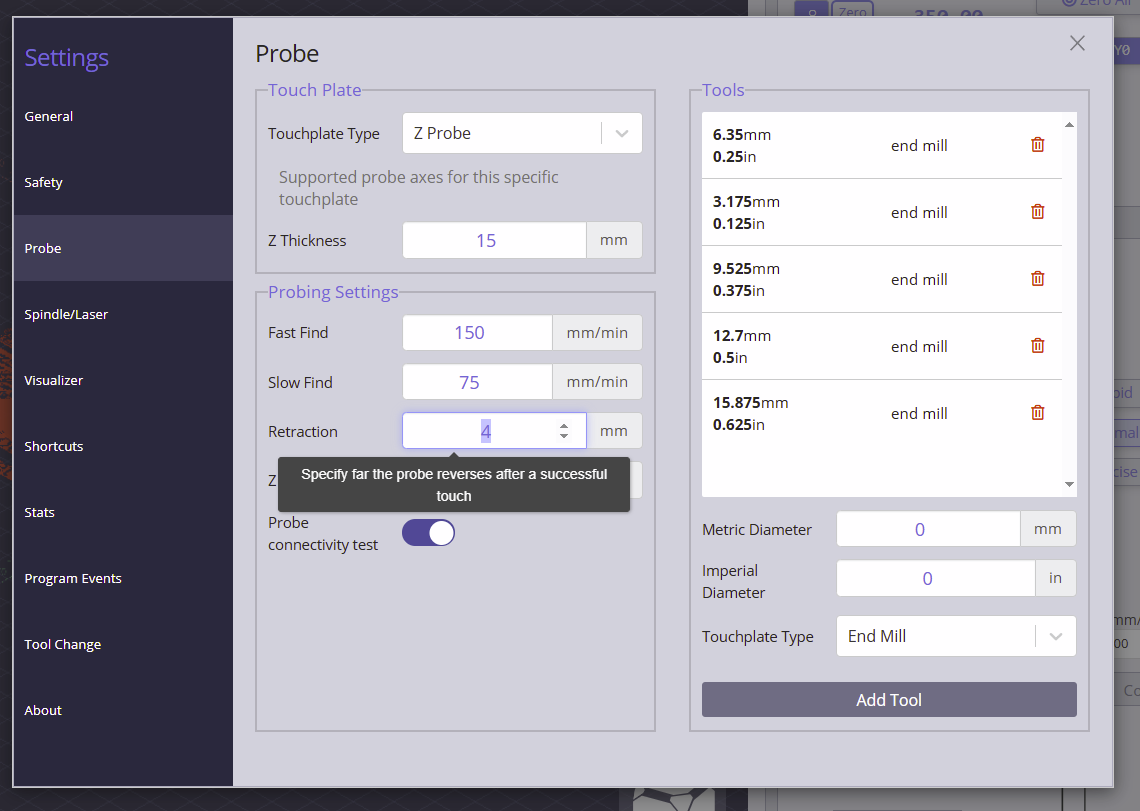
Something to play around with once I get out of my laser jobs.
I think that makes sense, we’d need to figure something out though: how high of a movement would you want to have happen? Since of the movement is quite a bit then it could be a risk where if you Z-prove taller material your Z-axis runs out of space to move
In a perfect world, it would be a variable in the settings. Currently, I raise it about 1/2” above the current value, so maybe 3/4 to 1”?
That is the distance it retracts between fast and slow probes.
I ended up writing a macro for the z probe and raise enough to install dust probe.
I understand the that after using the auto zero touch plate, the bit moves to xy0 and 1mm above Z Zero.
Is there a way to adjust that 1mm to something larger? Say 19mm (3/4") or something similar?
1 Like
I was wondering this as well. I always have to manually raise the Z to put the dust show on.
gSender does have a safe height feature but I’m not sure if it affects probing or not. If you decide to try the safe height in gSender be aware that it’s behavior depends on whether you have limit switches/sensors or not.
If you don’t have switches the safe height is a distance up from zero but if you do have switches the number is a distance down from the top of the Z. At least that’s how it used to work and I remember they added a section about it in the docs but I can’t seem to find it anymore.
I don’t use the safe height in gSender so I’m not sure if it’s behavior has changed or not. I’d be careful, keep the stop button handy, until you figure out it’s behavior. Another thing is it has no effect on your gcode like a safe height in Vectric, Fusion etc. It’s only used for some gSender functions when not running gcode.
The Safe Height only affects movement. That is, the spindle moves to the safe height when you use the Go to XY0, or go to the corners. It’s an AltMill, so it does have limit switches.
I have my safe height set to 1.5".
1 Like
I’ll jump in here, cause I am still at 1.2.2 and know I trail behind, but this final retract seperate from probing retract would come in handy when I have a hold down running accros my work piece. I implement such a hold down technique when I need to mill on the edges.
This introduces the need for a retract hight after probing to not run into the contraption when going xyzero (the clamp strip runs middle project). I end up setting a 35mm retract watching the probing routine creaping down for ages and some.
I use the same manner when I probe machine bed with a high project. It works, but I think the #3 request is to help the reduce probing time in these situations.
I however am not requesting this, I get it though.
1 Like
Having the cutter raised above the height of the touchplate after probing would make removing the touchplate a bit easier.
It would also be nice to have the touchplate cables made of a more supple cable such as the cables used with the inductive sensors.
1 Like
It would be great to have an option on the z height after a XYX and Z zeroing .
Currently on a xyz zeroing the spindle raises only a few mm above project and on just Z zeoring it raise 10mm (i believe).
The second coarse of action that always follows is to manually raise the Z height to be able to put on the dust boot.
Why not have an option to select how high you want it to go? and/or raise to max height option.
@mwarde Welcome to the group, Matthew.
I’m sure that the Sienci gurus will consider your suggestion. While waiting for a possible gSender revision, you could easily write a macro to raise Z to whatever height you want and tie that to one of the programmable buttons on the eStop. One consideration will be to take into account how much Z travel you have, considering the thickness of the material and the length of the tool. If you raise too much, you will top out Z travel and lose your Z0. Of course, this will be the same issue that Sienci must consider. 
1 Like
Would you loose z zero on an Altmill (closed loop)?
@Jens Good question. I have no idea. It would be easy enough for any AltMill owner to test it. Hint, hint. I, for one, would be interested in the answer. I don’t have, nor ever will have an AltMill, but it would be good to know, nonetheless.
The z axis already moves after a zeroing…im just wanting to be able to select the height to what it moves to.
after a touch plate xyz zeroing… the spindle moves to X 0 Y 0 Z 2… why not Z have go to a selectable height
after a z zeroing… z goes to 10… same thing a selectable height
@mwarde If I remember correctly from the test I did a few days ago, xyz zeroing goes to z1. Z zeroing goes to z15.
Your suggestion has been made before but it’s good to ask again. The more people ask, the more it’s likely to be implemented.
One reason to have it raised higher (and stay higher) is if you probe a corner but have the touch plate incorrectly configured to probe another corner. The bit will hit the touch plate as it moves, thinking there’s no touch plate material to hit.
@Jens As I said before, yours was a good question. It occurred to me after my first reply that just maybe I could try to reply.
I have the closed-loop stepper on my Vortex, connected to the SLB on my LM Mk1. I have no switches.
I set Z0 using the probe module specific to the Vortex. After it set Z0, I jogged in X a bit and clicked on “go to Z0”. The bit lowered until it was precisely centered on the tip of the live centre in the tailstock - exactly where it should have been.
Then, I raised the router until it hit the top of its travel, and I let it grind for a second or two.
Finally, I clicked on “go to Z0” again. It lowered past the tip of the live centre by quite a bit. So, in short, it lost Z0.
Now, I will repeat that I do not have switches, unlike the AltMill owners here. Their results may be different. For all I know, they could raise up in Z until the switch stops the movement, then hit “go to Z0” and the router will return to where is should be.
All I can say is that, within the context of a closed-loop stepper on my LM, it does not prevent the possible problem that I mentioned in my first reply to @mwarde.
I made a mistake on my earlier comment/question - it has nothing to do with closed loop and everything to do with limit switches. I suppose the closed loop motor will fault out when it hits the physical stop but I think z position is lost by that point.
That is the root of the issue - if you ‘grind’ you are loosing steps and therefore z position.
On an Altmill, z travel stops when the limit switch is triggered (or, if you are properly home’d and configured, when the mill thinks it has reached the travel limit)
Been too busy to try this out so far.
1 Like