Spindle locked at 7500 RPM Altmill 4x4 with 2.2kw Spindle and VFD
I have everything set up but the spindle will not run at any speed other than 7500 RPM. I can turn it on, reverse it, and stop it with no issues.
If I set my lower limit to 3000 RPM and try any setting under 7500, it just revs to 7500 and stays there. Same result when trying to go higher. After this I get error code 14, and both lights are blinking on the SuperLongBoard EXT.
Setup:
- Altmill 4x4
- 2.2kw Sienci’s Spindle and VFD
- gController
- GSender (latest version, updated firmware)
What I’ve tried:
- Followed the Spindle stuck at 7500 RPM guide
- Followed the Alarm 14 / Alarm 19 guide (everything except switching to MODVFD and checking internal cables, as I can’t find instructions for opening the enclosed VFD)
- Updated firmware and GSender
- Reset settings to default on the SuperLongBoard and GSender - same issue over both USB and Ethernet
- Rebooted everything multiple times
- Unplugged and reseated all electronics
- Adjusted baud rate in both GSender and the VFD - no change
- Increased timeout to 15 - no change
- Triple checked outlet - confirmed running at 220V
- All motion axes working correctly
Key observation: I switched the VFD to manual mode to control speed with the front panel knob and got the same result, I can watch it ramp up and then it just hits 7500 RPM and stops there.
Everything has its own correctly sized breaker.
Next step I plan to try is switching to MODVFD.
I have a support ticket open and am waiting to hear back. Any other suggestions in the meantime would be appreciated. Sorry if this isn’t the correct format for this forum I just stuck with how I add to tickets at work.
Followed this as well How-to-Diagnose-Spindle
@SlimeTime Looks like you did every troubleshooting steps except open the power connector to the spindle and check for a broken connection (making sure it’s not plugged in first)
Update: MODVFD Same issue.
I’ll grab my multi meter and check er out tomorrow Thanks @Chucky_ott. Was going to have so by’s over to check er out but now its just going to be a good old shed party.
Not sure if this would be a help but I found this:
The “Hz Display” Communication Reset
A known firmware bug occurs when enabling RS485 Modbus control where the VFD display defaults to an arbitrary internal threshold (7500).
- Power cycle the entire system: Turn off the SLB-EXT via the toggle switch, then unplug the VFD completely from its outlet.
- Boot back up: Plug the VFD back in, and flip the SLB-EXT back on.
- Change Display Metric: Look at the front face of your VFD. Press the SHIFT key repeatedly. Look for the display unit options and change it so the active monitoring screen is explicitly set to display Hertz (Hz) instead of RPM.
- On Sienci VFDs, shifting the display mode to Hz often forces the internal EEPROM to flush the 7500 loop error and restores communication
I did try this but I gave it another go with your instruction’s same issue.
I gave the VFD parameters another look based on some suggestions and made some progress, though the issue isn’t resolved yet.
F011 was set to 125 — I changed it to 0 and the spindle now runs at 300 RPM instead of 7500, so something is shifting but it’s still locked to a single speed. It looks like the spindle may be receiving a fixed minimum voltage rather than responding to the control signal.
A few things that would help me move forward:
- Does anyone know where I can find a full parameter list for the VFD that ships with the Altmill? I want to go through it systematically rather than guessing at parameter numbers.
- Does anyone have instructions or a guide for opening the enclosed Ontario VFD? I can’t find anything on how to access it and I’d like to check the internal wiring.
Still waiting on my support ticket as well. Any help appreciated.
@SlimeTime Are you sure that the minimum and maximum spindle speeds are set properly? See this article for the firmware settings
@SlimeTime
These are the settings I use:
Thank you I got to the video part and watched it and said got it I didnt scroll down.
Yes everything is matching but I will check them once more just incase. Never unwilling to give things a secound shot.
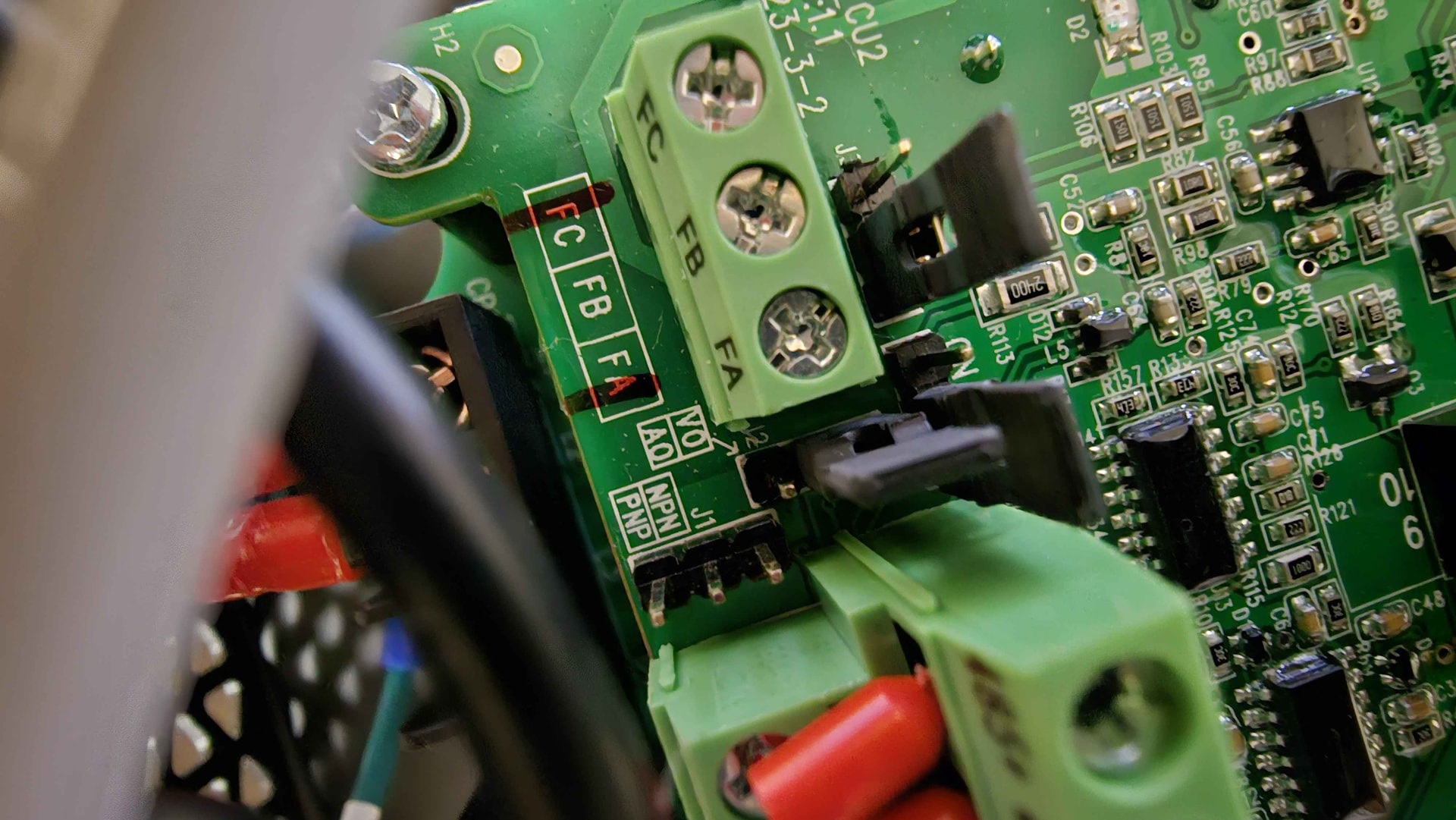
I think I found the issue there was a rattle in the vfd and a jumper fell out after shaking and routating it a bit. does anyone have a photo of the inside of one of these (control terminal area) or a schematic showing exactly where each jumper goes? I know there are at least a few in that area
Found the jumper issue the NPN / PNP jumper fell off. I assume NPN is the correct jump for a longboard. but I will test it tomorrow and post. Support said not to open it but with a jumper falling out figured I would just send it.
This worked the 0900 flashing numbers are now flashing 0000 even cleared from the VFD. Ran the Spindle Brake in just fine, it had no issues.