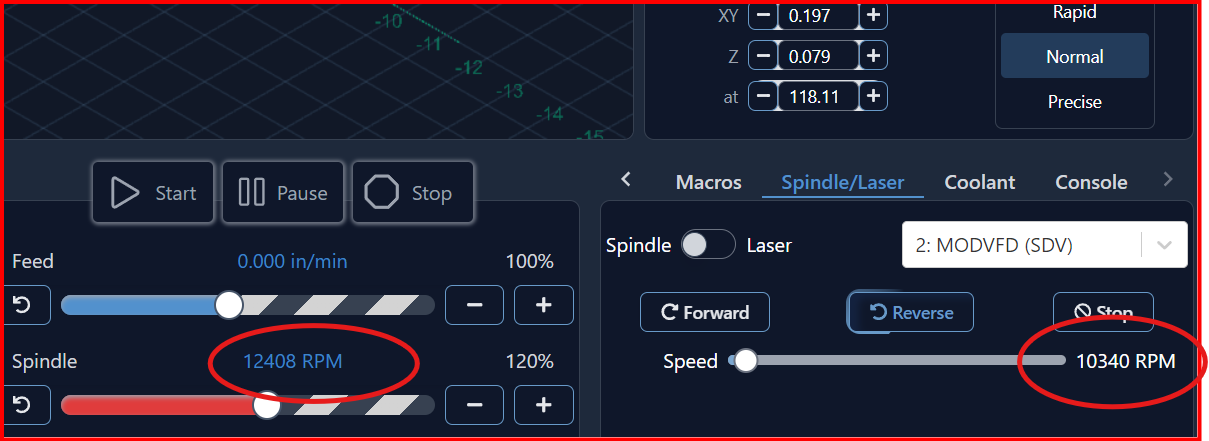
There are two controls for spindle speed. When I adjust the speed using the center panel the RPM rea-out does not update at the lower right panel. gSender 1.5.2
@JDWW Have you checked to see if this is the same in 1.5.3?
This is the expected behaviour. Both these sliders serve different purposes and are independent of each other in a way.
The spindle slider in the center panel is the spindle override, where you can adjust its speed in real-time during a job.
The spindle slider in the spindle/laser tab is the regular spindle speed adjustment. This is a fixed value you set for your spindle before you start a job.
Looking at your screenshot, it looks like you have the spindle speed set to 10340 RPM, and then you cranked the spindle override slider to 120%, which makes the active spindle speed 12408 (120% of 10340 is 12408!), so the math checks out there.
Hope that makes sense to you, let me know if you need me to clarify it further 
simple
left is for active job
right is for messing with the spindle when no file is loaded
with the slider on the right you can do checks, spindle warmup and so on, this value never changes unless you move the slider