New to community. I recently purchased the longmill 30x30. After a short run, I decided to upgrade to the autospin router. My cnc worked fine before the upgrade. After installing the new router and doing the firmware upgrade, the y-axis stepper motors are misbehaving. Using gsender, when I manually jog the y-axis, one motor goes one direction and the other motor goes the other. It does not do this every time. Usually the first time that I try to move the router forwards or backwards. I have double checked all of the connections to make sure that something hasn’t come lose. I have tried doing resets. I have uninstalled gsender and re-installing. I can tap the icon a couple of times to move the y-axis and then it will behave correctly.
Update: I tried using Candle to control the CNC. It does the same thing.
Do you have the LongBoard or SuperLongBoard? What do you mean by ‘firmware upgrade’? Do you just mean doing the AutoSpin Firmware setup or did you flash the firmware? If you flashed the firmware did you choose the right profile your controller? You’d want grbl for LB or grblHAL for SLB depending on which one you have.
You probably don’t need it but just in case here is a link to the autospin setup pages.
Thanks for you questions. I found the problem. I said that I checked all of the connections, but upon closer examination, the blue wire in one of the y-axis motors was not crimped and was not fully pushed into the connector. For now, I have crammed the wire into the connector, but I do see any way of actually crimping the wire. If anyone has any suggestions, I would greatly appreciate it. Just for the record, I did just the AutoSpin Firmware setup.
Glad you got it working! This is the type of connector you need.
You can crimp them with small pliers if your careful but it’s a real pain. A wire crimping tool like this is the correct way to crimp them. Those crimpers have a ratchet mechanism with 3-4 positions so you can put the pin in the crimper and go 1-2 clicks to secure the pin then insert the wire and finish crimping. They wont release until fully squeezed. The is no backing up so you might want to practice a bit to get a feel for it. Then when the pin is crimped to the wire it is inserted into the connector and it locks inside.
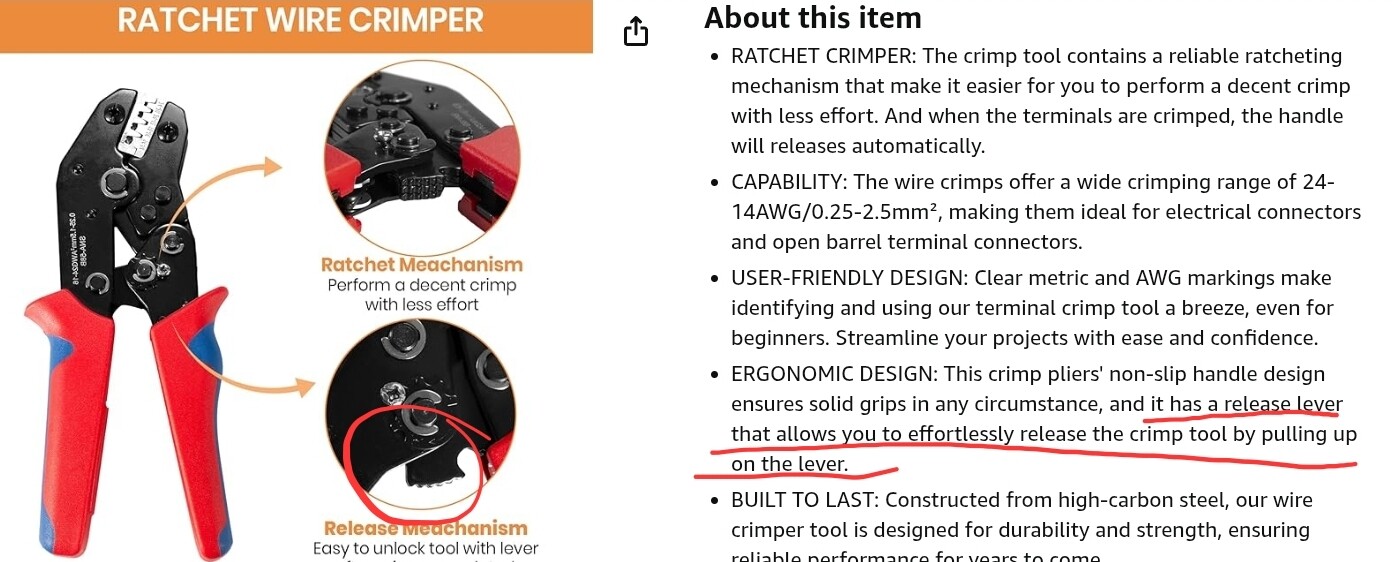
Haha! Correct again sir! I have two pairs and they both have that release if you know what your looking for and now I do. Apparently there are still things left for me to learn, who would have thunk it…
Thanks for watching my six Eddie!