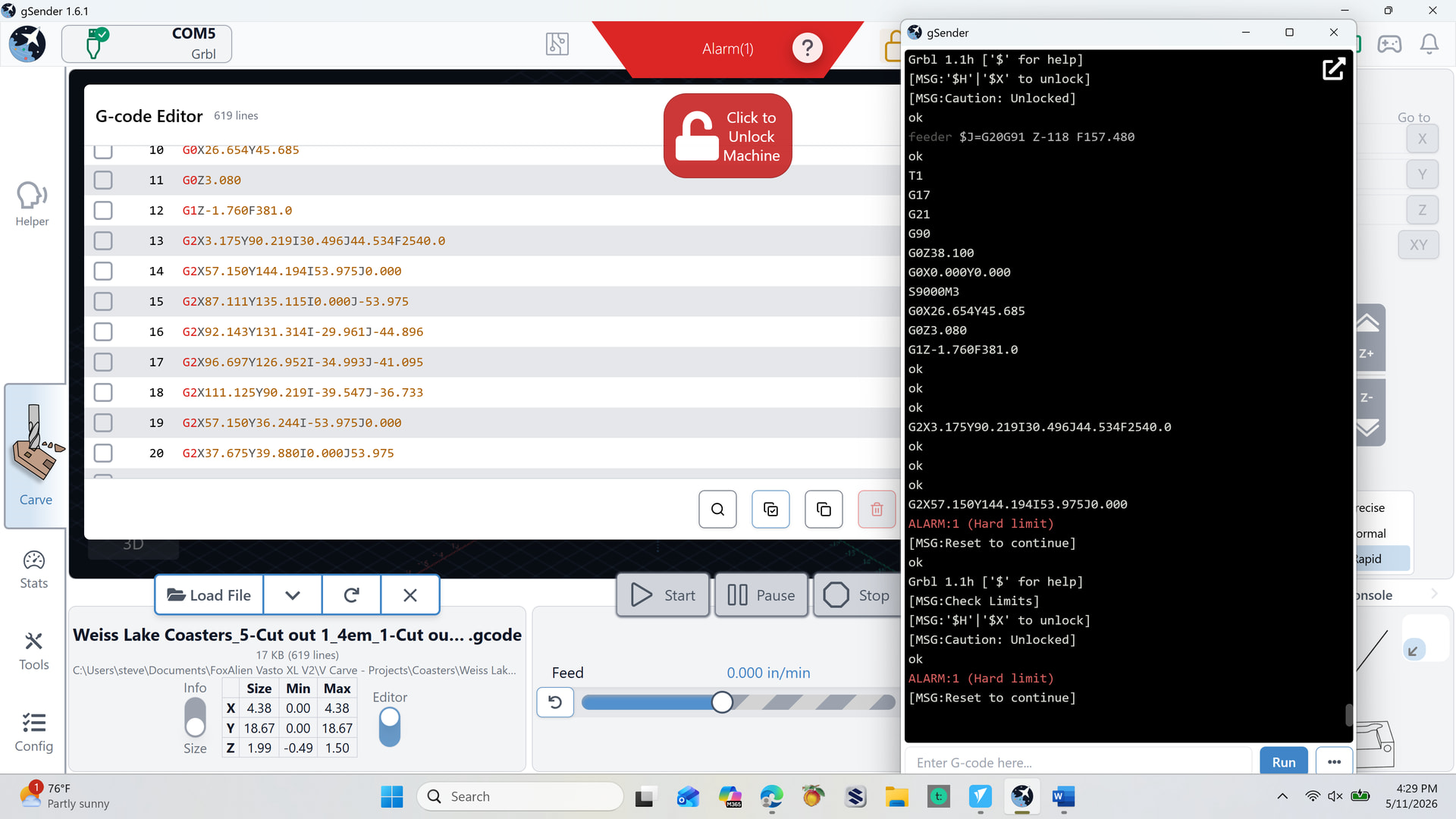
I’m new to CNC so bear with me. I have used the program for 30 projects without a problem. A couple of days ago I loaded a new project and hit start. The Z drive immediately went straight up till it hit the limit switch. Lowered it and it repeated the same issue. Turned everything off and rebooted. Same issue.
Loaded another project and had 4 successful cuts. Then on the 5th cut, it repeated the above and shot straight up till it hit the Z limit switch. I’ve rebooted everything a couple of times. Including homing.
Checked the settingsin Vcarve to make sure nothing was off (i.e. safe height). Everything looks good.
Vasto XL V2 - VCarve
This is the first lines of code showing.
Not sure where to start. Delete all programs and reload? Clean cache? What’s triggering this action?
@WatersEdge
Can you position the spindle at X0Y0, clear the console, and then run your program? It’s not clear to me when you are getting the alarm. And clean console might help.
That first feeder command, is that a manual jog that you did? G20 is setting the units to inches and the z movement is 118 . Not sure what’s happening there.
This is the first set of gcode . Hope it helps.
(VECTRIC POST REVISION)
(DBACA454EADF39A6347D6F40BF903BF0)
T1
G17
G21
G90
G0Z38.100
G0X0.000Y0.000
S9000M3
G0X26.654Y45.685
G0Z3.080
G1Z-1.760F381.0
G2X3.175Y90.219I30.496J44.534F2540.0
G2X57.150Y144.194I53.975J0.000
G2X87.111Y135.115I0.000J-53.975
G2X92.143Y131.314I-29.961J-44.896
G2X96.697Y126.952I-34.993J-41.095
G2X111.125Y90.219I-39.547J-36.733
G2X57.150Y36.244I-53.975J0.000
G2X37.675Y39.880I0.000J53.975
G2X31.996Y42.463I19.475J50.339
G2X26.654Y45.685I25.154J47.756
G1Z-3.520F381.0
G2X3.175Y90.219I30.496J44.534F2540.0
@WatersEdge I can’t really see what would cause the alarm. If you ran it following the steps in my previous post, it might help me or someone else.
Alternatively, gSender had an option to check the gcode before you run it. You’ll see which line generates the alarm.
Knowing your machine travel limits might also be useful.
I have determined that the first GOZ38.10 sends the z to the limit switch. I manually lowered it to 23.1 and it quit running up to the z limit. There is a corresponding line at the end of the code right at it finishes. What determines that height? GSender? VCarve?
@WatersEdge In the material setup window of vcarve, check your “rapid Z gaps about the material” and the “Z gap above the material” in your home start position. Then, in your toolpaths, check the “safe Z” setting.
Be sure to set the thickness of your material accurately. If you are setting Z0 at the top of the material, all these settings are based on that height/position.