I just noticed that when running an Outline test before cutting, gSender followed the long “rapid” part of the path up to the toolpath starting point. Vectric is good at choosing to start wherever it damn well pleases. In this case, a pocket was started 15" away from the zero corner.
This showed the Outline of the job as starting XYZ=zero (the center of a 1" diameter tool) and sloping over to the starting point 15" away. This made me question my toolpath and equipment which I spent doing for 15 - 30 minutes.
The job gCode was fine and cut normally, but the Outline was/is screwed up.
You can move the start point on a vector, but that doesn’t mean the toolpath generator will observe that start point. It won’t for sure if you use a pocket toolpath with automatic layer selection. And in other ways. Change / add points and make them the start point, but the pocket toolpath will not recognize the change.
I don’t know how gSender goes about creating an outline but I’d be interested the broad strokes. I was thinking of how I’d TRY to do it. This is how I’d approach it.
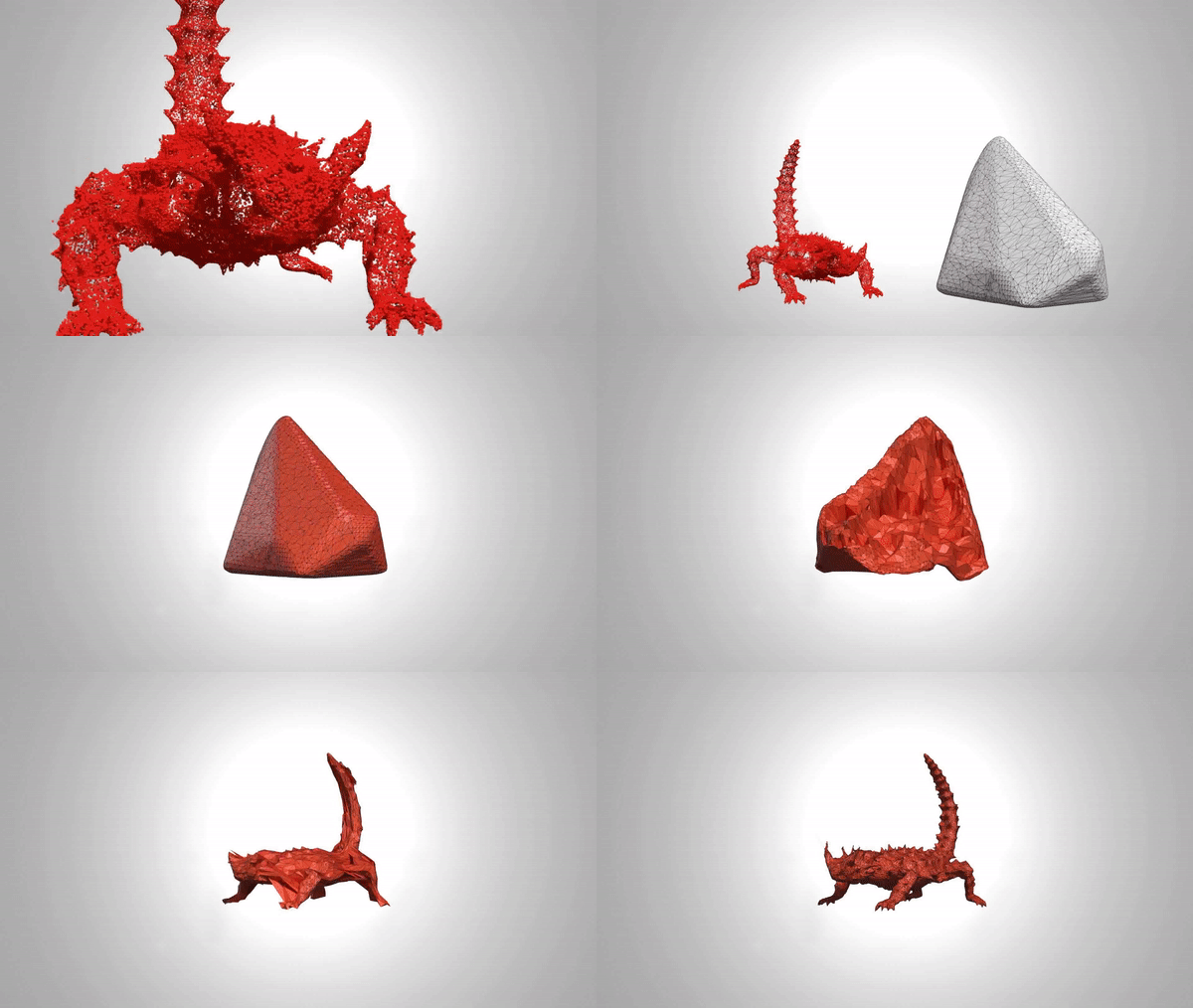
What about constructing a 2D point cloud from the G-code and then creating a convex hull from the point cloud. That gives you a shape to start with and then there are algorithms to ‘shrink wrap’ the shape onto the point cloud. I don’t know how long it takes for something like that to run but it’s just what popped into my head for a possible way to make a decent outline.
Doing a quick search I found point2mesh on GitHub. In this gif you can see the convex hull on the right and then its used to wrap the points of the lizard to recreate the mesh. I assume it would be faster if you only need 2D.
I think it’s interesting if you look at the whole pipeline for CNC it seems like the outline would be easier to do with the information that the CAD program had. It had all the geometry and reduced it to G-code and now it seems like you need to recreate some it in gSender to do things beyond just sending G-code.
The video in the post Outline pauses, screams and looses position is a perfect example of the Outline “Stutter” issue NOT resolved. However, I think I have some better input to focus the problem solving.
My setup: MK2 with SLB, gSender ver 1.4.12, Router not spindle
NOTE: This issue did NOT happen with any prior version of gSender or Longmill controller.
My research here, on the web, and on my machine seem to all have some key points in common.
When Outline is run, the head will “stutter” at several points causing a loss of position that requires re-homing.
All programs, whether generated by internal surfacing, external Gcode files, or macros - all Test and Run with no errors.
Doesn’t matter how you connect or interface used.
ALL solutions offered = Quit using Outline !!
Now let me add my testing results:
NO stutter, pauses, screams, etc. - under any situation or code file - BEFORE SLB was installed!!
The stutter now happens almost ALL of the time - but ONLY during an Outline operation- making the internal function COMPLETELY useless. All other movement, manual or gcode, has no problems whatsoever.
SLB forces MANY MANY MANY new settings (in Firmware codes) for gSender to handle and consider during an “Outline File” execution. Several of which may (or do) introduce conflicting gcode commands when the Outline toolpath is BUILT BY GSENDER ! In other words, the Outline Function is NOT running ANY gcode provided by the user. Thus, user provided surfacing, external files and/or macros have ABSOLUTELY NOTHING to do with the gSender generated Outline Toolpath Function. Thus, all other gcode will Verify and Run as expected. ALL machine movement, during the Outline Function, has been generated internally, by gSender ALONE. No other code has any effect on Outline gcode movements in any way.
The stutter is NOT random. Re-running the same Outline repeatedly, will produce the stutter at the SAME locations every time. AND the amount of offset (position loss) is the SAME every time in the X and Y positions ONLY !! The there is no Z stutter (loss of position) since it is never exercised during an Outline Execution. Different pattern files (used only to find the extreme pattern points) will produce the stutter at different locations. However, again, re-running the same outline repeatedly will produce the same stutter in the same location(s). Thus, we have eliminated ALL machine mechanical, electrical, computer and connection issues as having ANY effect on the studder issue. It’s not your wheels, backlash blocks, motors, software, computer, internet, signals form space aliens or your mother-in-law!!! Most importantly - IT IS NOT AN OPERATOR OR MACHINE ERROR IN ANY WAY !! Proper testing has eliminated both of those.
Given the results above, confirmed by many users, the issue is in the Outline Code File Generation sub-routine, embedded in the the gSender software. As we have all seen, executing the Outline command button generates the message “Creating An Outline File”. gSender reads the User file to get extreme pattern points and then uses them (combined with FIRMWARE Settings data), to create its very own - separate from the REAL gcode pattern - Outline Toolpath gcode file. All errors are created here. This is most evident in the fact that gSender mis-calculates the same way, at the same place, in the same part of its gcode, EVERYTIME !! The stutter is conflicting motor movements, speeds, motor current, direction, and/or mis-formatted gcode commands that force the motors to jog unexpectedly. Since the program uses the same code routine every time for its calculations, the offset is the same every time. Thus the “Go to X0 Y0” at the end of an Outline run will produce a repeatable, measurable, offset from the original starting point. The table THINKS it is back to the original starting point so the whole table is out of sync now. Going home will be off the same amount.
PLEASE - whoever controls the gSender programmer - PUT THIS ON THE TOP OF HIS TO DO LIST.
There is nothing we endusers can do to fix this !!! And it TOTALLY reflects on the reputation of SIENCI LABS.
BTW - please verify that this is happening to Longmills and perhaps not Altmills. I would not be surprised since they are different animals using the same FIRMWARE settings data. I’m sure there may be several (or one key) parameters that have a proper effect on the Altmill (or laser) but drive the Longmill nuts.
Looking at some other posts - I wonder if gSender Outline is attempting some SLB Closed Loop adjustments that a Longmill would stutter on.
I seem to recall that there is some work being done on the outline function or has already been done. I have no idea if the work that is/was done relates to the issue posted here.
I have a longmill but have not gone to the dark side and still run my longboard.
If I’m not mistaken, the slb runs higher feedrates and accelerarion numbers, no? Since I never use outline, and it has been a while since I’ve tried it to see what it does. I seem to remember having to run from my office to the machine to just catch the last part of the sequence. It is not a slow paced proces, maybe even running at max speed? Anyway, it was a useless feafure for me that was not needed in my workflow. (I hate running.)
So, have you played around with those speed and acc numbers in the slb settings?
Actually I find the outline feature quite handy. I tend to run it just before I run the actual project or before I do an air run. Sometimes I only do the outline if I am confident in the gcode itself. I tend to use a lot of scrap bits of wood for trial runs and what-have-you and the outline feature confirms that the current chunk of wood is positioned correctly and that the tool path stays within the bounds of the work piece.
There is a lot of back and forth when it runs and if I recall correctly, the intention of the re-write was to remove the back and forth and just run the portion that is the actual outline. Currently it goes through a lot of the code that isn’t on the outside of the model.
Loss of position has never been a problem on the Altmill - likely because of the closed loop motors.
With an open loop system, especially when tuned for maximum speed and acceleration during normal operation, I am not surprised that position is lost. It does some pretty erratic (fast) moves and if you are already at maximum, it isn’t surprising to loose a step (or 20) here or there. I would try reducing top speed and acceleration substantially and check if that fixes the issue. If it fixes things, go up gradually until errors show up again and back off a bit.
I find it lacking. If I run outlines, they are custom to see if a laser etch matches a carve silhouet or if my machine honors keepoutzones when clamping a frame from the inside out so I can champfer the outline. (It does but not on the xy0 return trip, so mind that when using keepout zones in vectric.)
I see the need to check outlines, just not for what gsender offers. I know I am centre stock and I know its dimensions. The project will fit, for I have designed it to fit said stock with said xy0.
Losing steps and fitting stock aint among the worries I have when starting a project.
But, that is mute. The op has a problem and it seems that playing around with speed/acc settings aint the problem (looking at the links provided). I wonder if @_Michael can reproduce the problem with his mk1. He has surcommed to the dark side recently and might be able to chime in.
So glad to see engagement here. More than once, in the days of my Long Board (not SLB), the Outline Function has saved me from completely trashing a project that has several bits and program files. Oops - weird outline moves - means I loaded the wrong pattern file for this bit !! Every project is a new one, not a repeat of a tried and true production run. Our standard procedure has/had become, run an outline on EVERY bit before actual cutting.
With LB we never had an issue. Now, with SLB, I miss the outline function. The SLB has made our machine motors run quieter, smoother and faster. It would be interesting to hear how a MK1 with SLB behaves. I expect the same.
Now, a little more testing insight.
The stutter movement is NOT Speed setting related. A feed rate too high for the motors or gantry mechanism would produce a different type of problem. There would be too many steps in the expected direction or not enough steps, in that direction, because of missed increments. And it would sound like skipped teeth in the gears. Further, skips caused by speed would produce losses at different locations and varied amounts each time the same pattern is run. That is if we assume mechanical issues caused by excesive speed. There would be few, if any, times the problem would repeat, in a measurable way, exactly the same way each time due to the mechanics of the system. But there are NO gears in a stepper motor or the gantry movement. And the loss of position happens at the same locations, by the same amount, every time.
The key here is - Speed issues would all happen with movement in the SAME direction. The stepper motor direction is controlled by the phase, bandwidth and pulse width of the motor signal. Speed related problems would still move the motors in the SAME direction, while the mechanics had issues keeping up. Plus, those same problems would appear in any gcode, or operator, related movements during a program run. Never happens.
However, the stutter is caused by BACK STEPPING, in the OPPISITE direction intended, during an Outline Execution. This is what’s called a Head Dance. The X and Y motors are reversed back and forth several quick times, in short increments, causing a head jiggle. This requires the motor signal to actually change the signal direction being sent to the motors. The motors are moving EXACTLY as they are being told to.
Since the head dance NEVER happens outside of the Outline function (and its repeatability), we have eliminated all links to the motors, speeds, mechanics and electronics as the source of the problem. The Outline toolpath sub-routine is introducing additional (or incorrectly formatted, most likely), movement commands as it creates the Outline Toolpath file that actually controls Outline movement. Remember, NO user created gcode or macros are used in the Outline movements. The repeatability and accuracy of the head dance location and duration means the head dance is always inserted the same way, in the same place, by the Outline toolpath sub-routine. Again, the motors are acting exactly as they are commanded to. In programming this is called a Random, Un-documented Feature - ie, the bug dance.
I find it interesting that the Verify pattern code function is run on User created gcode files, but NOT on the Outline Created Toolpath File. The programmer assumes we are the issue, not him. Too typical. If we could capture the Outline Toolpath File, and run Verify on it, we could solve this VERY quickly.
If anyone knows how I can capture the actual Outline Toolpath gcode, it would help solve the issue. I do not know of a way to capture the Outline gcode before, or during, its execution. Perhaps use of the Console Feature somehow ? Let me know. It is my understanding gSender is open source, so maybe some of our software gurus can peek at the sub-routine that creates the Outline Toolpath file. Or at least suggest how to capture/export it.
BTW - I have not tested with gSender 1.5.xx. This is a major upgrade to gSender and should have been called version 2.0. In general, we do not install major upgrades until other guinea pigs get toasted with untested software. Thus, versions 1.5.++++. Never forget - the Titanic was unshinkable - the problem was they gave it to endusers that didn’t know that !!
Will give newer version a try today to see what happens. I do not expect to find this fixed, although, I suspect gSender’s upgrade was related to the Altmill release and was never tested for backward compatibility.
I did have all kinds of problems with the early 1.5 releases and actually reverted back to 1.4.12. When 1.5.3 hit I decided to give it another go and so far so good.
I’m running 1.5.3 and it seems to work fine. I’ve never used the outline before but I tested it with a kidney shaped pocket and it seems okay. It returned to the correct spot and ran smoothly.
LongMill 30x30 V4b with SLB. If you care to share a G-code file that gives you trouble I’ll test it.
@wwitm777 FWIW, I’ve been running 1.4.12 since it was released. I am running an original LM Mk1 with the SLB. Outline has been and is working fine for me.